About the Exam

This certification exam measures ability to interpret documented standards and perform key administrative tasks in a Nutanix multicloud platform environment, including deploying, configuring, migrating, troubleshooting, expanding, and managing. It is aimed at IT professionals with existing Nutanix experience, including administrators, engineers, operators, and Tier 1 or 2 support or NOC/SOC escalation staff. Passing demonstrates practical readiness to administer and support Nutanix multicloud infrastructure.

Exam Topics

  • Manage VMs within a Nutanix Multicloud Environment20%
  • Manage Clusters within a Nutanix Multicloud Environment27%
  • Configure Disaster Recovery and Data Protection within a Nutanix Multicloud Environment21%
  • Troubleshoot a Nutanix Multicloud Environment20%
  • Conduct Custom Monitoring within a Nutanix Multicloud Environment12%

How to Use This Practice Exam

  1. Browse — Read each question, select your answer, and reveal the explanation.
  2. Exam Mode — Simulate real exam conditions with a timed session and score report.
  3. Learn Mode — Spaced repetition schedules questions you struggle with for long-term retention.

Download the Full Exam PDF

Get every question and answer in a clean, printable PDF built for offline study. Purchase once, keep permanent access, and re-download the latest version anytime.

Last updated June 16, 2026 at 12:11 AM

Topic filter
Retired questions
Question sort

QuestionQ1

Manage Clusters within a Nutanix Multicloud Environment

Which prerequisite must be satisfied before performing any LCM updates?

  • A Update AOS
  • B Update Foundation
  • C Update BIOS
  • D Update AHV
Explanation

AOS provides the cluster software and compatibility baseline used by Nutanix Lifecycle Manager. Updating AOS first ensures that the LCM workflow and the target software or firmware versions are supported before subsequent LCM-managed updates are applied.

Learn more

Community Discussion

No comments yet. Be the first to start the discussion!

QuestionQ2

Troubleshoot a Nutanix Multicloud Environment

Refer to the exhibit.

Question Image

An administrator has received complaints regarding VM performance. After reviewing the VMs’ CPU Ready Time data shown in the exhibit, which action should the administrator take to diagnose the issue further?

  • A Check the number of vCPUs assigned to each CVM.
  • B Enable VM memory oversubscription.
  • C Assess cluster SSD capacity.
  • D Review host CPU utilization.
Explanation

High CPU Ready Time indicates that virtual machines are waiting for physical CPU scheduling time, which can result from host CPU contention. Reviewing host CPU utilization confirms whether contention on the underlying hosts is causing the performance problem.

Community Discussion

No comments yet. Be the first to start the discussion!

QuestionQ3

Troubleshoot a Nutanix Multicloud Environment

An administrator is tasked with performing firmware upgrades across all Nutanix sites.

When trying to perform firmware upgrades through Life Cycle Manager (LCM) at a remote site that has a single-node cluster deployed, no firmware updates are shown as available. The administrator has confirmed that the installed firmware is several revisions behind.

Why does LCM list no firmware upgrades for this cluster?

  • A LCM does not have connectivity to the internet.
  • B LCM cannot perform firmware upgrades on single-node clusters.
  • C Single-node clusters only support one-click firmware upgrades.
  • D LCM is not supported on single-node clusters.
Explanation

LCM cannot perform hardware firmware upgrades on a single-node cluster because firmware updates require taking the only node out of service and there is no cluster redundancy for a rolling upgrade. LCM support is not categorically absent for single-node clusters; the restriction is specific to firmware upgrades.

Community Discussion

No comments yet. Be the first to start the discussion!

QuestionQ4

Configure Disaster Recovery and Data Protection within a Nutanix Multicloud Environment

An administrator has successfully configured a Metro Availability protection domain. After a few days, the following NCC warning is raised:

Question Image

What is the first action the administrator must take to resolve the issue?

  • A Run command ncli pd ls metro-avail-true |egnep “Protection Domain|Stretch|Role” |grep -B2 "ACTIVE" | grep “Protection Domain”.
  • B Run command ncc health_checks metro_availability_checks data_locality_check --cvm_list=X.X.X.20.
  • C Migrate the VM to its primary site and set appropriate rules for DRS and affinity.
  • D Use "must" affinity rules to avoid automated VM migration to the standby datastore.
Explanation

In a Nutanix Metro Availability deployment, a data_locality_check warning indicating a VM is reading and writing across the metro link from a remote cluster means the VM's compute is currently running at a site opposite from where the active copy of its data resides; because Metro Availability resolves I/O against the local copy for optimal performance while synchronously mirroring to the standby site, the corrective action is to migrate the VM back onto a host at the site holding its data and then configure appropriate DRS/affinity rules so future placement stays aligned with the protection domain's active site.

Learn more

Community Discussion

No comments yet. Be the first to start the discussion!

QuestionQ5

Troubleshoot a Nutanix Multicloud Environment

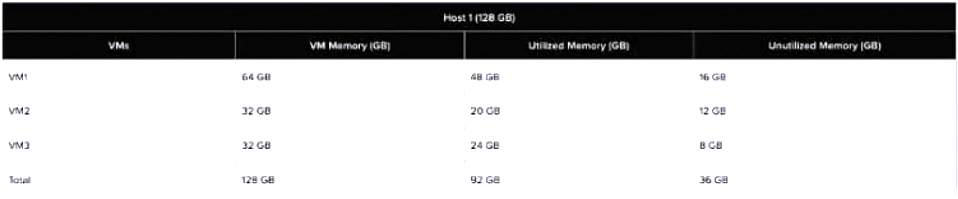
An administrator is running a storage performance test between two Microsoft Windows VMs. The first VM was deployed using a template, whereas the second was created from scratch.

The results show that the VMs have very different metrics when running the same performance test. The first VM reaches 8000 IOPS, while the second struggles to reach 500/800 IOPS. The AHV cluster is currently not under pressure.

How can the administrator determine why these results occurred?
  • A Compare vDisk bus type between VMs.
  • B Enable AHV Turbo on the second VM.
  • C Check number of vCPUs assigned to VMs.
  • D Verify both VMs have installed Nutanix Guest Tools.
Explanation

AHV uses SCSI as the preferred virtual-disk bus type for most workloads, with the VirtIO drivers installed in the guest OS. IDE, SATA, and PCI bus types are primarily compatibility options and can have performance implications. Comparing the vDisk bus type can therefore identify whether the lower-performing VM is using a less performant disk controller configuration.

Learn more

Community Discussion

No comments yet. Be the first to start the discussion!
Know a question that should be here? Contribute to this exam
Back home