You have a Microsoft 365 E5 subscription that includes a Microsoft SharePoint Online site named Site1.
You need to deploy a Microsoft Purview insider risk management solution that generates an alert when users share sensitive information from Site1 with external recipients.
Which two actions should you perform? Each correct answer presents part of the solution.
NOTE: Each correct answer is worth one point.
Choose two
ATurn on analytics.
BTurn on indicators.
CConfigure adaptive protection.
DCreate an insider risk policy.
ECreate a data loss prevention (DLP) policy.
You have Microsoft 365 E5 subscriptions.
You deploy Microsoft Purview Data Security Posture Management for AI (DSPM for AI).
You need to modify the default policies created during the deployment.
Which two Microsoft Purview solutions should you use? Each correct answer presents part of the solution.
> NOTE: Each correct selection is worth one point.
Choose two
AInsider Risk Management
BInformation Protection
CCompliance Manager
DDSPM for AI
EInformation Barriers
FData Lifecycle Management
HOTSPOT
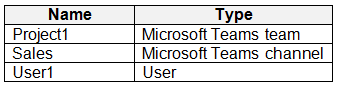
You have a Microsoft 365 E5 tenant that contains the objects in the following table.
You need to restore a Microsoft Word document deleted from the Sales channel by User1.
From where can the document be restored, and for how long is it retained if it is not restored?
Select
Restored from:
Retained for:
You have a Microsoft 365 E5 subscription that includes a device named Device1.
You need to enable Endpoint data loss prevention (Endpoint DLP) for Device1.
What should you do first in the Microsoft Purview portal?
ATurn on device onboarding.
BEnable Microsoft Priva Privacy Risk Management.
CCreate a Microsoft Purview Information Barriers (IBs) segment.
DAdd a Microsoft Purview Information Protection scanner cluster.
EOnboard Device1 to Microsoft Purview.
QuestionQ6
Implement data loss prevention and retention
0
Community Discussion
No comments yet. Be the first to start the discussion!
QuestionQ7
Implement information protection
QuestionQ8
Manage risks, alerts, and activities
QuestionQ9
Implement data loss prevention and retention
QuestionQ10
Manage risks, alerts, and activities
QuestionQ11
Manage risks, alerts, and activities
QuestionQ12
Implement data loss prevention and retention
QuestionQ13
Implement information protection
QuestionQ14
Implement information protection
QuestionQ15
Implement information protection
QuestionQ16
Implement data loss prevention and retention
QuestionQ17
Manage risks, alerts, and activities
QuestionQ20
Implement data loss prevention and retention
QuestionQ21
Manage risks, alerts, and activities
QuestionQ22
Implement data loss prevention and retention
QuestionQ23
Manage risks, alerts, and activities
QuestionQ24
Implement data loss prevention and retention
QuestionQ25
Implement information protection
QuestionQ27
Implement information protection
QuestionQ28
Manage risks, alerts, and activities
Save question
0
Community Discussion
No comments yet. Be the first to start the discussion!
Save question
0
Community Discussion
No comments yet. Be the first to start the discussion!
Save question
Note: This question is part of a series of questions that present the same scenario. Each question in the series contains a unique solution that might meet the stated goals. Some question sets might have more than one correct solution, while others might not have a correct solution.
After you answer a question in this section, you will NOT be able to return to it. As a result, these questions will not appear in the review screen.
You have a Microsoft 365 tenant and 500 computers that run Windows 11. The computers are onboarded to Microsoft Purview.
You discover that a third-party application named Tailspin_scanner.exe accessed protected sensitive information on multiple computers. Tailspin_scanner.exe is installed locally on the computers.
You need to block Tailspin_scanner.exe from accessing sensitive documents without preventing the application from accessing other documents.
0
Community Discussion
No comments yet. Be the first to start the discussion!
Save question
Note: This question is part of a series of questions that present the same scenario. Each question in the series contains a unique solution that might meet the stated goals. Some question sets might have more than one correct solution, while others might not have a correct solution.
After you answer a question in this section, you will NOT be able to return to it. As a result, these questions will not appear in the review screen.
You have a Microsoft 365 tenant and 500 computers that run Windows 11. The computers are onboarded to Microsoft Purview.
You discover that a third-party application named Tailspin_scanner.exe accessed protected sensitive information on multiple computers. Tailspin_scanner.exe is installed locally on the computers.
You need to block Tailspin_scanner.exe from accessing sensitive documents without preventing the application from accessing other documents.
0
Community Discussion
No comments yet. Be the first to start the discussion!
Save question
Note: This question is part of a series of questions that present the same scenario. Each question in the series contains a unique solution that might meet the stated goals. Some question sets might have more than one correct solution, while others might not have a correct solution.
After you answer a question in this section, you will NOT be able to return to it. As a result, these questions will not appear in the review screen.
You have a Microsoft 365 tenant and 500 computers that run Windows 11. The computers are onboarded to Microsoft Purview.
You discover that a third-party application named Tailspin_scanner.exe accessed protected sensitive information on multiple computers. Tailspin_scanner.exe is installed locally on the computers.
You need to block Tailspin_scanner.exe from accessing sensitive documents without preventing the application from accessing other documents.
0
Community Discussion
No comments yet. Be the first to start the discussion!
Save question
0
Community Discussion
No comments yet. Be the first to start the discussion!
Save question
0
Community Discussion
No comments yet. Be the first to start the discussion!
Ad
Want a break from the ads?
Go ad-free and unlock Learn Mode, Exam Mode, AstroTutor AI and every premium tool — everything you need to walk in prepared, and confident.
No comments yet. Be the first to start the discussion!
Save question
0
Community Discussion
No comments yet. Be the first to start the discussion!
Save question
0
Community Discussion
No comments yet. Be the first to start the discussion!
Save question
0
Community Discussion
No comments yet. Be the first to start the discussion!
Save question
0
Community Discussion
No comments yet. Be the first to start the discussion!
Save question
0
Community Discussion
No comments yet. Be the first to start the discussion!
Save question
0
Community Discussion
No comments yet. Be the first to start the discussion!
Save question
0
Community Discussion
No comments yet. Be the first to start the discussion!
Save question
0
Community Discussion
No comments yet. Be the first to start the discussion!
Save question
0
Community Discussion
No comments yet. Be the first to start the discussion!
Save question
0
Community Discussion
No comments yet. Be the first to start the discussion!
Save question
0
Community Discussion
No comments yet. Be the first to start the discussion!
You have a Microsoft 365 E5 tenant that uses Microsoft Teams and includes two users named User1 and User2.
You create a data loss prevention (DLP) policy that applies to the Teams chat and channel messages location for User1 and User2.
Which Teams entities will receive DLP protection?
A1:1/n chats and general channels only
B1:1/n chats and private channels only
C1:1/n chats, general channels, and private channels
You have a Microsoft 365 subscription that includes 100 users and a Microsoft 365 group named Group1.
All users have Windows 11 devices and use Microsoft SharePoint Online and Exchange Online.
A sensitivity label named Label1 is published as the default label for Group1.
You add two sublabels, Sublabel1 and Sublabel2, to Label1.
You need to ensure that the settings in Sublabel1 are applied by default to Group1.
What should you do?
AModify the policy of Label1.
BDuplicate all the settings from Sublabel1 to Label1.
CDelete the policy of Label1 and publish Sublabel1.
DChange the order of Sublabel1.
You have a Microsoft 365 E5 subscription that uses Microsoft Defender for Cloud Apps.
You need to make sure that you receive an alert when a user uploads a document to a third-party cloud storage service.
What should you use?
Aan insider risk policy
Ba file policy
Ca sensitivity label
Dan activity policy
Solution: In the Microsoft 365 Endpoint data loss prevention (Endpoint DLP) settings, add a folder path to the file path exclusions.
Does this achieve the goal?
AYes
BNo
Solution: Create an app discovery policy in Microsoft Defender for Cloud Apps.
Does this solution meet the goal?
AYes
BNo
Solution: In Microsoft Defender for Cloud Apps, mark the application as Unsanctioned.
Does this meet the goal?
AYes
BNo
You plan to implement Microsoft 365 Endpoint data loss prevention (Endpoint DLP).
You need to determine which end-user activities can be audited on endpoints and which can be restricted on endpoints.
What should you identify for each activity?
Select
Print a protected document:
Create a document in a monitored location:
Copy a protected document to USB removable media:
You create a label that encrypts email data.
Users report that they cannot use the label in Outlook on the web to protect the email messages they send.
You need to make sure that users can use the new label to protect their email.
What should you do?
ACreate a label policy.
BWait six hours and ask the users to try again.
CCreate a new sensitive information type.
DModify the priority order of label policies.
You are planning to implement Microsoft Purview Advanced Message Encryption.
You need to ensure that encrypted email sent to external recipients expires after seven days.
What should you create first?
Aa mail flow rule
Ban X.509 version 3 certificate
Ca custom branding template
Da remote domain in Microsoft Exchange
Ea connector in Microsoft Exchange
You have a Microsoft SharePoint Online site named Site1 and a sensitivity label named Sensitivity1. Sensitivity1 adds both a watermark and a header to content.
You create a policy that automatically applies Sensitivity1 to emails in Microsoft Exchange Online and to Site1.
How will Sensitivity1 mark matching emails and documents in Site1?
Select
Exchange Online email:
Site1 documents:
You have a Microsoft 365 E5 subscription.
You need to create static retention policies for the following locations:
Teams chats
Exchange email
SharePoint sites
Microsoft 365 Groups
Teams channel messages
What is the minimum number of retention policies needed?
A1
B2
C3
D4
E5
You have a Microsoft 365 E5 subscription.
You need to review a usage report for Microsoft 365 Copilot.
Where should you review the report?
AInformation Protection in the Microsoft Purview portal
Bthe Microsoft 365 admin center
CDSPM for AI in the Microsoft Purview portal
Dthe Microsoft Defender portal
You have a Microsoft 365 subscription.
You identify these data loss prevention (DLP) requirements:
Notify users when they attempt to send attachments containing an EU Social Security Number (SSN) or Equivalent ID.
Prevent email messages that contain credit card numbers from being sent outside the organization.
Block external sharing of Microsoft OneDrive content containing EU passport numbers.
Send administrators email alerts whenever any rule is matched.
What is the minimum number of DLP policies and rules required to meet these requirements?
Select
Policies:
Rules:
You have a Microsoft 365 E5 subscription containing two users named User1 and Admin1. Admin1 manages the subscription’s audit retention policies.
You need to ensure that User1’s audit logs are retained for 10 years.
What should you do first?
AAssign a Microsoft Purview Audit (Premium) add-on license to Admin1.
BAssign a 10-year audit log retention add-on license to Admin1.
CAssign a Microsoft Purview Audit (Premium) add-on license to User1.
DAssign a 10-year audit log retention add-on license to User1.
You are planning a data loss prevention (DLP) solution that applies to Windows Client computers.
You need to ensure that when users try to copy a file containing sensitive information to a USB storage device, these requirements are satisfied:
If users are members of a group named Group1, they must be permitted to copy the file and an event must be written to the audit log.
All other users must be prevented from copying the file.
What should you create?
Aone DLP policy that contains one DLP rule
Bone DLP policy that contains two DLP rules
Ctwo DLP policies that each contains one DLP rule
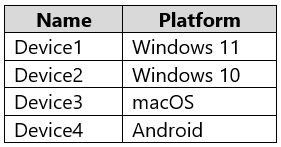
You have a Microsoft 365 E5 subscription that includes the devices in the following table.
You plan to implement insider risk management and collect forensic evidence.
Which devices support forensic-evidence collection, and how should each supported device be prepared? Select the appropriate options in the answer area.
Select
Device:
To prepare:
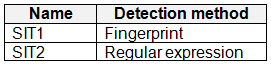
You have a Microsoft 365 E5 subscription containing the sensitive information types (SITs) in the following table.
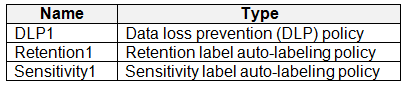
You plan to create the policies in the following table and assign them to a Microsoft SharePoint Online site.
Identify which policies can use SIT1 and which can use SIT2.
Select
SIT1:
SIT2:
You have a Microsoft 365 E5 tenant that contains a trainable classifier named Classifier1.
You need to improve the accuracy of Classifier1. The solution must follow the principle of least privilege.
Which feature should you use, and to which role group should you be added?
Select
Feature:
Role group:
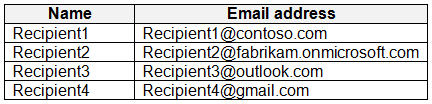
You have a Microsoft 365 E5 tenant that uses a domain named contoso.com.
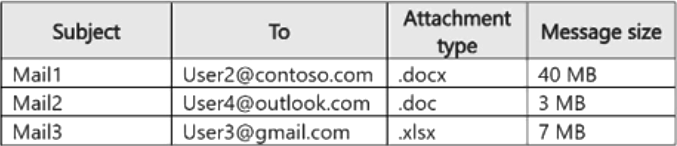
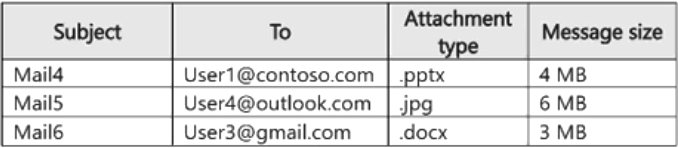
A user named User1 sends link-based, branded emails encrypted by using Microsoft Purview Advanced Message Encryption to the recipients shown in the following table.
For which recipients can User1 revoke the emails?
ARecipient1 only
BRecipient4 only
CRecipient1 and Recipient2 only
DRecipient3 and Recipient4 only
ERecipient1, Recipient2, Recipient3, and Recipient4
You have a Microsoft 365 E5 subscription that includes a user named User1.
You deploy Microsoft Purview Data Security Posture Management for AI (DSPM for AI).
You need to ensure that User1 can check the subscription's auditing status. The solution must adhere to the principle of least privilege.
To which role group should you add User1?
ASecurity Reader
BInsider Risk Management Analysts
CInsider Risk Management Investigators
DView-Only Organization Management for Microsoft Exchange Online

Community Discussion