Loading provider exams...

Loading provider exams...

Sign Up & unlock 100% of Exam Questions
No Strings Attached!
Updated
Case study -
This is a case study. Case studies are not timed separately. You can use as much exam time as you would like to complete each case. However, there may be additional case studies and sections on this exam. You must manage your time to ensure that you are able to complete all questions included on this exam in the time provided.
To answer the questions included in a case study, you will need to reference information that is provided in the case study. Case studies might contain exhibits and other resources that provide more information about the scenario that is described in the case study. Each question is independent of the other questions in this case study.
At the end of this case study, a review screen will appear. This screen allows you to review your answers and to make changes before you move to the next section of the exam. After you begin a new section, you cannot return to this section.
To start the case study -
To display the first question in this case study, click the Next button. Use the buttons in the left pane to explore the content of the case study before you answer the questions. Clicking these buttons displays information such as business requirements, existing environment, and problem statements. When you are ready to answer a question, click the Question button to return to the question.
Background -
Contoso Pharmaceuticals distributes specialty pharmaceuticals, ingredients, and raw materials throughout North America. The company has 33 offices and 12 warehouses across the US, Mexico, and Canada. As their customers’ needs grow in sophistication, Contoso wants to delight customers with breakthrough products, exceptional service, and on-time delivery of materials. They want to automate time consuming and manual processes that are prone to error. Contoso wants to consolidate and automate ordering and fulfillment processes.
• The company has a fleet of 500 delivery trucks. The company has 150 drivers and uses third-party contractors to deliver goods.
• The company has 400 warehouse workers and 30 finance clerks.
• Contoso has 85 sales representatives and 50 customer service representatives. Sales representatives spend most of their time on the road visiting customers or prospects.
• The IT department consists of four system administrators and six system analysts.
Current environment -
Overview -
Contoso Pharmaceuticals has a custom enterprise resource management (ERP) system. It is difficult to integrate other applications and services with the system. Office staff manually key in purchase orders, customer orders, and invoices after they receive a scan or hard copy of an agreement.
Applications -
• The company uses a custom supplier management system named SMSApps that runs on each user’s workstation. The system is costly to run and maintain. SMSApp does not have an API.
• Sales representatives manage customer requests by using Dynamics 365 Sales.
• Contoso has Microsoft Power Platform development, user acceptance testing (UAT), and production environments.
• Administrators create one Accounts Payable (AP) mailbox for each environment to support testing.
• The use of a DLP policy and Desktop Flow development is specified as part of the automation requirements.
Security -
You assign all users one or more Microsoft Dataverse security roles.
Business Process -
Requirements -
Functional requirements -
• Large volume orders must be processed before other orders.
• Invoices must be cross-checked with received items against packing slip for shipments.
• The finance team must be able to analyze patterns in transactional data to conduct fraud prevention activities.
• You must automate the process of entering data about incoming orders into SMSApp.
• The solution must follow the principle of least privilege.
Purchase Order Quantity flow -
• You must create an unmanaged solution to update purchase order details in SMSApp. The flow must use a manual trigger.
• Members of Accounts Payable team will be testers for the solution. They must be able to access the Purchase Order Quantity flow.
Flow for processing invoice data
• You must create a flow to monitor the AP mailbox. When an invoice arrives as an attachment in the inbox, the flow must automatically process the invoice data by using a form processing model. The flow must cross-check the received items against the packing slip.
• You must use different Accounts Payable email addresses for development, user acceptance testing (UAT), and production environments.
• You must use an environment variable to represent the Accounts Payable mailbox for the environment in use.
• You must be able to use the environment variable across multiple cloud flows, a custom connector, and a canvas app.
Technical requirements -
• Users must only be allowed to connect to and access systems that are required for the employee to perform required job tasks.
• All automation flows must be either co-owned or shared between staff.
• All employees must be able to access the new environment to build personal productivity automations.
• You must distribute the workload for desktop flows to optimize productivity.
• A DLP policy must be created and applied to the Development environment. Connectors required by the data entry automation flow must be added to the policy.
Order fulfillment flow -
You must automate the customer communication process by using an unattended desktop flow. The flow must check the fulfilment status of each active order in SMSApp. If an order is fulfilled, the flow must send the customer an email that includes tracking information for their order.
Monitor flows -
• All data extracted from Invoices should be stored in a custom Dataverse table.
• You must assign users from the finance to the Finance business unit. You must add these users to a new security role named Finance.
• Finance users must be prevented from creating or deleting invoice records.
• All users must be able to view invoices.
Issues -
Invoice data -
All users report that they can see and modify invoice data.
New environment -
• The IT department creates a new environment that includes Microsoft Dataverse. An employee reports operational issues in Power Platform Admin center.
• A user switch to the new environment and creates a cloud flow named FlowA that triggers a desktop flow. The user reports that the cloud flow does not trigger the desktop flow to run.
• A user attempts to create a Desktop flow in the default environment. A Dataverse error message displays.
Data entry automation flow -
An administrator runs a new desktop flow in the development environment to automate data entry into SMSApp. The flow automatically reverts to a suspended state.
Order fulfillment flow -
The warehouse team observers that the order fulfillment flow has stopped working. Orders are flowing into SMSApp but customers do not receive tracking emails. A system administrator is troubleshooting the flow on the target machine.
You need to ensure that the solution uses the correct accounts payable mailbox.
Which three actions should you perform? Each correct answer part of the solution.
NOTE: Each correct selection is worth one point.
Case study -
This is a case study. Case studies are not timed separately. You can use as much exam time as you would like to complete each case. However, there may be additional case studies and sections on this exam. You must manage your time to ensure that you are able to complete all questions included on this exam in the time provided.
To answer the questions included in a case study, you will need to reference information that is provided in the case study. Case studies might contain exhibits and other resources that provide more information about the scenario that is described in the case study. Each question is independent of the other questions in this case study.
At the end of this case study, a review screen will appear. This screen allows you to review your answers and to make changes before you move to the next section of the exam. After you begin a new section, you cannot return to this section.
To start the case study -
To display the first question in this case study, click the Next button. Use the buttons in the left pane to explore the content of the case study before you answer the questions. Clicking these buttons displays information such as business requirements, existing environment, and problem statements. When you are ready to answer a question, click the Question button to return to the question.
Background -
Woodgrove Bank is a large, member-owned bank in the United States Woodgrove Bank provides financial products with low customer fees and direct customer service.
Woodgrove Bank has 177 branches across the United States with 5.000 branch staff and supervisors serving over 750,000 members. The primary languages used by most members include English and Spanish when interacting with customer service representatives. The Woodgrove Bank headquarters is in California and has 450 office workers. The office workers include financial advisors, customer service representatives, finance clerks, and IT personnel.
Current environment. Bank applications
• An application named Banker Desktop. The branch employees use this desktop app to review business transactions and to perform core banking updates.
• An application named Member Management System. This application is a custom customer relationship management (CRM) that integrates with other systems by using an API interface.
• An application named Fraud Finder. This application is a mission-critical, fraud management application that runs on the employees' desktops. The bank has experienced challenges integrating the application with other systems and is expensive to support.
• SharePoint Online provides an employee intranet as well as a member document management system that includes polices, contracts, statements, and financial planning documents.
• Microsoft Excel is used to perform calculations and run macros. Branch employees may have multiple Microsoft Excel workbooks open on their desktop simultaneously.
Current environment. Bank devices
• All supervisors are provided with a mobile device that can be used to access company email and respond to approval requests.
• All branch employees and supervisors are provided with a Windows workstation.
Requirements. New member enrollment
Woodgrove Bank requires new members to sign up online to start the onboarding process. The bank requires some manual steps to be performed during the onboarding process.
First step:
• Members complete an online Woodgrove Bank document and email the PDF attachment to the bank’s shared mailbox for processing.
Second step:
• Members are asked to provide secondary identification to their local branch, such as a utility bill, to validate their physical address.
• Branch staff scan the secondary identification in English or Spanish using optical character recognition (OCR) technology.
Third step:
• A branch supervisor approves the members’ application from their mobile device.
• Only supervisors are authorized to complete application approvals.
Fourth step:
• Data that is received from applications must be validated to ensure it adheres to the bank's naming standards.
The bank has the following requirements for the members’ data:
• New members must be enrolled by using the document automation solution.
• Member data is subject to regulatory requirements and should not be used for non-business purposes.
• A desktop workflow is required to retrieve member information from the Member Management System on-demand or by using a cloud flow.
Requirements. Bank fees -
The process for calculating bank fees include:
• using a shared Excel fee workbook with an embedded macro, and
• an attended desktop flow that is required to automate the fee workbook process. The flow should open an Excel workbook and calculate the members' fees based on the number of products.
Requirements. Fraud detection -
The bank has the following requirements to minimize fraud:
• Branch employees must use the Fraud Finder application during onboarding to validate a member’s identity with other third-party systems.
• Branch employees must be able to search for a member in the Fraud Finder application by using a member's full name or physical address.
• If fraudulent activity is identified, a notification with member details must be sent to the internal fraud investigation team.
Requirements. Technical -
The bank has the following technical requirements:
Flows -
• The Fraud Finder application uses a custom connector with Power Automate to run fraud checks.
• The application approval process triggers a cloud flow, then starts an attended desktop flow on the branch employee s workstation and completes the approval.
• The banker desktop flow runs using the default priority
• An IT administrator is the co-owner of the banker desktop flow.
• The IT department will be installing the required OCR language packs.
• The Extract text with OCR action is used to import the members' secondary identification
Member Management System -
• A secure Azure function requires a subscription key to retrieve members’ information.
• Production flows must connect to the Member Management System with a custom connector. The connector uses the Azure function to perform programmatic retrievals, creates, and updates.
• The host URL has been added to the custom connector as a new pattern.
• A tenant-level Microsoft Power Platform data loss prevention (DLP) policy has been created to manage the production environment.
• A developer creates a desktop flow to automate data entry into a test instance of the Member Management System.
• A developer creates an on-demand attended desktop flow to connect to a data validation site and retrieve the most current information for a member.
Banker desktop application -
• A banker desktop flow is required to update the core banking system with other systems.
• When a transaction is complete, the branch employee submits the request by using a submit button.
• After submitting the request, an instant cloud flow calls an unattended desktop flow to complete the core banking update.
• The banker desktop flow must be prioritized for all future transactions.
Deployment & testing -
• Development data must be confined to the development environment until the data is ready for user acceptance testing (UAT).
• The production environment in SharePoint Online must connect to the development instance of the Member Management System.
• Developers must be able to deploy software every two weeks during a scheduled maintenance window.
• The banker desktop flow must continue to run during any planned maintenance.
• The fraud custom connector requires a policy operation named EscalateForFraud with a parameter that uses the members' full name in the request.
Scalability -
• The bank requires a machine group to distribute the automation workload and to optimize productivity.
• The IT administrator needs to silently register 20 new machines to Power Automate and then add them to the machine group.
Security -
• The IT administrator uses a service principal account for machine connection.
• The IT administrator has the Desktop Flow Machine Owner role.
Issues -
A branch staff member reports the document automation solution is not processing new members’ data and emails are not being sent for approvals.
An IT administrator reports that the banker desktop flow has become unresponsive from data that is queued in another flow.
Code -
A Power Automate developer created the following script for the Member Management System desktop flow:

You need to choose the two optical character recognition (OCR) engines that are able to extract text from the members' secondary identification.
Which two OCR technologies achieve this goal? Each correct answer presents a complete solution.
NOTE: Each correct selection is worth one point.
You are creating a custom connector to support invoice automation. You connect a Power Automate flow to the custom connector and successfully authenticate.
When you test the flow, you observe that several actions are missing from the custom connector.
You need to update the custom connector settings.
What should you do?
A company uses an enterprise resource planning (ERP) system. The ERP system has an API.
The company requires a custom connector for the ERP system.
You need to create the custom connector.
In which order should you perform the actions? To answer, move all actions from the list of actions to the answer area and arrange them in the correct order.

DRAG DROP -
Case study -
This is a case study. Case studies are not timed separately. You can use as much exam time as you would like to complete each case. However, there may be additional case studies and sections on this exam. You must manage your time to ensure that you are able to complete all questions included on this exam in the time provided.
To answer the questions included in a case study, you will need to reference information that is provided in the case study. Case studies might contain exhibits and other resources that provide more information about the scenario that is described in the case study. Each question is independent of the other questions in this case study.
At the end of this case study, a review screen will appear. This screen allows you to review your answers and to make changes before you move to the next section of the exam. After you begin a new section, you cannot return to this section.
To start the case study -
To display the first question in this case study, click the Next button. Use the buttons in the left pane to explore the content of the case study before you answer the questions. Clicking these buttons displays information such as business requirements, existing environment, and problem statements. When you are ready to answer a question, click the Question button to return to the question.
Background -
Woodgrove Bank is a large, member-owned bank in the United States Woodgrove Bank provides financial products with low customer fees and direct customer service.
Woodgrove Bank has 177 branches across the United States with 5.000 branch staff and supervisors serving over 750,000 members. The primary languages used by most members include English and Spanish when interacting with customer service representatives. The Woodgrove Bank headquarters is in California and has 450 office workers. The office workers include financial advisors, customer service representatives, finance clerks, and IT personnel.
Current environment. Bank applications
• An application named Banker Desktop. The branch employees use this desktop app to review business transactions and to perform core banking updates.
• An application named Member Management System. This application is a custom customer relationship management (CRM) that integrates with other systems by using an API interface.
• An application named Fraud Finder. This application is a mission-critical, fraud management application that runs on the employees' desktops. The bank has experienced challenges integrating the application with other systems and is expensive to support.
• SharePoint Online provides an employee intranet as well as a member document management system that includes polices, contracts, statements, and financial planning documents.
• Microsoft Excel is used to perform calculations and run macros. Branch employees may have multiple Microsoft Excel workbooks open on their desktop simultaneously.
Current environment. Bank devices
• All supervisors are provided with a mobile device that can be used to access company email and respond to approval requests.
• All branch employees and supervisors are provided with a Windows workstation.
Requirements. New member enrollment
Woodgrove Bank requires new members to sign up online to start the onboarding process. The bank requires some manual steps to be performed during the onboarding process.
First step:
• Members complete an online Woodgrove Bank document and email the PDF attachment to the bank’s shared mailbox for processing.
Second step:
• Members are asked to provide secondary identification to their local branch, such as a utility bill, to validate their physical address.
• Branch staff scan the secondary identification in English or Spanish using optical character recognition (OCR) technology.
Third step:
• A branch supervisor approves the members’ application from their mobile device.
• Only supervisors are authorized to complete application approvals.
Fourth step:
• Data that is received from applications must be validated to ensure it adheres to the bank's naming standards.
The bank has the following requirements for the members’ data:
• New members must be enrolled by using the document automation solution.
• Member data is subject to regulatory requirements and should not be used for non-business purposes.
• A desktop workflow is required to retrieve member information from the Member Management System on-demand or by using a cloud flow.
Requirements. Bank fees -
The process for calculating bank fees include:
• using a shared Excel fee workbook with an embedded macro, and
• an attended desktop flow that is required to automate the fee workbook process. The flow should open an Excel workbook and calculate the members' fees based on the number of products.
Requirements. Fraud detection -
The bank has the following requirements to minimize fraud:
• Branch employees must use the Fraud Finder application during onboarding to validate a member’s identity with other third-party systems.
• Branch employees must be able to search for a member in the Fraud Finder application by using a member's full name or physical address.
• If fraudulent activity is identified, a notification with member details must be sent to the internal fraud investigation team.
Requirements. Technical -
The bank has the following technical requirements:
Flows -
• The Fraud Finder application uses a custom connector with Power Automate to run fraud checks.
• The application approval process triggers a cloud flow, then starts an attended desktop flow on the branch employee s workstation and completes the approval.
• The banker desktop flow runs using the default priority
• An IT administrator is the co-owner of the banker desktop flow.
• The IT department will be installing the required OCR language packs.
• The Extract text with OCR action is used to import the members' secondary identification
Member Management System -
• A secure Azure function requires a subscription key to retrieve members’ information.
• Production flows must connect to the Member Management System with a custom connector. The connector uses the Azure function to perform programmatic retrievals, creates, and updates.
• The host URL has been added to the custom connector as a new pattern.
• A tenant-level Microsoft Power Platform data loss prevention (DLP) policy has been created to manage the production environment.
• A developer creates a desktop flow to automate data entry into a test instance of the Member Management System.
• A developer creates an on-demand attended desktop flow to connect to a data validation site and retrieve the most current information for a member.
Banker desktop application -
• A banker desktop flow is required to update the core banking system with other systems.
• When a transaction is complete, the branch employee submits the request by using a submit button.
• After submitting the request, an instant cloud flow calls an unattended desktop flow to complete the core banking update.
• The banker desktop flow must be prioritized for all future transactions.
Deployment & testing -
• Development data must be confined to the development environment until the data is ready for user acceptance testing (UAT).
• The production environment in SharePoint Online must connect to the development instance of the Member Management System.
• Developers must be able to deploy software every two weeks during a scheduled maintenance window.
• The banker desktop flow must continue to run during any planned maintenance.
• The fraud custom connector requires a policy operation named EscalateForFraud with a parameter that uses the members' full name in the request.
Scalability -
• The bank requires a machine group to distribute the automation workload and to optimize productivity.
• The IT administrator needs to silently register 20 new machines to Power Automate and then add them to the machine group.
Security -
• The IT administrator uses a service principal account for machine connection.
• The IT administrator has the Desktop Flow Machine Owner role.
Issues -
A branch staff member reports the document automation solution is not processing new members’ data and emails are not being sent for approvals.
An IT administrator reports that the banker desktop flow has become unresponsive from data that is queued in another flow.
Code -
A Power Automate developer created the following script for the Member Management System desktop flow:

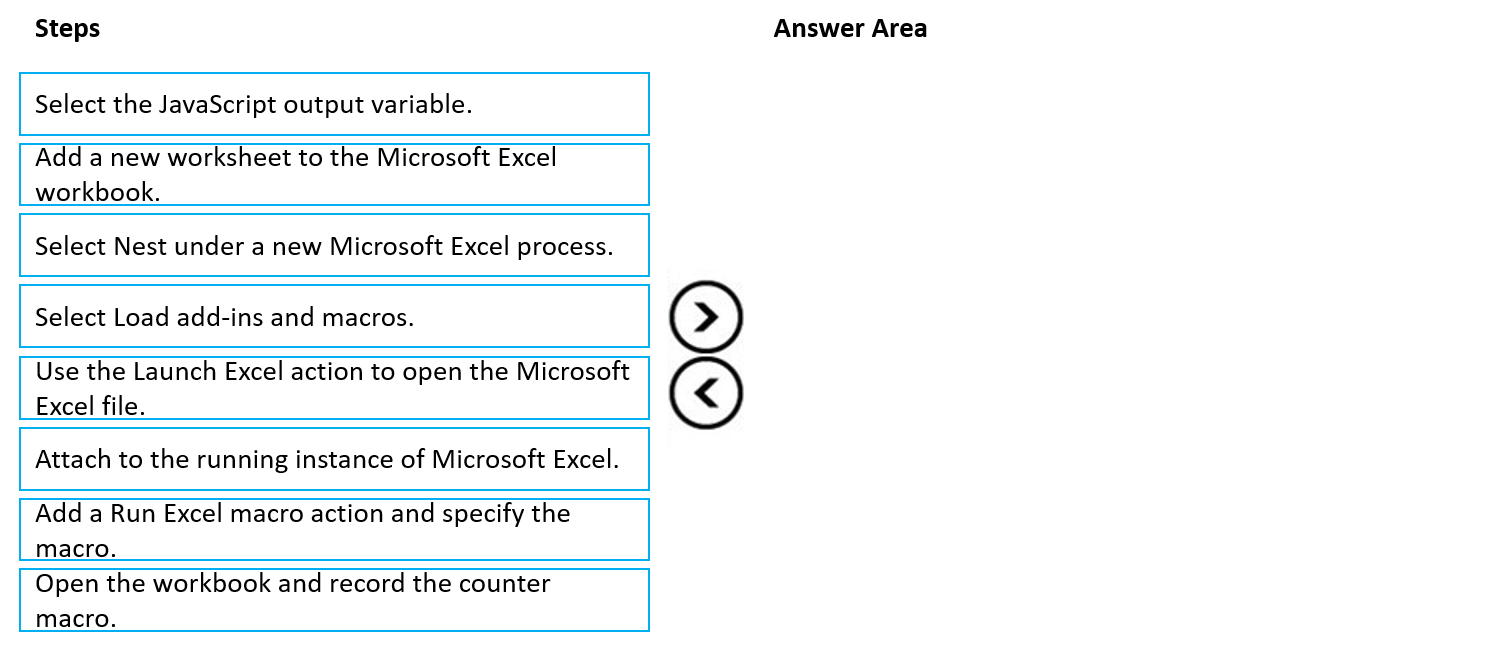
You need to create the desktop flow to calculate a member’s fees.
Which four steps should you perform in sequence? To answer, move the appropriate steps from the list of steps to the answer area and arrange them in the correct order.
Want a break from the ads?
Become a Supporter and enjoy a completely ad-free experience, plus unlock Learn Mode, Exam Mode, AstroTutor AI, and more.

