Design and implement data modelsDesign and implement data distributionIntegrate an Azure Cosmos DB solutionOptimize an Azure Cosmos DB solutionMaintain an Azure Cosmos DB solution
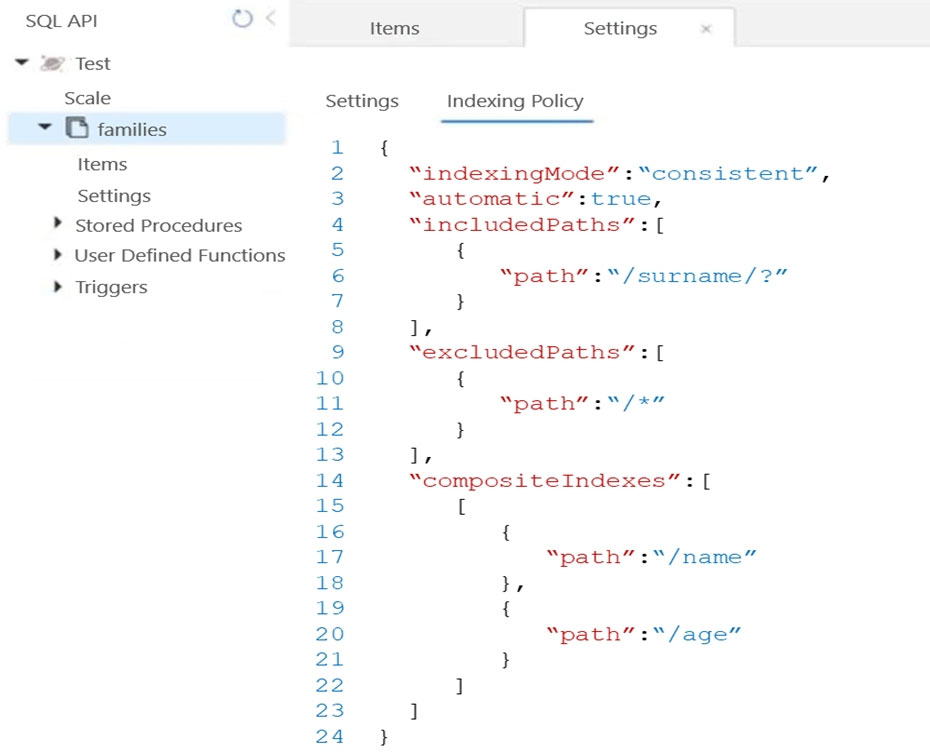
You have the indexing policy shown in the following exhibit.
Use the drop-down menus to choose the answer that responds to each question based on the information in the graphic.
Select
When creating a query, which ORDER BY statement will execute successfully?
During the creation of an item, when will the index update?
You have an Azure Cosmos DB database that contains a container named container1.
You need to make sure items stored in container1 do not expire unless their TTL value is explicitly configured.
What should you do?
ASet the DefaultTimeToLive property to 0.
BRemove the DefaultTimeToLive property.
CSet the DefaultTimeToLive property to null.
DSet the DefaultTimeToLive property to –1.
You have an Azure subscription containing an Azure Cosmos DB for NoSQL account. The account has a container named Container1 that stores product data and stock-level information.
You need to implement a stored procedure that accepts these parameters:
productid
productName
initialStockLevel
The solution must create the following:
An item containing the product data
An item containing the stock-level data for each product
Complete the stored procedure.
Select
function addNewProduct(productID, productName, initialStockLevel) {
var dbContext = getContext();
var container = dbContext.
var product = {
id: productID,
type: "product",
name: productName
};
var productStockLevel = {
id: productID,
type: "productStockLevel",
currentStockLevel: initialStockLevel
};
var containerLink = container.
var productAccepted = container.createDocument(containerLink, product,
function (productError, addedProduct) {
if (productError) throw new Error('Error' + productError.message);
var productStockLevelAccepted = container.createDocument(containerLink, productStockLevel,
function (productStockLevelError, addedProductStockLevel) {
if (productStockLevelError) throw new Error('Error' + productStockLevelError.message);
context.getResponse().setBody({
product: addedProduct,
stocklevel: addedProductStockLevel
});
});
});
}
You have a database in an Azure Cosmos DB SQL API Core (SQL) account used for development.
The database is changed once per day by a batch process.
You must be able to restore the database if the most recent batch process fails, while minimizing costs.
How should you configure the backup settings?
Select
Backup interval
Backup retention
QuestionQ6
Integrate an Azure Cosmos DB solution
0
Community Discussion
No comments yet. Be the first to start the discussion!
QuestionQ7
Maintain an Azure Cosmos DB solution
QuestionQ8
Design and implement data distribution
QuestionQ9
Maintain an Azure Cosmos DB solution
QuestionQ10
Maintain an Azure Cosmos DB solution
QuestionQ11
Optimize an Azure Cosmos DB solution
QuestionQ12
Design and implement data models
QuestionQ13
Maintain an Azure Cosmos DB solution
QuestionQ14
Maintain an Azure Cosmos DB solution
QuestionQ15
Integrate an Azure Cosmos DB solution
QuestionQ16
Integrate an Azure Cosmos DB solution
QuestionQ17
Integrate an Azure Cosmos DB solution
QuestionQ18
Optimize an Azure Cosmos DB solution
QuestionQ19
Design and implement data distribution
QuestionQ20
Design and implement data models
QuestionQ21
Optimize an Azure Cosmos DB solution
QuestionQ22
Maintain an Azure Cosmos DB solution
QuestionQ23
Design and implement data distribution
QuestionQ24
Design and implement data distribution
QuestionQ25
Maintain an Azure Cosmos DB solution
Save question
0
Community Discussion
No comments yet. Be the first to start the discussion!
Save question
0
Community Discussion
No comments yet. Be the first to start the discussion!
Save question
0
Community Discussion
No comments yet. Be the first to start the discussion!
Save question
0
Community Discussion
No comments yet. Be the first to start the discussion!
Save question
0
Community Discussion
No comments yet. Be the first to start the discussion!
Save question
0
Community Discussion
No comments yet. Be the first to start the discussion!
Save question
0
Community Discussion
No comments yet. Be the first to start the discussion!
Ad
Want a break from the ads?
Go ad-free and unlock Learn Mode, Exam Mode, AstroTutor AI and every premium tool — everything you need to walk in prepared, and confident.
You have an Azure Cosmos DB for NoSQL account that contains a database named DB1 and a container named Container1.
You need to manage the account by using the Azure Cosmos DB SDK.
What should you do?
Choose three
ACreate a container in DB1.
BList the physical partitions of Container1.
CRead a stored procedure in Container1.
DCreate a user defined function (UDF) in Container1.
You plan to build an operational system that stores data in an Azure Cosmos DB Core (SQL) API account.
You need to configure the account to meet these requirements:
Support Spark queries.
Support analysis of data from the previous six months.
Pay for analytical compute only when queries run.
Which three actions should you take? Each correct answer represents part of the solution.
NOTE: Each correct selection is worth one point.
Choose three
AEnable Azure Synapse Link for the account.
BCreate a container and set the analyticalTTL property to six months.
CCreate an Azure Databricks notebook.
DCreate an Azure Synapse linked service.
ECreate a container and set the time to live to six months.
FCreate an Azure Synapse pipeline.
You need to create a data store for a directory of small and medium-sized businesses (SMBs). The data store must satisfy these requirements:
Store companies and the users who work for them. Each company will have fewer than 1,000 users.
Some users have data larger than 2 KB.
Associate each user with only one company.
Provide the capability to browse by company.
Provide the capability to browse users by company.
Whenever a company or user profile is selected, display a details page for the company and all related users.
Be optimized for data reads.
Which design should you implement to optimize the data store for reading data?
AIn a directory container, create a document for each company and a document for each user. Use the company ID as the partition key.
BCreate a user container that uses the user ID as the partition key and a company container that uses the company ID as the partition key. Add the company ID to each user document.
CIn a user container, create a document for each user. Embed the company into each user document. Use the user ID as the partition key.
DIn a company container, create a document for each company. Embed the users into company documents. Use the company ID as the partition key.
You have an Azure Cosmos DB for NoSQL account with multiple write regions.
You need to receive an alert when requests directed to the database exceed the available request units per second (RU/s).
Which Azure Monitor signal should you use?
ARegion Removed
BMetadata Requests
CProvisioned Throughput
DData Usage
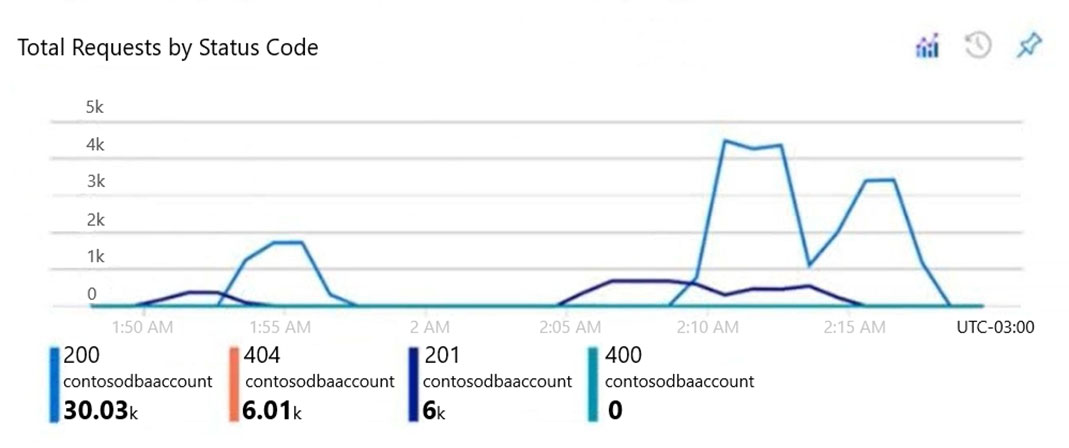
You have an Azure Cosmos DB Core (SQL) API account that an application named App1 uses. You open the account's Insights pane and view the following chart.
Select
The HTTP 404 status code is caused by
There are successful resource creations in the account during the time period of the chart
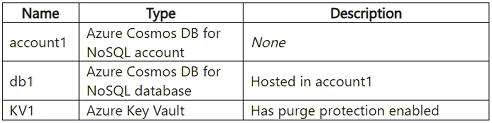
You have an Azure subscription containing the resources shown in the following table.
You need to create a container in db1 with these attributes:
Name: Container1
Encryption: Client-side encryption with Always Encrypted
Which three actions should you take, in sequence?
Drag & Drop
Create Container1 and include an encryption policy.
Create a data encryption key in db1.
Generate and upload a secret to KV1.
Generate and upload a key to KV1.
Generate and upload a certificate to KV1.
You have an Azure Cosmos DB account called account1.
You need to access account1 from an on-premises environment by using a Site-to-Site VPN.
What should you use?
Aa private endpoint
Ba dedicated gateway
CAzure Synapse Link
You have an Azure subscription containing an Azure Cosmos DB for NoSQL account. The account has a database named DB1 and an Azure Key Vault named KV1.
You need to create a container named Container1 in DB1. The solution must ensure that item properties in Container1 are encrypted by using Always Encrypted.
Which four actions should be performed, in order?
Drag & Drop
Create a customer-managed key.
Create Container1.
Store the customer-managed key in KV1.
Store the database encryption key in KV1.
Create a data encryption key.
1
2
3
4
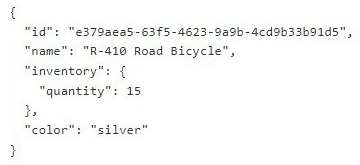
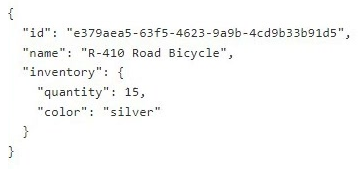
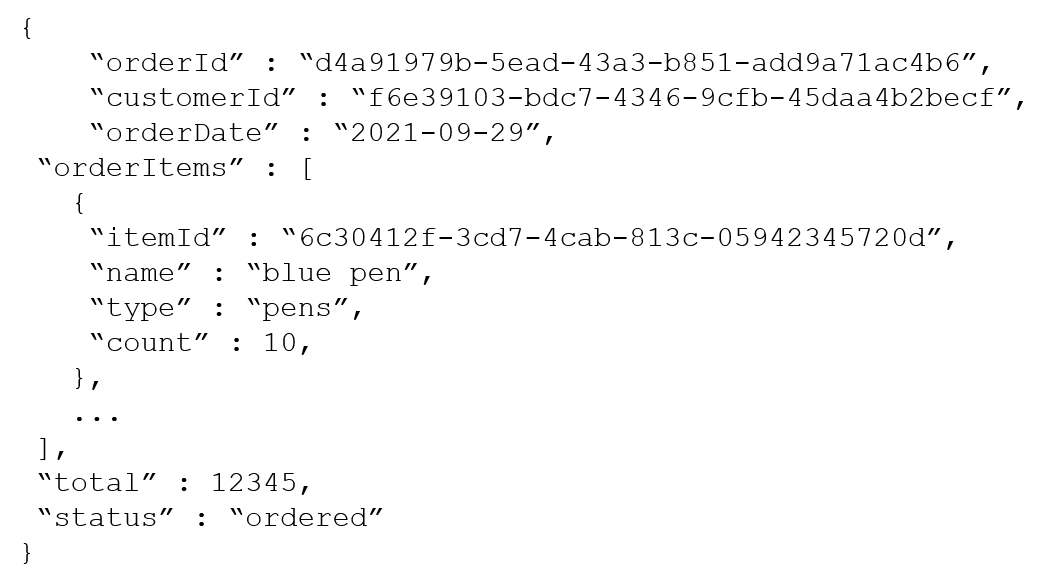
The following is an example document in orders.
The orders container uses customerId as its partition key.
You need to produce a report of the total items ordered per month, by item type. The solution must meet these requirements:
Ensure that the report runs as quickly as possible.
Minimize request unit (RU) consumption.
What should you do?
AConfigure the report to query orders by using a SQL query.
BConfigure the report to query a new materialized view. Populate the view by using the change feed.
CConfigure the report to query orders by using a SQL query through a dedicated gateway.
DConfigure the report to query a new materialized view. Populate the view by using SQL queries that run daily.
You need to choose the partition key for con-iot1. The solution must satisfy the IoT telemetry requirements.
What should you choose?
Athe timestamp
Bthe humidity
Cthe temperature
Dthe device ID
You have an app named App1 that uses an Azure Cosmos DB for NoSQL database.
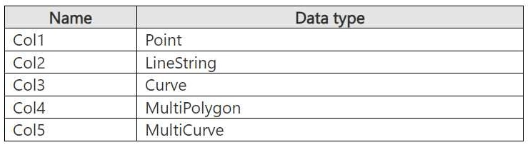
App1 uses the spatial columns shown in the following table.
You need to design an indexing strategy for App1.
Which columns can be indexed using spatial indexes?
ACol1 only
BCol1 and Col2 only
CCol1, Col2, and Col3 only
DCol1, Col2, and Col4 only
You have an Azure subscription containing an Azure Cosmos DB for NoSQL account named account1 and a Log Analytics workspace named Workspace1. Workspace1 stores account1’s logs.
You need to determine which operations consumed the most request units per second (RU/s) over the past 24 hours.
Complete the query.
Select
| where ResourceProvider=="MICROSOFT.DOCUMENTDB" and Category==
| where TimeGenerated >= ago(1d)
| summarize max(responseLength_s), max(requestLength_s), max(requestCharge_s), count = count() by OperationName,
requestResourceType_s, userAgent_s, collectionRid_s
You have an Azure Cosmos DB Core (SQL) API account named account1 with the disableKeyBasedMetadataWriteAccess property enabled.
You are developing an app named App1 that DevUser1 will use to create containers in account1. DevUser1 has a non-privileged user account in the Azure Active Directory (Azure AD) tenant.
You need to ensure that DevUser1 can use App1 to create containers in account1.
What should you do?
Select
Grant permissions to create containers by using:
Create containers by using the:
You are designing three apps named App1, App2, and App3. Each app will use its own Azure Cosmos DB for NoSQL account. The apps have these consistency requirements:
App1: Reads must always return an item's most recently committed version when the commit occurred in the same session.
App2: Reads must always return an item's most recently committed version, even when the commit occurred in a different session.
App3: Write latency must be minimized, and data staleness is acceptable.
You need to recommend a default consistency level for each Azure Cosmos DB for NoSQL account while minimizing concurrency.
Each consistency level may be used once, more than once, or not at all.
Drag & Drop
Bounded Staleness
Consistent Prefix
Eventual
Session
Strong
App1:
App2:
App3:
You have an Azure Cosmos DB for NoSQL account named account1.
You plan to implement a multi-region write scenario.
You enable multi-region writes for account1.
Which two actions should you take next? Each correct answer presents part of the solution.
> NOTE: Each correct answer is worth one point.
Choose two
ASet ApplicationRegion to the name of the deployed region.
BSet UseMultipleWriteLocations to True.
CSet consistencyLevel to Eventual.
DUpdate connectionString.
You have an Azure subscription containing an Azure Cosmos DB for NoSQL account. The account hosts a container named Container1.
At some time during the previous 4S hours, Container1 was deleted.
You need to restore the account to the point immediately before Container1 was deleted. The solution must minimize administrative effort.
What should you do first?
AReview the event feed blade.
BIdentify the last restorable timestamp.
CCreate a new Azure Cosmos DB for NoSQL account.
DRestore Container1 to a different Azure Cosmos DB for NoSQL account.

Community Discussion