Secure Windows Server on-premises and hybrid infrastructuresImplement and manage Windows Server high availabilityImplement Disaster RecoveryMigrate servers and workloadsMonitor and troubleshoot Windows Server environments
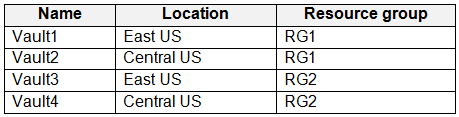
You have an Azure subscription containing the Azure key vaults shown in the following table.
You create a virtual machine with the following configuration:
Name: VM1
Resource group: RG1
Azure region: East US
Operating system: Windows Server
You need to enable Azure Disk Encryption for VM1.
Which key vault can you use to store VM1's encryption key?
AVault1 only
BVault1 or Vault2 only
CVault1 or Vault3 only
DVault1, Vault2, Vault3, or Vault4
You have an on-premises server named Server1 that runs Windows Server. Server1 has the Web Server (IIS) server role installed and hosts an ASP.NET web application named App1.
You have an Azure subscription.
You plan to migrate App1 to an Azure container.
You need to export App1 to a ZIP file.
What should you install on Server1?
Athe Windows Server Migration Tools feature
Bthe IIS Management Scripts and Tools role service
CWeb Deploy
DDocker Enterprise
You need to configure BitLocker on Server4.
Choose the volumes on which you can enable BitLocker and those on which you can enable auto-unlock.
Select
BitLocker:
Auto-unlock:
Your network has an Active Directory domain containing a domain controller named DC1 and a Windows Server computer named Server1.
You need to enable event log subscriptions that forward events from DC1 to Server1.
Which command should you use to enable the Windows Event Collector service, and on which server or servers should you run it?
Select
Command:
Servers:
QuestionQ6
Implement Disaster Recovery
0
Community Discussion
No comments yet. Be the first to start the discussion!
QuestionQ7
Migrate servers and workloads
QuestionQ8
Monitor and troubleshoot Windows Server environments
QuestionQ9
Monitor and troubleshoot Windows Server environments
QuestionQ10
Migrate servers and workloads
QuestionQ11
Migrate servers and workloads
QuestionQ12
Implement and manage Windows Server high availability
QuestionQ13
Migrate servers and workloads
QuestionQ14
Secure Windows Server on-premises and hybrid infrastructures
QuestionQ15
Monitor and troubleshoot Windows Server environments
QuestionQ16
Implement Disaster Recovery
QuestionQ17
Monitor and troubleshoot Windows Server environments
QuestionQ18
Migrate servers and workloads
QuestionQ19
Migrate servers and workloads
QuestionQ20
Migrate servers and workloads
QuestionQ21
Secure Windows Server on-premises and hybrid infrastructures
QuestionQ22
Migrate servers and workloads
QuestionQ23
Secure Windows Server on-premises and hybrid infrastructures
QuestionQ24
Implement Disaster Recovery
QuestionQ25
Implement Disaster Recovery
Save question
0
Community Discussion
No comments yet. Be the first to start the discussion!
Save question
0
Community Discussion
No comments yet. Be the first to start the discussion!
Save question
0
Community Discussion
No comments yet. Be the first to start the discussion!
Save question
0
Community Discussion
No comments yet. Be the first to start the discussion!
Save question
0
Community Discussion
No comments yet. Be the first to start the discussion!
Save question
0
Community Discussion
No comments yet. Be the first to start the discussion!
Save question
0
Community Discussion
No comments yet. Be the first to start the discussion!
Ad
Want a break from the ads?
Go ad-free and unlock Learn Mode, Exam Mode, AstroTutor AI and every premium tool — everything you need to walk in prepared, and confident.
No comments yet. Be the first to start the discussion!
Save question
0
Community Discussion
No comments yet. Be the first to start the discussion!
Save question
0
Community Discussion
No comments yet. Be the first to start the discussion!
Save question
0
Community Discussion
No comments yet. Be the first to start the discussion!
Save question
Your network contains a single-domain Active Directory Domain Services (AD DS) forest named contoso.com. The functional level of the forest is Windows Server 2012 R2. All domain controllers run Windows Server 2012 R2.
Sysvol replicates by using the File Replication Service (FRS).
You plan to replace the existing domain controllers with new domain controllers that will run Windows Server 2022.
You need to ensure that you can add the first domain controller that runs Windows Server 2022.
0
Community Discussion
No comments yet. Be the first to start the discussion!
Save question
Your network contains a single-domain Active Directory Domain Services (AD DS) forest named contoso.com. The functional level of the forest is Windows Server 2012 R2. All domain controllers run Windows Server 2012 R2.
Sysvol replicates by using the File Replication Service (FRS).
You plan to replace the existing domain controllers with new domain controllers that will run Windows Server 2022.
You need to ensure that you can add the first domain controller that runs Windows Server 2022.
0
Community Discussion
No comments yet. Be the first to start the discussion!
Save question
Your network contains a single-domain Active Directory Domain Services (AD DS) forest named contoso.com. The functional level of the forest is Windows Server 2012 R2. All domain controllers run Windows Server 2012 R2.
Sysvol replicates by using the File Replication Service (FRS).
You plan to replace the existing domain controllers with new domain controllers that will run Windows Server 2022.
You need to ensure that you can add the first domain controller that runs Windows Server 2022.
0
Community Discussion
No comments yet. Be the first to start the discussion!
Save question
Your network contains a single-domain Active Directory Domain Services (AD DS) forest named contoso.com. The functional level of the forest is Windows Server 2012 R2. All domain controllers run Windows Server 2012 R2.
Sysvol replicates by using the File Replication Service (FRS).
You plan to replace the existing domain controllers with new domain controllers that will run Windows Server 2022.
You need to ensure that you can add the first domain controller that runs Windows Server 2022.
0
Community Discussion
No comments yet. Be the first to start the discussion!
Save question
0
Community Discussion
No comments yet. Be the first to start the discussion!
Save question
0
Community Discussion
No comments yet. Be the first to start the discussion!
Save question
0
Community Discussion
No comments yet. Be the first to start the discussion!
Save question
0
Community Discussion
No comments yet. Be the first to start the discussion!
You are assessing the technical requirements for Cluster 2.
What is the minimum number of Azure Site Recovery Providers that must be installed?
A1
B4
C12
D16
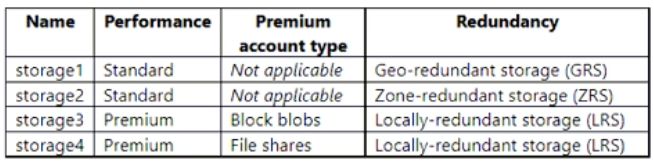
You have an Azure subscription that contains a Windows Server virtual machine named VM1. The subscription includes the storage accounts shown in the following table.
You plan to enable boot diagnostics for VM1.
You need to configure storage for the boot-diagnostics logs and snapshots.
Which storage account should you use?
Astorage1
Bstorage2
Cstorage3
Dstorage4
You have an Azure virtual machine named VM1 that runs Windows Server.
When you try to install the Azure Performance Diagnostics extension on VM1, the installation fails.
You need to determine the cause of the installation failure.
What are two possible ways to accomplish the goal? Each correct answer provides a complete solution.
NOTE: Each correct selection is worth one point.
Choose two
ASign in to VM1 and verify the MonitoringAgent.log file.
BSign in to VM1 and verify the WaAppAgent.log file.
CFrom the Azure portal, view the alerts for VM1.
DFrom the Azure portal, view the activity log for VM1.
You have an Azure subscription containing two Windows Server virtual machines named VM1 and VM2.
You need to use Azure Network Watcher to meet these requirements:
Identify the security rules that stop network traffic from reaching VM1.
Identify the source region of packets sent to VM2.
What should you use for each requirement?
Select
Identify security rules that prevent network traffic from reaching VM1:
Identify the source region of packets sent to VM2:
You are planning the DHCP1 migration to support the DHCP migration plan.
Which two PowerShell cmdlets should be run on DHCP1, and which two should be run on DHCP2?
Each cmdlet may be used once, more than once, or not at all.
Drag & Drop
Add-DhcpServerInDC
Add-DhcpServerv4Scope
Export-DhcpServer
Import-DhcpServer
Remove-DhcpServerInDC
Remove-DhcpServerv4Scope
DHCP1:
DHCP2:
HOTSPOT -
Your network contains an Active Directory Domain Services (AD DS) domain. The domain includes the servers shown in the following table.

Server3 contains a share named Share1.
On Server1, DHCP has the following configurations:
For each of the following statements, select Yes if the statement is true. Otherwise, select No.
Yes or No
Yes
No
Statements
On Server2, Conflict detection attempts is set to 3.
On Server2, there is a reservation for computer2.contoso.com.
On Server2, Policy1 is applied to Scope1.
You have a failover cluster named FC1 with two nodes, Server1 and Server2. FC1 is configured with a file share witness.
You plan to configure FC1 to use a cloud witness.
You need to configure Azure Storage accounts for the cloud witness. Which storage account type and authorization method should you configure?
Select
Storage account type:
Authentication method:
You have a server named Server1 that runs Windows Server and has the Hyper-V server role installed.
You import the Azure Migrate appliance as VM1.
You need to register VM1 with Azure Migrate.
What should you do in Azure Migrate? Each correct answer represents part of the solution.
NOTE: Each correct selection is worth one point.
Choose three
ACreate a project.
BAdd a migration tool.
CAdd an assessment tool.
DGenerate a project key.
EDownload the Azure Migrate installer script ZIP file.
HOTSPOT
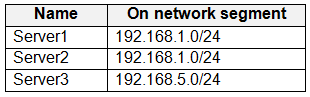
Your network has an on-premises Active Directory Domain Services (AD DS) domain. The domain includes the servers listed in the following table.
For each server, Windows Defender Firewall is set to allow communication only between servers on the same segment.
Server1 has this connection security rule:
Name: Rule1
Rule type: isolation
Requirement: Require authentication for inbound connections and request authentication for outbound connections
Authentication method: Computer (Kerberos V5)
Profile: Domain, Private, Public
Server2 has no connection security rules.
Server3 has this connection security rule:
Name: Rule3
Rule type: Server-to-server
Endpoints
Computers in Endpoint 1: 192.168:5.0/24
Computers in Endpoint 2: 192.168.1.0/24
Requirement: Request authentication for inbound and outbound connections
Authentication method: Computer (Kerberos V5)
Profile: Domain, Private, Public
For each of the following statements, select Yes if the statement is true. Otherwise, select No.
Yes or No
Yes
No
Statements
Server1 can initiate communication with Server2 successfully.
Server2 can initiate communication with Server3 successfully.
Server3 can initiate communication with Server1 successfully.
Your on-premises network connects to Azure.
You have an Azure subscription that contains a virtual machine named VM1 running Windows Server.
You need to determine the latency between the on-premises network and VM1.
Which Azure Network Watcher settings should you use?
AIP flow verity
BConnection monitor
CVPN troubleshoot
DConnection troubleshoot
You have an Azure subscription that contains two Windows Server virtual machines named VM1 and VM2. VM1’s OS disk is encrypted by using Azure Disk Encryption, and VM1 is backed up daily by using Azure Backup.
Several files on VM1’s OS disk have become corrupted.
You need to restore the corrupted files from the latest restore point. The solution must minimize the time required to complete the restore.
What should you do first?
ARestore VM1, including the disk, to the disk’s original location.
BGenerate and download a script.
CAttach the disk to VM2.
DRestore the disk to a new location.
Your network has an Active Directory Domain Services (AD DS) domain containing 20 Active Directory sites. All user management is handled from a central site.
You add users to a group and discover that the group changes do not appear on a domain controller at a remote site.
You need to determine whether the group changes appear on other domain controllers.
What should you use?
AActive Directory Sites and Services
BActive Directory Replication Status Tool
CMicrosoft Support and Recovery Assistant
DFile Replication Service (FRS) Status Viewer
Solution: Migrate SYSVOL from FRS to Distributed File System (DFS) Replication.
Does this accomplish the goal?
AYes
BNo
Solution: You upgrade the PDC emulator.
Does this achieve the goal?
AYes
BNo
Solution: You run the Active Directory Migration Tool (ADMT).
Does this achieve the goal?
AYes
BNo
Solution: You raise both the domain and forest functional levels.
Does this accomplish the goal?
AYes
BNo
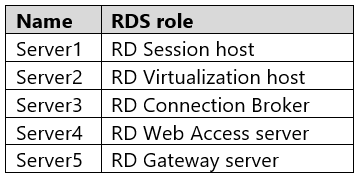
You have a Windows Server 2022 Remote Desktop Services deployment that includes the servers shown in the following table.
You need to upgrade the Remote Desktop Services deployment to Windows Server 2025.
Which server must you upgrade first?
AServer1
BServer2
CServer3
DServer4
EServer5
You have an Azure virtual machine named VM1. Crash dumps for a process named Process1 are enabled on VM1.
When process1.exe on VM1 crashes, a technician must be able to access the memory dump files on the virtual machine. The technician must be prevented from accessing the virtual machine.
To what should you grant the technician access?
Aan Azure file share
Ban Azure Log Analytics workspace
Can Azure Blob Storage container
Da managed disk
Your network contains an Active Directory Domain Services (AD DS) domain named contoso.com. The domain has a domain controller named DC1, an organizational unit (OU) named OU1, and a user named User1. Active Directory Recycle Bin is disabled.
User1 is accidentally deleted from OU1.
You need to restore User1 from a backup of DC1.
How should you complete the command?
Select
"authoritative restore" "restore object q q
You have an Azure virtual machine named VM1 that runs Windows Server.
You configure Azure Site Recovery replication for VM1.
You need to run a test failover on VM1.
What should you use from the VM1 blade in the Azure portal?
Community Discussion