Loading questions...

Loading questions...
 Preview
Updated
Want a break from the ads?
Become a Supporter and enjoy a completely ad-free experience, plus unlock Learn Mode, Exam Mode, AstroTutor AI, and more.
Support Examcademy
Your support keeps this platform running. Become a Supporter to remove all ads and unlock exclusive study tools.
Study without distractions
Supporters get zero ads, spaced-repetition Learn Mode, timed Exam Mode, and AI-powered explanations from AstroTutor.
Create a free account to unlock all questions for this exam.
Log In / Sign UpAll client computers on your company network run Windows 7 and are members of a Windows Server 2008 R2 domain. The R&D department staff are local administrators on their computers and are members of the R&D global security group.
A new version of a business software application is available on the network.
You plan to apply an AppLocker security policy to the R&D group.
You need to ensure that members of the R&D group are not allowed to upgrade the software.
What should you do?
All client computers on your company network run Windows 7.
The preview displayed in the Content view of Windows Explorer and the Search box is considered a security risk by your company.
You need to ensure that documents cannot be previewed in the Content view.
What should you do?
All client computers on your company network were recently migrated from Windows XP to Windows 7.Employees use Internet Explorer 8.
Each time employees access a Web application, they are prompted to install an add-on. After each installation, the application restarts and prompts the employees to install the add-on again.
You need to ensure that employees can run the application.
What should you do?
Your network contains an Active Directory domain. All client computers run Windows 7 Enterprise.
A custom application named App1 is installed on the computers. All settings for App1 are stored in the user portion of the registry.
The help desk reports a high volume of calls from users who have incorrectly configured the App1 settings.
You need to recommend a solution to minimize the number of help desk calls about the incorrect App1 configurations. Users must be able to use App1. What should you do?
All client computers on your company network run Windows 7. A software application that monitors Internet usage is installed on each of the computers.
You plan to collect all Critical and Error events generated by the application and review them on your computer.
You perform the following tasks on your computer:
✑ Create an event subscription by using Event Viewer.
✑ Create a query filter and select Critical and Error events from the Application event log.
You need to ensure that the following requirements are met:
✑ Only Critical and Error events from the Application event log are forwarded to your computer.
✑ The Application event log can be viewed from your computer and the computers that generated the errors.
What should you do first?
All client computers on your company network were recently migrated from Windows XP to Windows 7.
Your company uses a proprietary software program that is installed by using a Windows Installer (.msi) file.
Employees who require the application must install it on their computers.
Employees are unable to install the software due to compatibility issues.
You need to ensure that the application can be installed.
What should you do?
All client computers on your company network run Windows 7.
The event logs contain errors from an application source and the Kernel-Power source. You plan to track the errors.
You need to capture only the relevant data to generate a report.
What should you do?
All client computers on your company network run Windows 7. Several legacy software applications are made available on the computers by using Windows XP
Mode (XPM).
Employees report that all Start menu shortcuts for the legacy applications are missing from their computers.
You need to ensure that all employees can access the Start menu shortcuts for the legacy applications.
What should you do?
All client computers on your company network were recently migrated from Windows XP to Windows 7.
Your company uses a proprietary application that is currently not compatible with Windows 7. A shim has been created and applied to mitigate compatibility issues until a Windows 7-compatible version is developed.
A security update is made for this application. The update must be tested and then deployed as a new version of the application.
During testing you are unable to install the application.
You need to ensure that the application can be installed in the test environment before it can be deployed to the production environment.
What should you do?
All client computers on your company network run Windows 7. The computers are deployed within an Active Directory Domain Services domain in a Windows
Server 2003 environment.
When an employee attempts to log on to the domain from his computer, he receives the following error message:
"System cannot log you on to the domain because the system's computer account in its primary domain is missing or the password on that account is incorrect.
"You need to ensure that the employee can log on to the domain from his computer.
What should you do?
All client computers on your company network are members of an Active Directory Domain Services domain.
The Finance team uses Remote Desktop to access Windows 7 virtual machines that are hosted on a Windows Server 2008 Hyper-V server.
The team members receive the following error message when they attempt to log on to the virtual machines:
"The trust relationship between this workstation and the primary domain failed."
You discover that the Hyper-V server was recently restored from a backup.
You need to ensure that the team members can log on to the virtual machines.
You log on to the virtual machines as local administrator. What should you do next?
All client computers on your company network run Windows 7.
An application has stopped working. The application is dependent on a service that runs automatically and logs on to the domain by using a dedicated service account. You also discover that an entry in the event log has the following message:
"Logon failure: unknown user name or bad password."
You need to ensure that the service runs successfully.
What should you do?
All client computers on your company network run Windows 7.
A computer is unable to connect to network resources.
The configuration of the computer is as shown in the following table.
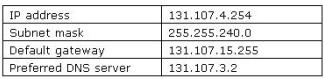
You need to ensure that the computer is able to connect to network resources.
What should you do?
Your company has an Active Directory Domain Services domain named contoso.com. All client computers run Windows 7 and are members of the contoso.com domain.
All computers are configured to use a proxy server as shown in the exhibit. (Click the Exhibit button.)
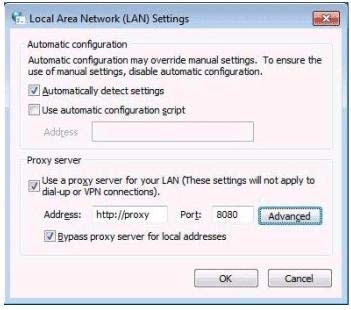
An internal SSL Web application named Webapp1 does not run properly when it is accessed through a proxy server.
Employees type https://Webapp1.contoso.com into their browsers and attempt to run the Web application. They are still unable to run the application.
You need to ensure that employees can run the Web application.
What should you do?
Your company has client computers that run Windows 7 and client computers that run Windows XP Professional.
You enable the Network Discovery feature on the Windows 7 computers.
You discover that the Windows XP computers do not appear on the network map.
You need to ensure that all client computers appear on the network map.
What should you do?
Your company has a main office and a branch office.
The network contains an Active Directory forest. All users on the network access the Internet from their computers.
The company hires a temporary employee who has his own portable computer. The employee connects his portable computer to the network.
When the employee attempts to join the computer to the domain, the connection fails. A help desk technician reports the following about the employee:
✑ He has a domain user account.
✑ His computer can access Internet Web sites.
✑ His computer can contact domain controllers by using the domain controllers' IP addresses.
You need to ensure that the employee's computer can join the domain. The solution must ensure that the computer can access resources on the Internet.
What should you do?
All client computers on your company network run Windows 7 and all servers on your company network run Windows Server 2008. The computers and the servers are members of an Active Directory Domain Services domain. A network administrator moves the Internet Information Services (IIS) server to a different network segment and configures the appropriate network settings.
Employees are unable to connect to the IIS server.
You confirm that the network settings are appropriate.
You need to ensure that all employees are able to connect to the IIS server.
What should you do?
All client computers on your company network run Windows 7 and are members of an Active Directory Domain Services domain.
A network administrator changes the IP address of a file server.
Employees are unable to connect to the file server.
You need to ensure that the employees are able to connect to the file server immediately.
What should you do?
All client computers on your company network run Windows 7 and are members of an Active Directory Domain Services domain named contoso.com.
Employees access the company intranet site at http://app.contoso.com.
The Test team must be able to access a new version of http://app.contoso.com before the site is in production.
You need to ensure that the Test team can access the new version of the site without affecting other employees' access to the current site.
What should you do?
All client computers on your company network run Windows 7 and are members of an Active Directory Domain Services domain.
You deploy network printers.
You need to ensure that employees are able to find these printers.
What should you do first?
All client computers on your company network run Windows 7. An employee installs several new applications on a computer.
After the applications are installed, the computer takes longer to start.
You need to reduce the startup process time.
What should you do?
Your company network has 500 client computers that run Windows 7. Your team consists of 20 desktop support technicians.
Two technicians troubleshoot a hardware-related performance issue on a computer. The technicians obtain different results by using their own User Defined Data
Collector Sets.
You need to create a standardized Data Collector Set on a network share that is accessible to your team.
What should you create?
All client computers on your company network run Windows 7. Each computer has four 1-GB RAM modules and a single physical disk.
When the employees run a three-dimensional (3-D) design application that extensively uses the RAM, they experience slow performance on their computers.
You discover that the swap files on the computers are extensively used.
You need to improve the performance of the computers.
What should you do?
