Loading questions...

Loading questions...
 Preview
Updated
Want a break from the ads?
Become a Supporter and enjoy a completely ad-free experience, plus unlock Learn Mode, Exam Mode, AstroTutor AI, and more.
Support Examcademy
Your support keeps this platform running. Become a Supporter to remove all ads and unlock exclusive study tools.
Study without distractions
Supporters get zero ads, spaced-repetition Learn Mode, timed Exam Mode, and AI-powered explanations from AstroTutor.
Your network consists of an Active Directory domain and a Direct Access infrastructure.
You install Windows 7 on a new portable computer and join the computer to the domain.
You need to ensure that the computer can establish Direct Access connections.
What should you do?
Your company has a main office and a branch office. The relevant portion of the network is configured as shown in the exhibit. (Click the Exhibit button.)
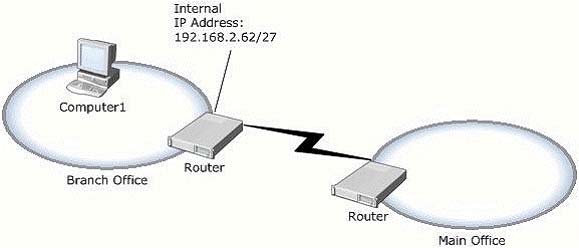
In the branch office, you deploy a new computer named Computer1 that runs Windows 7.
You need to assign an IP address to Computer1.
Which IP address should you use?
You work in an international company which is named Wiikigo. Before entering this company, you have two years of experience in the IT field, as well as experience implementing and administering any Windows client operating system in a networked environment. You are professional in installing, upgrading and migrating to Windows 7, deploying Windows 7, and configuring Hardware and Applications and son on. You are in charge of a computer that runs Windows Vista.
You have Windows 7 installed on a new partition on the computer. You have to make sure that the computer always starts Windows Vista by default. So what action should you perform to make sure of this?
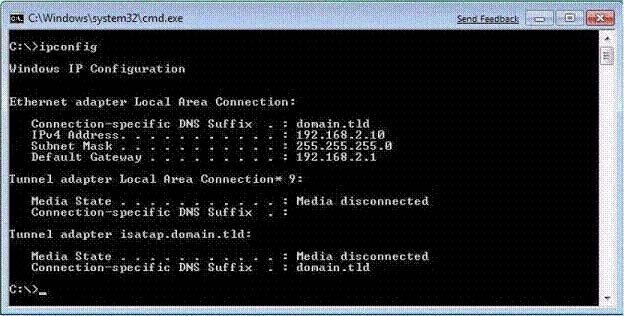
You have a computer that runs Windows 7.
You run Ipconfig as shown in the exhibit. (Click the Exhibit button.)
You need to ensure that you can establish a Direct Access connection to the network.
What should you do first?
You have a computer that runs Windows Vista. The computer contains a custom application.
You need to export the user state and the settings of the custom application.
What should you do?
You have a computer that runs Windows 7.
Multiple users log on to your computer.
You enable auditing on a folder stored on your computer.
You need to ensure that each access to the folder is logged.
What should you do?
You have a computer that runs Windows 7.
You discover that an application named App1 runs during the startup process.
You need to prevent only App1 from running during startup. Users must be allowed to run App1 manually.
What should you do?
You have a computer that runs Windows 7. The computer has two volumes named volume C and volume D.
You create a document on volume D.
You manually create a restore point and modify the document.
You view the properties of the document as shown in the exhibit. (Click the Exhibit button.)
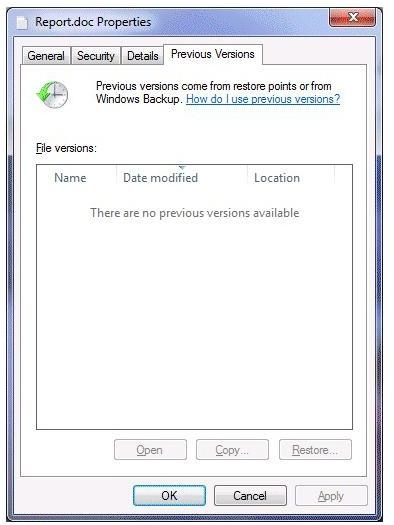
You need to ensure that you can restore the current version of the document if the document is modified.
What should you do first?
You start a computer by using Windows Preinstallation Environment (Windows PE).
You need to dynamically load a network adapter device driver in Windows PE.
What should you do?
Your company has an Active Directory domain. All computers are members of the domain.
Your network contains an internal Web site that uses Integrated Windows Authentication.
From a computer that runs Windows 7, you attempt to connect to the Web site and are prompted for authentication.
You verify that your user account has permission to access the Web site.
You need to ensure that you are automatically authenticated when you connect to the Web site.
What should you do?
Your network contains a wireless access point. You have a computer that runs Windows 7. The computer connects to the wireless access point.
You disable Service Set Identifier (SSID) broadcasts on the wireless access point.
You discover that you are now unable to connect to the wireless access point from the Windows 7 computer.
You need to ensure that the computer can connect to the wireless access point.
What should you do?
You have a computer named Computer1 that runs Windows 7.
You need to ensure that Computer1 can connect to File Transfer Protocol (FTP) servers only while it is connected to a private network.
What should you do?
Your network has a main office and a branch office. The branch office has computers that run Windows 7. A network administrator enables BranchCache in the main office. You run Netsh on your computer as shown in the exhibit. (Click the Exhibit button.)
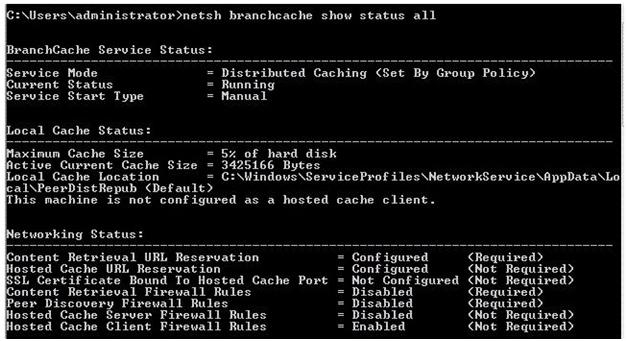
You need to ensure that other computers in the branch office can access the cached content on your computer.
What should you do?
You have a computer that runs Windows 7.
A printer is installed on the computer.
You remove the Everyone group from the access control list (ACL) for the printer, and then you share the printer.
You need to ensure that members of the Sales group can modify all the print jobs that they submit.
You must prevent Sales group members from modifying the print jobs of other users.
What should you do?
You work in an international company which is named Wiikigo. Before entering this company, you have two years of experience in the IT field, as well as experience implementing and administering any Windows client operating system in a networked environment. You are professional in installing, upgrading and migrating to Windows 7, deploying Windows 7, and configuring Hardware and Applications and son on. You have a computer that runs Windows 7.
You run Runas and specify the /savecred parameter to start an application.
The stored password needs to be deleted.
What action should you perform?
You have a computer that runs Windows 7. The computer has System Protection enabled.
You need to retain only the last System Protection snapshot of the computer. All other snapshots must be deleted.
What should you do?
You have a reference computer that runs Windows 7.
You plan to deploy an image of the computer.
You create an answer file named answer.xml.
You need to ensure that the installation applies the answer file after you deploy the image.
Which command should you run before you capture the image?
You have a Virtual Hard Disk (VHD) and a computer that runs Windows 7. The VHD has Windows 7 installed.
You need to start the computer from the VHD.
What should you do?
You have a computer that runs Windows 7. Your company has a corporate intranet Web site. You open Windows Internet Explorer as shown in the exhibit. (Click the Exhibit button.)
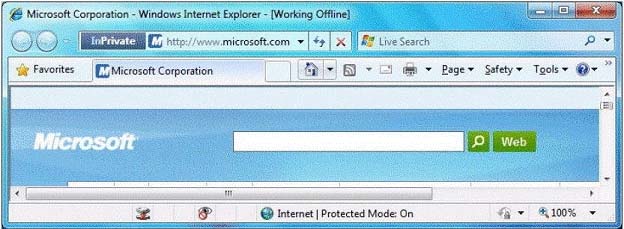
You need to ensure that you can access Web pages on both the Internet and the intranet.
What should you do?
You have a wireless access point that is configured to use Advanced Encryption Standard (AES) security. A pre-shared key is not configured on the wireless access point.
You need to connect a computer that runs Windows 7 to the wireless access point.
Which security setting should you select for the wireless connection?
You have two computers named Computer1 and Computer2 that run Windows 7.
You need to ensure that you can remotely execute commands on Computer2 from Computer1.
What should you do?
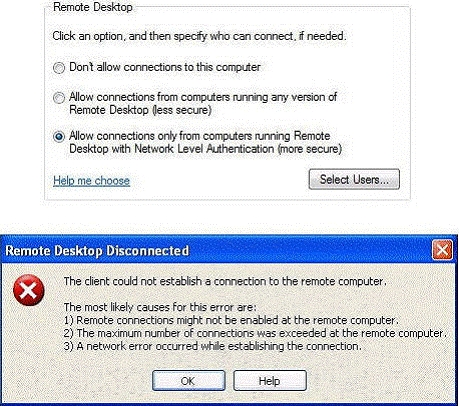
You work in an international company which is named Wiikigo. Before entering this company, you have two years of experience in the IT field, as well as experience implementing and administering any Windows client operating system in a networked environment. You are professional in installing, upgrading and migrating to Windows 7, deploying Windows 7, and configuring Hardware and Applications and son on. You are in charge of two computers that are respectively named C01 and C02. C01 runs Windows 7 and C02 runs Windows XP Professional.
On C01, you enable Remote Desktop as shown in the Remote Desktop exhibit. What action should you perform?
You have a computer that runs Windows 7. The computer connects to the corporate network by using a VPN connection.
You need to ensure that you can access the Internet when the VPN connection is active. The solution must prevent Internet traffic from being routed through the
VPN connection.
What should you do?
You have a computer that runs Windows 7 Professional. A USB disk is attached to the computer.
You need to ensure that you can enable BitLocker to go on the USB disk.
What should you do?
You have a stand-alone computer that runs Windows 7.
You open Windows Update as shown in the exhibit. (Click the Exhibit button.)
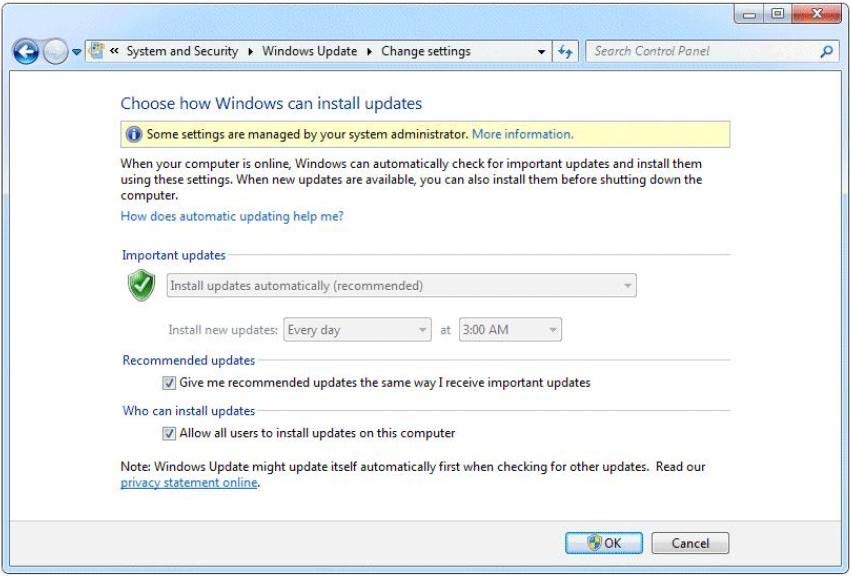
You need to ensure that you can manually change the Windows Update settings on the computer.
What should you do?
