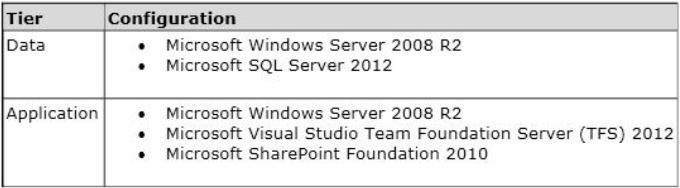
Your network environment includes a Microsoft Visual Studio Team Foundation Server (TFS) 2012 server named TFS1. SharePoint and Reporting Services components are also installed and configured for TFS on the same server.
You need to be able to access the SharePoint Project Portal from the TFS server by using the following URL: http: //tfs.fabrikam.com.
What should you do?
AFrom the TFS Administration Console, edit the SharePoint Web Application URL.
BFrom Visual Studio Team Explorer, edit the portal settings.
CRun the TFSC0nfIg.exe SharePointportal command.
DFrom the SharePoint Central Administration website, configure the Alternate Access Mappings.
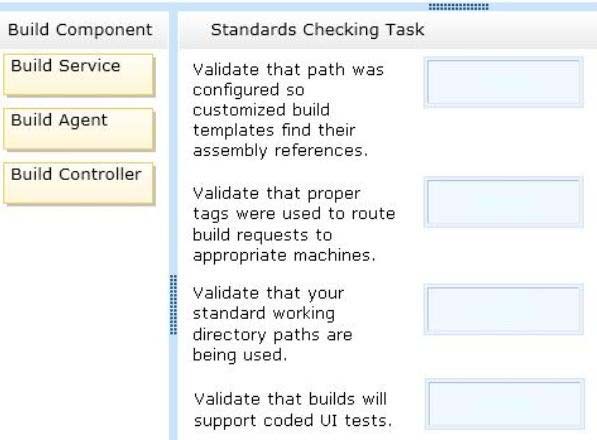
DRAG DROP -
Your network environment includes a Microsoft Visual Studio Team Foundation Server (TFS) 2012 server with one project collection and multiple build machines.
A development team installs and configures a build service on a new build machine.
You need to be able to validate that the installation and configuration meets your organizations requirements and follows its best practices.
At which service would you perform the following tasks? (To answer, drag the appropriate build component to the correct standards- checking task in the answer area. Each build component may be used once, more than once, or not at all.)
Select and Place:
Your network environment includes a Team Foundation Server (TFS) 2012 named TFS1 that contains two project collections named PC1 and PC2. A build server named Bi is configured with a build controller named C1 and an agent named A1 that runs build definitions created in Pd.
A development team wants to create a gated check-in build definition on PC2.
You need to perform a supported infrastructure enhancement to run PC2 build definitions.
What should you do?
A• Add a new build server (B2). • On the B2 build server, migrate controller C1 and install a new controller (C2) that connects to the PC2 project collection. • On the Bi build server, configure a second build agent (A2) that uses the C2 controller.
B• Add a new build server (B2). • On the B2 build server, install a build controller (C2) that connects to the PC2 project collection. • On the B2 build server, configure a second build agent (A2) that uses the C2 controller.
C• On the Bi build server, configure the C1 controller to connect to project collections PC1 and PC2. • On the Bi build server, update the Al agent to use controllers C1 and C2.
D• On the Bi build server, configure the C1 controller to connect to project collections PC1 and PC2.
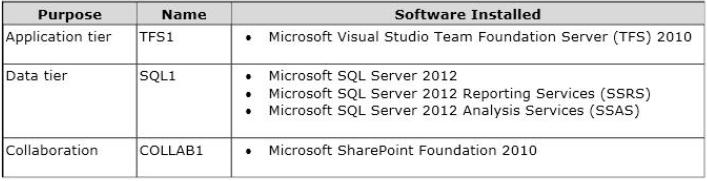
Your network environment is configured according to the following table:
Your TFS environment is configured with the following URLs:
✑ TFS: http: //tfssrv: 8080/tfs
✑ Reporting: http: //tfssrv/reports
✑ SharePoint: http: //tfssrv/sites
You need to configure only the TFS URL to be the following fully qualified domain name (FQDN): http: //tfs.contoso.com.
You log on to the application-tier server. What should you do next?
AIn the IIS Manager, select TFS Website and configure the host name with the friendly name.
BIn the TFS Administration Console, go to the Change URIs dialog box and enter the friendly URL in the Notification URL text box.
CIn the IIS Manager, select TFS Website and configure the server URL with the friendly name.
DIn the TFS Administration Console, go to the Change URIs dialog box and enter the friendly URL in the Server URL text box.
Your network environment includes a Microsoft Visual Studio Team Foundation Server (TFS) 2012 server and a test environment that is based on non-Hyper-V- based virtualized machines.
You need to be able to run tests on all the test machines.
Which two actions should you perform? (Each correct answer presents part of the solution. Choose two.)
AInstall System Center Virtual Machine Manager (SCVMM) 2010.
BUse Microsoft Test Manager (MTM) to create a new standard environment.
CManually install the Agents for Visual Studio 2012 on the virtualization server.
DFrom Microsoft Test Manager (MTM), create a new System Center Virtual Machine Manager- (SCVMM-) based environment and select the virtual machines hosted on the non-Hyper-V-based virtualization server.
EInstall a Visual Studio 2012 test controller.
Your network environment includes a Microsoft Visual Studio Team Foundation Server 2012 (TFS) server. A single build machine is installed with one controller and two agents. The working directories are configured to use the following working directory:
$(SystemDrive)\Builds$(BuildAgentId)$(BuildDefinitionPath).
Your system drive is running out of space and some builds often fail with the following error:
"The specified path, file name, or both are too long. The fully qualified file name must be less than 260 characters, and the directory name must be less than 248 characters."
You need to meet the following requirements:
✑ Point the working path to drive D.
✑ Construct a working directory that can be used to define the shortest unique path for each build agent it is used on.
What should you do?
ASet the Build Agent working directory path to D: \BId$(BuildAqentld)$(BuildDetinitionPath).
BCreate a system variable named BuildDrive and set its value to D: .
CSet the Build Service working directory path to D: \BId$(BuildAqentld)$(BuildDefinitionPath).
DSet the Team Foundation Build variable named $(BuildDrive) to the value D: .
Your clients network environment includes a Microsoft Visual Studio Team Foundation Server (TFS) 2012) server installed at its main office. Branch offices have limited bandwidth connecting to the main office.
Client team members at one of the branch offices report that it is taking too long to retrieve files from source control.
You need to speed up the source control access for their most commonly accessed files.
What should you do?
AInstall a SQL server at the remote office and configure replication of the source control database from the main office to the SQL server at the remote office. Install and configure a TFS proxy server at the remote office to use the replicated database. Configure all the clients at the remote office to use the new proxy server
B• Install a new TFS instance at the remote office and configure it to sync with the main office. • Configure all the clients at the remote office to connect to the new TFS instance.
C• Install and configure a TFS proxy server at the remote office. • Configure all the clients at the remote office to use the new proxy server.
D• Install and configure a TFS proxy server at the remote office. • Run the TFSConfig.exe command to redirect remote users to the TFS proxy server based on IP address. • Install and configure a TFS proxy server at the remote office.
DRAG DROP -
Your network environment is configured according to the following table:
You do not have budget to install a new machine.
You need to perform an in-place upgrade of your TFS1 server from TFS 2012.
What should you do? (To answer, move six appropriate actions from list of actions to the answer are and arrange them in the correct order)
Select and Place:
Your network environment includes a Microsoft Visual Studio Team Foundation Server (TFS) 2012 server. Your development team uses Visual Studio 2012.
You store specialized design files within your Visual Studio solution by using version control. These design files are stored in a proprietary binary format and use the filename extension .dzn.
You need to meet the following requirements:
✑ Ensure that all developers can modify these design files.
✑ Prevent multiple check-outs on all .dzn files.
✑ Ensure that all other file types can be edited by multiple developers at the same time.
What should you do?
AWithin the Source Control Explorer, right-click each .dzn file and uncheck the Allow multiple check outs option.
BAdd a new file type for .dzn to the Team Project Source Control Settings and clear the Enable file merging and multiple check out checkbox.
CWithin the Visual Studio Options dialog box for Source Control, add the .dzn extension to the Prevent multiple check-outs for the following file types list in the Visual Studio Team Foundation server node.
DAdd a new file type for .dzn to the Team Project Collection Source Control Settings and clear the Enable file merging and multiple check out checkbox.
Your network environment includes a Microsoft Visual Studio Team Foundation Server (TFS) 2012 server. Your developers use Visual Studio 2012.
Developers frequently work from locations where there is no network connection.
You need to ensure that developers are able to easily compare their current changes to the last version retrieved from version control.
Which type of workspace should you configure?
AServer
BLocal
CServer-synchronized
DWindows Azure
Your network environment includes a Microsoft Visual Studio Team Foundation Server (TFS) 2012 server. You create a new build definition and select the
Continuous Integration trigger. The build definition runs a build verification test.
You discover that the build fails because the build verification test has not passed, even though compilation of the source code succeeds.
You need to prevent further check-ins until the code passes the build verification test and the build succeeds.
What should you do?
AEnable the Builds check-in policy.
BConfigure the build definition’s source control folders to be read-only for the other developers.
CEnable the Testing check-in policy. Select the same test that is used as the build verification test to be run and passed for the check-in to succeed.
DConfigure the server-side check-in event handler to roll back if the earlier build has failed.
Your network environment includes a Microsoft Visual Studio Team Foundation Server (TFS) 2012 server.
The Application Lifecycle Management (ALM) Center of Excellence of your organization has created a ruleset to perform the code analysis of the code being developed.
You need to ensure that all developers code passes the static code analysis with the custom ruleset at the time of check in.
Which two actions should you perform? (Each correct answer presents part of the solution. Choose two.)
AUnder the source control of the team project, check in the .ruleset file.
BCreate a .reg file on your machine to add a registry entry for the Code Analysis policy with the custom ruleset under H KEY_LOCAL_MACHINE\Software \Microsoft\VisualStudio\1 11.0_Config\TeamFoundation\SourceControl\Checkin Policies.
CDistribute the .reg file that you have created to all developers and request them to run it with elevated privileges.
DAdd Code Analysis check-in policy team project source control settings. When prompted, select the custom ruleset file by browsing under the source control.
Your network environment includes a Microsoft Visual Studio Team Foundation Server 2012 (TFS) server and several TFS 2012 build servers configured.
You need to ensure that developers compile their own code against the latest code before checking their changes into source control.
What should you do?
AEnable the check-out setting to download the latest copy of an item before checking it out.
BCreate a build definition for the solution with a gated check-in trigger.
CCreate a build definition for the solution with a continuous integration trigger.
DCreate a build definition for the solution with a rolling builds trigger, and configure the Builds check-in policy.
Your clients network environment includes a Microsoft Visual Studio Team Foundation Server (TFS) 2012 server installed at its main office.
The network administrator at a remote office reports high WAN utilization. Users at the remote office report slow response times when downloading source code.
You need to minimize WAN utilization and improve the response times for downloading source code.
What should you do?
AInstall TFS Server at the remote site and set up database synchronization between the existing TFS Server and the remote site.
BInstall and configure TFS Proxy at the remote site. Point the TFS Proxy to the TFS server and point Team Explorer to the TFS Proxy.
CInstall and configure IIS caching. Point Team Explorer to the IIS server.
DInstall TFS Proxy at the remote site. Configure TFS Proxy to point to the TFS Server and configure each user’s Visual Studio Source Control to use the proxy
Your network environment includes a Microsoft Visual Studio Team Foundation Server (TFS) 2012 server.
A user places a large shelveset on the TFS server.
You need to delete the shelveset.
What should you do?
AUse the tf shelvesets command with the /delete parameter.
BUse the tf shelve command with the /move parameter.
CUse the tf unshelve command with the /delete parameter.
DUse the tf shelve command with the /delete parameter.
Your network environment includes a Microsoft Visual Studio Team Foundation Server (TFS) 2012 server.
A user accidentally deletes a file from version control.
You need to restore the deleted file to version control.
What should you do?
A• Add a file with the same name in the same place in source control as the old file. • Right-click the file in the source control explorer and select Rollback. • Roll back the file to a change set right before the file was deleted.
B• In Visual Studio 2012 click Tools, then click Options. • Expand the Source Control option, select Visual Studio Team Foundation, and then select Show deleted items in the Source Control Explorer. • Right-click the file in Source Control Explorer and select Rollback. • Roll back the file to a changeset right before the file was deleted.
C• In Visual Studio 2012 click Tools, then click Options. • Expand the Source Control option and select Visual Studio Team Foundation, then select Show deleted items in the Source Control Explorer. • Right-click the file in Source Control Explorer and select Advanced, then select Get Specific Version. • Select a version of the file created right before the file was deleted.
D• In Visual Studio 2012 click Tools, then click Options. • Expand the Source Control option and select Visual Studio Team Foundation, then select Show deleted items in the Source Control Explorer.
Your network environment includes a multi-tier Microsoft Visual Studio Team Foundation Server (TFS) 2012 server implementation. Developers use Visual Studio
2012.
Your team has just started developing a very large enterprise-scale application.
You need to create a workspace for the new project that meets the following requirements:
✑ Developers should be able to use Visual Studio 2012 and earlier versions to work with the workspace.
✑ Performance of the workspace should not be degraded when the number of items in the workspace increases.
✑ The storage utilization of the developer local hard drive should be as minimal as possible.
What should you do?
ACreate a hybrid workspace.
BCreate a server workspace.
CCreate a server workspace and a Local workspace. Configure synchronization between both, and allow developers to utilize the local workspace.
DCreate a local workspace.
Your network environment includes two Microsoft Visual Studio Team Foundation Server (TFS) 2012 servers.
A remote site has two teams. Each team uses a different TFS instance. The developers at the remote site experience poor performance due to network bandwidth issues.
You need to relieve bandwidth by configuring Team Foundation server with the minimal components.
What should you do?
A• Install an IIS Server at the remote site and add Output Caching Rules to the IIS instance. • Change user configurations at the remote site to use IIS server.
B• Install a single TFS Proxy instance at the remote site, adding <Server> tags in TFProxy Proxy.contiq for each server instance. • Point all users at the remote site to the TFS Proxy server.
C• Install a third TFS Server and move the projects that are used by the remote team from existing servers to the third server. • Point all users at the remote site to the new server.
D• Install a TFS Proxy server instance for each project team.
Your network environment includes a Microsoft Visual Studio Team Foundation Server (TFS) server.
You are performing capacity planning for three teams of developers. Each team is developing a different software module. Developers belong to only one team.
You need to ensure that team members can edit only the work items of the module on which they are working.
What should you do?
A• Create three teams under the Team Project for team members of three modules. • On the Security tab of the team give Edit work items in this node permission to that team for the corresponding area. • Deny that permission to other two teams.
B• Create three TFS groups at the Team Project level for team members of three modules. • Create three areas for the three modules. • For each area, on the Permissions tab of the groups, give Edit work items in this node permission to the group corresponding to that area. • Deny that permission to other two groups.
C• Create one TFS group at the Team Project level for the team members of the three modules. • Create three areas for the three modules. For each area, give Edit work items in this node permission to the group.
D• Create three teams under the Team Project for team members of three modules. • For each area corresponding to the team, give Edit work items in this node permission to that team.

 Preview