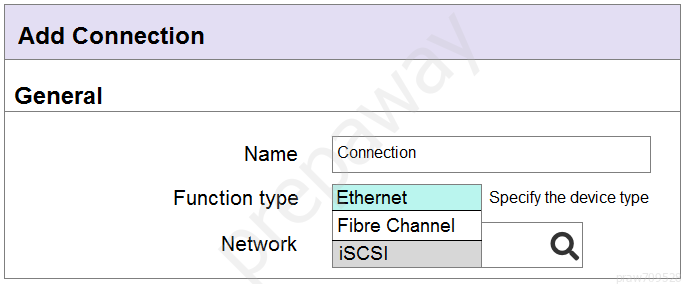
An integrator needs to add an FCoE connection to the server profile, but the FCoE connection type is not available.
What is the likely cause of this issue?
AFCoE capable interconnect modules are not installed in the Synergy frame
BDefined FCoE network is not associated with a SAN or does not have VLAN Id defined
CA FCoE connection is not available, as there is no LIG configured for FCoE connectivity
DThe FCoE connection has not been added as a Fibre Channel connection within a server profile
An integrator is installing three Synergy frames in different locations for a customer. As part of the installation, the customer requests a single monitoring dashboard that shows the current hardware status, warranty status, and open support cases of all three frames.
Which configuration steps must the integrator perform to provide the customer with this functionality?
AEnable Remote Support and Insight Online Integration in the Composer UI
BInstall Insight Remote Support Advanced, and integrate it with HPE Global Dashboard
CConfigure OneView with iLO Amplifier pack
DActivate iLO Federation on all installed compute nodes
What are valid uses for an IPv4 address pool when configuring an HPE Synergy solution? (Choose two.)
Aassignment of IP addresses for NICs in an operating system
Bassignment of IP addresses for Composer appliances
Cassignment of IP addresses for PXE booting to a deployment server
Dassignment of IP addresses for interconnect modules
Eassignment of IP addresses for iLOs
Which policy can an integrator apply when creating a datastore using HPE OneView for vCenter Server?
AData at Rest encryption policy
BRound Robin load balancing policy
CRecovery Manager Central policy
Dvirtual machine Restart policy
Question 6
Install, configure, and set up HPE compute solutions.
0
Question 7
Review and validate design for compute solution implementation.
Question 8
Review and validate design for compute solution implementation.
Question 9
Install, configure, and set up HPE compute solutions.
Question 10
Install, configure, and set up HPE compute solutions.
Question 11
Describe the mainstream HPE enterprise compute product portfolio.
Question 12
Install, configure, and set up HPE compute solutions.
Question 13
Install, configure, and set up HPE compute solutions.
Question 14
Install, configure, and set up HPE compute solutions.
Question 15
Install, configure, and set up HPE compute solutions.
Question 16
Install, configure, and set up HPE compute solutions.
Question 17
Review and validate design for compute solution implementation.
Question 18
Review and validate design for compute solution implementation.
Question 19
Troubleshoot HPE compute solutions.
Question 20
Describe the mainstream HPE enterprise compute product portfolio.
Question 21
Install, configure, and set up HPE compute solutions.
Question 22
Install, configure, and set up HPE compute solutions.
Question 23
Install, configure, and set up HPE compute solutions.
Question 24
Install, configure, and set up HPE compute solutions.
Question 25
Install, configure, and set up HPE compute solutions.
Ask AstroTutor
0
Ask AstroTutor
0
Ask AstroTutor
0
Ask AstroTutor
0
Ask AstroTutor
0
Ask AstroTutor
0
Ask AstroTutor
0
Ad
Want a break from the ads?
Become a Supporter and enjoy a completely ad-free experience, plus unlock Learn Mode, Exam Mode, AstroTutor AI, and more.
Ask AstroTutor
0
Ask AstroTutor
0
Ask AstroTutor
0
Ask AstroTutor
0
Ask AstroTutor
0
Ask AstroTutor
0
Ask AstroTutor
0
Ask AstroTutor
0
Ask AstroTutor
0
Ask AstroTutor
0
Ask AstroTutor
0
Ask AstroTutor
0
HOTSPOT -
A customer has the following HPE Synergy solution:
✑ three Synergy frames
✑ two HPE Virtual Connect SE 32Gb Fibre Channel (FC) modules in each time
✑ two HPE Virtual Connect SE 40GB F8 modules
✑ four HPE Synergy 10Gb Interconnect Link Modules
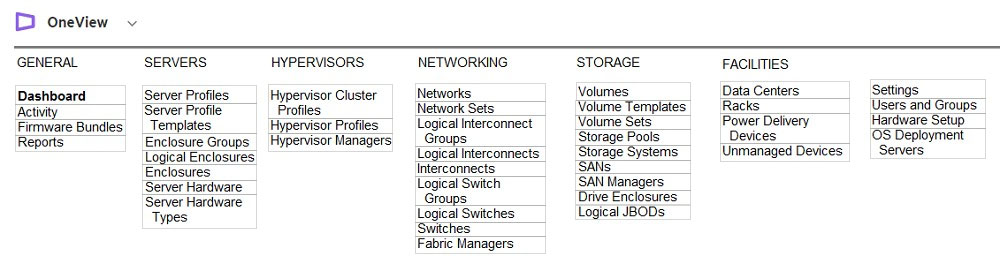
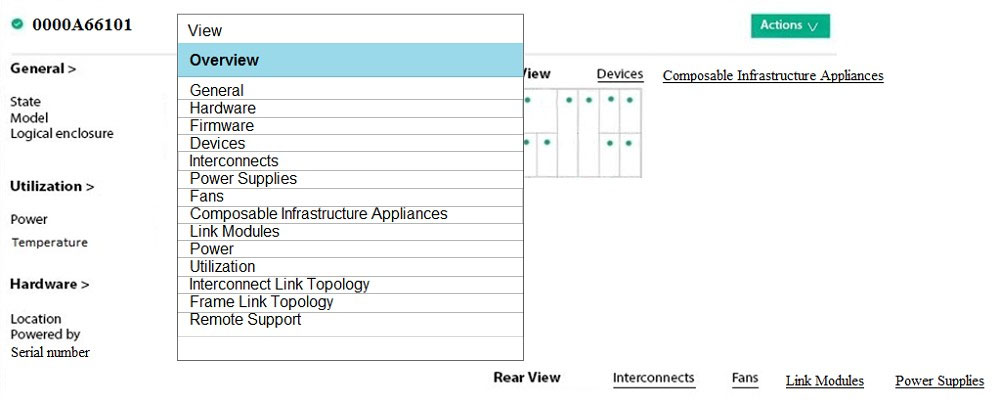
Click the menu option the integrator should use to add more uplinks ports from HPE Virtual Connect SE 32 Gb FC modules to SAN uplink set.
Hot Area:
An integrator prepares deployment documents with the list of all the hardware and software components. The integrator also needs a list of all infrastructure services deployed, with the functionality described.
Which services are provided by the vCenter Server component and should be placed in the report? (Choose two.)
AAuto Deploy
BSingle Sign-On
CUpdate Manager
DLookup Service
ECertificate Authority
A customer needs to evaluate Image Streamer as Proof-of-Concept (PoC) in a test and development tab environment.
At a minimum, what does a Synergy integrator need in order to support this requirement?
Aa three-frame environment with redundant composer and Image Streamer appliances
Ba single frame with single composer and Image Streamer appliances
Ca two-frame environment with single composer and Image Streamer appliances
Da single frame with redundant Image Streamer appliances
Which component of the HPE Synergy solution should you use to set the firmware/driver baseline and the installation method for Synergy Compute nodes?
AComposer
BSmart Update
CImage Streamer
DGlobal Dashboard
Which storage solution can be used for volume provisioning using HPE Composer?
AMSA 2040
BHPE StoreEasy 1560
CHPE 3PAR StoreServ
DHPE XP7 Storage
What is the purpose of the OmniStack Accelerator card installed in HPE SimpliVity platform?
AIt performs inline data efficiency processing and deduplication
BIt provides very fast SSD capacity for demanding workloads
CIt provides graphic acceleration for VDI infrastructure
DIt accelerates CPU processing within a virtual machine
A customer needs to deploy a farm of Windows Server 2019 Hyper-V using an Image Streamer. The customer discovered that the OS Build Plan for this OS is not available from the Image Streamer interface.
How can the customer access all the tools and scripts needed to provision the required operating system?
AThe customer has to update Image Streamer firmware, as with the new firmware all OS Build Plans are updated and new ones are added.
BThe customer must buy an Image Streamer upgrade license to get support for the latest operating systems.
CThe customer needs to download the artifact bundle from the internet that will provide all required components.
DThe customer can use any Windows build plan because they are self-updating.
HOTSPOT -
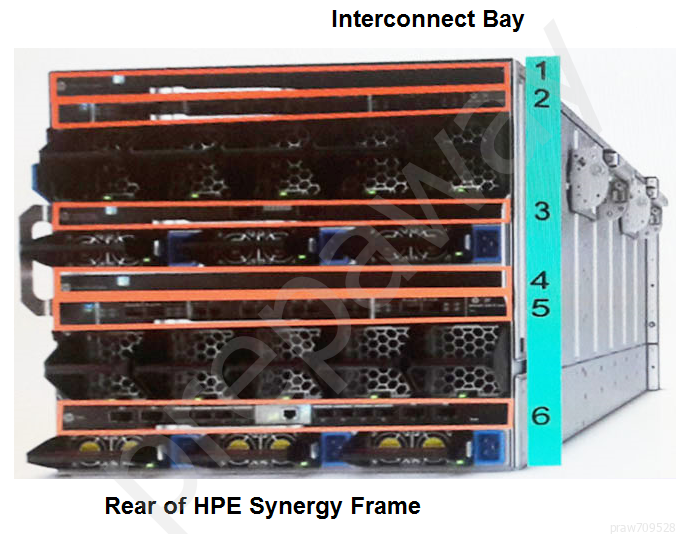
An integrator has installed a new Synergy frame into a rack with two existing Synergy frames in a customer's environment.
Click where the integrator should verify that the cabling for the management ring was completed correctly.
Hot Area:
A customer needs to aggregate uplink ports from two Virtual Connect interconnects to increase bandwidth and availability of the networks configured for HPE
Synergy platform.
Which steps must the integrator perform in the configuration to meet the customer's needs?
AConnect Satellite modules using Ports L1 and L4
BConnect Ports Q7 and Q8 on the Master interconnect Modules (ICM)
CInstall Redundant Frame Link Modules and a second management ring
DEnable Intelligent Resilient Fabric (IRF) on the Virtual Connect Modules
Which operating systems are supported for use with Image Streamer? (Choose two.)
AVMware ESXi 6.7
BCentOS 7.2
CSUSE Linux Enterprise Server 11
DWindows Hyper-V 2019
ERed Hat Enterprise Linux 7.3
An HPE Synergy compute module has a template-based server profile with two identically configured connections, each containing five VLANs.
What is the most efficient method the integrator can use to add a new VLAN to each connection?
AAdd the new VLAN to the network set configured in the profile template, and update the server profile from the template
BAdd the new VLAN under Edit server profile connections
CAdd the new VLAN to the network set configured in the profile template
DAdd the new VLAN under Edit server profile connections in the profile template, and update the server profile from the template
A customer needs to significantly improve I/O performance to a database server.
Which product should an integrator implement as part of a Synergy composable solution?
AHPE Synergy D3940 storage module with SSD drives
BHPE Composer with NVMe drives
CHPE Synergy compute module with a Tesla accelerator
DHPE Synergy Image Streamer
HOTSPOT -
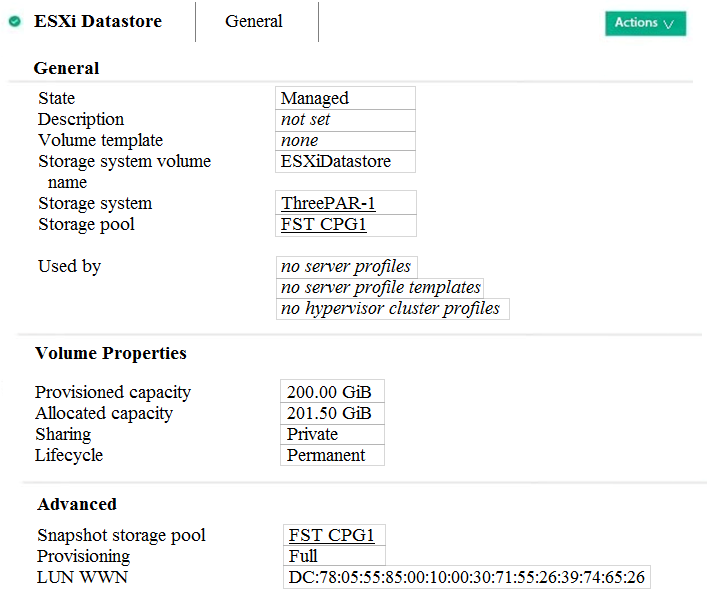
An integrator needs to validate whether the datastore created for ESXi systems based on 3PAR virtual volume can support all DRS cluster functionalities.
Click on the parameter that the integrator needs to verify.
Hot Area:
A customer tries to revert a data volume located on the HPE 3PAR array to a specific snapshot that was taken using HPE Composer, but the process fails.
What must an integrator do to fix this problem?
AInstall the snapshot agent on the operating system to enable online snapshot operations
BSelect the ג€Forceג€ checkbox to ignore the warning, and revert to the snapshot because this is a data volume
CNavigate to the SSMC and revert to the snapshot using HPE 3PAR tools
DDisconnect the volume from the server, then revert to the snapshot and reconnect back to the server
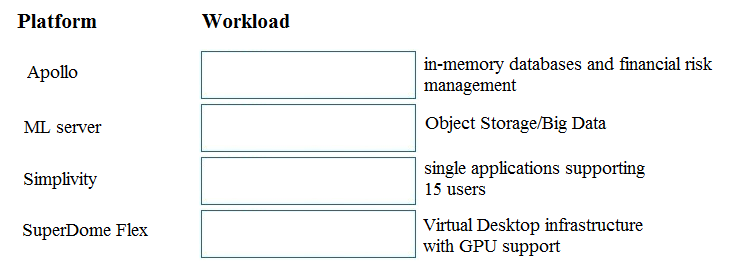
DRAG DROP -
Match each HPE server platform with optimal workload.
Select and Place:
A customer needs to deploy additional management components, such as vCenter Server and HPE Global Dashboard.
According to HPE best practices, how should an integrator deploy these components?
ADeploy VMware HA cluster on two dedicated management servers, then deploy management components to this cluster.
BDeploy vCenter Server as a virtual machine on the Hyper-V host and HPE Global Dashboard to the domain controller.
CInstall vCenter Server on the domain controller, then deploy HPE Global Dashboard to the HPE Composer or HPE OneView appliance.
DDeploy vCenter Server to any Windows machine, and install HPE Global Dashboard on the same server.
During a first-time installation of HPE Synergy, an external monitor is not available to the integrator.
Which approach should the integrator take to perform the first-time setup?
ADownload MSTCS, connect the laptop to the front Panel Ethernet port, and open a RDP Session to 192.168.10.1 on port 443.
BDownload VNC Viewer, connect the laptop to the front Panel Ethernet port, and open a VNC-connection to 192.168.10.1 on port 5900.
CDownload Telnet, connect the laptop to the front Panel Ethernet port, and open a connection to 192.168.10.1 on port 8443.
DDownload PuTTY, connect the laptop to the front Panel Ethernet port, and open an SSH connection to 192.168.10.1 on any port (default is 22).
A customer has a datacenter with 3-frame Master/Satellite Synergy solution. They plan to add two additional frames to the remote datacenter, but they want to have a single management tool.
How should the integrator set up the management of the datacenter?
AAdd two frames from the remote datacenter as remote enclosures using existing Composer
BInstall one Composer in every frame in both local and remote datacenter
CDeploy one Composer in each site and link them together
DConnect the management links with fibre cables if the distance between datacenters is more than 500m
An integrator needs to configure a set of networks for Synergy compute nodes to send data to devices outside of a Synergy frame.
How should the integrator complete the task?
AAdd the network to an interconnect bay within a Logical Enclosure (LE)
BAdd the networks to an uplink set within a Logical Interconnect Group (LIG)
CAdd the networks to an Enclosure Group (EG)
DAdd the network sets to a Logical Interconnect Group (LIG)
A customer needs to expand a single-frame Synergy solution to two frames.
What should the integrator do to establish a proper management network for the two frames?
AConnect the RJ-45 management ports of the Virtual Connect modules together with redundant CAT6A cables.
BDisconnect the existing management ring, and cable the Frame Link Modules in the first frame to the Frame Link Modules in the added frame.
CConnect the RJ-45 front panel connectors on the two frames together with a single CAT6A cable.
DIn the Synergy console, select the Frame Link Modules in the new frame and define the connection between them.