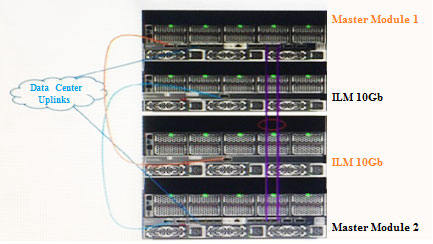
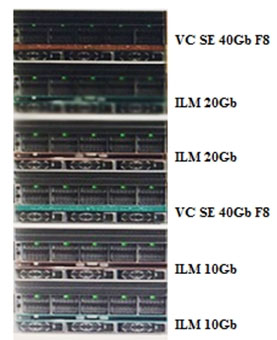
A customer with the configuration shown attempts to configure a server profile for a new application that requires 20Gb of bandwidth, but the configuration fails.
The HPE SY 480 Gen9 compute modules have two Intel Xeon E5 "" 2695 v4 processors. 256GB of RAM and HPE Synergy 3520C Converged Network Adapters installed.
What is the likely cause of the configuration failure?
AHPE Virtual Connect SE 40Gb F8 Module does not support 20Gb.
BIntel Processor does not have enough PCI-e lanes for 20Gb.
CHPE 10Gb Interconnect Link Module does not support 20Gb.
DConverged Network Adapter is unable to support 20Gb.
0
Question 2
Troubleshoot HPE Storage Solutions
0
Question 3
Install, configure, and set up HPE storage solutions
0
Question 4
Manage, Monitor, and Maintain Storage Solutions
0
Question 5
Plan and design HPE storage solutions
0
That's the end of the Preview
This exam has 53 community-verified practice questions. Create a free account to access all questions, comments, and explanations.
Topics covered:
Install, configure, and set up HPE storage solutionsManage, Monitor, and Maintain Storage SolutionsTroubleshoot HPE Storage SolutionsPlan and design HPE storage solutions
Using composable features, what should a Synergy integrator do to resolve high memory utilization on an HPE Synergy compute module?
AUse the API to optimize the memory allocation from the HPE Synergy fluid resource pool.
BIncrease the allocated physical memory from the HPE Synergy fluid resource pool, and then reboot the compute module.
CTake a small outage and reassign the HPE OneView server profile to a higher capacity compute module.
DIncrease the reversed physical memory in the Server Profile (SP), and then reapply.
How can a Synergy integrator increase the efficiency with which a Synergy solution can be provisioned? (Choose two.)
AUse Powershell to automate configuration and application of server profiles.
BUse Image Streamer to provide a stateless OS environment.
CAssociate all Synergy frames with the same data center.
DUse a Multimodule Link Aggregation Group (MLAG) to automate link failover.
EUse Composer as a PXE server to automate OS deployments.
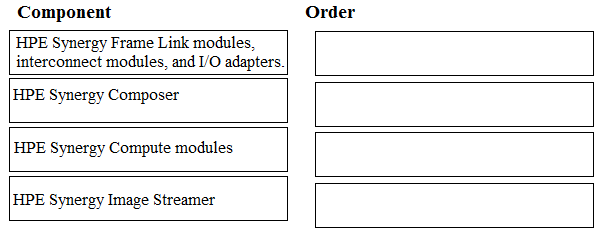
DRAG DROP -
Use the arrow or click and drag the HPE Synergy components on the left to their correct order for a firmware update, based on HPE best practices, on the right.
Select and Place:
A customer needs to attach 20 HPE 1TB 6G SAS SFF hard drives to an HPE Synergy 480 Gen9 compute module. The customer needs a fully redundant storage solution.
Which HPE products meet the customer's needs? (Choose three.)
BHPE D3940 storage module with Single I/O Adapter.
Ctwo HPE Synergy 12Gb SAS Connection Modules
Dtwo HPE Smart Array P542D Controllers
Eone HPE Smart Array P542D Controller
Fone HPE Synergy 12Gb SAS Connection Module
Question 6
Troubleshoot HPE Storage Solutions
0
Question 7
Plan and design HPE storage solutions
Question 8
Troubleshoot HPE Storage Solutions
Question 9
Troubleshoot HPE Storage Solutions
Question 10
Install, configure, and set up HPE storage solutions
Question 11
Plan and design HPE storage solutions
Question 12
Plan and design HPE storage solutions
Question 13
Troubleshoot HPE Storage Solutions
Question 14
Plan and design HPE storage solutions
Question 15
Plan and design HPE storage solutions
Question 16
Manage, Monitor, and Maintain Storage Solutions
Question 17
Plan and design HPE storage solutions
Question 18
Manage, Monitor, and Maintain Storage Solutions
Question 19
Install, configure, and set up HPE storage solutions
Question 20
Install, configure, and set up HPE storage solutions
Question 21
Troubleshoot HPE Storage Solutions
Question 22
Install, configure, and set up HPE storage solutions
Ask AstroTutor
0
Ask AstroTutor
0
Ask AstroTutor
0
Ask AstroTutor
0
Ask AstroTutor
0
Ask AstroTutor
0
Ask AstroTutor
0
Ad
Want a break from the ads?
Become a Supporter and enjoy a completely ad-free experience, plus unlock Learn Mode, Exam Mode, AstroTutor AI, and more.
Ask AstroTutor
0
Ask AstroTutor
0
Ask AstroTutor
0
Ask AstroTutor
0
Ask AstroTutor
0
Ask AstroTutor
0
Ask AstroTutor
0
Ask AstroTutor
0
Ask AstroTutor
0
A customer needs to collect a support dump from its appliance, but when the customer attempts to save the support dump to a USB drive, no valid USB drive displays as available in the HPE Synergy Management Console.
Which action should the Synergy integrator propose to the customer?
AVerify that the USB being used in no larger than 4GB.
BFormat the USB drive on a computer prior to collecting the support dump.
CInsert the USB drive in any of the compute nodes.
DEnable the compute module to format the USB drive prior to collecting the support dump.
A Synergy integrator has planned a highly available Synergy composable fabric with 20Gb Interconnect Link Modules.
What is the maximum number of SY 480 Gen9 compute modules the integrator can install into this configuration?
A12
B24
C36
D48
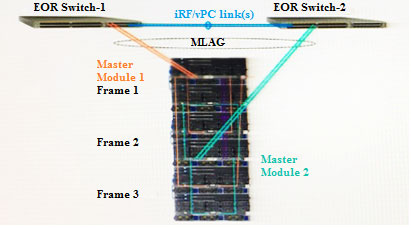
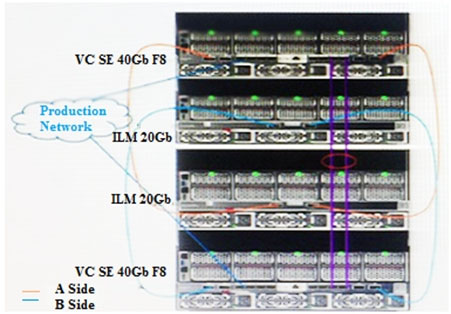
Refer to the exhibit.
Based on the Synergy configuration shown, what will be the outcome in the event of an end-of-row (EoR) switch failure?
ASmartlink will be triggered
BThere will be no NIC failover.
CUplink bandwidth will decrease.
DServer and downlinks will fail.
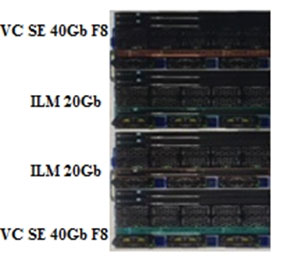
Refer to the exhibits.
A customer has a Synergy 2-frame design, as shown above.
Due to expanding business needs, the customer has ordered a third frame to expand the environment to a 3-frame fabric design, as shown below.
While attempting to extend the Logical Interconnect Group (LIG) for the enclosure group, the Synergy integrator is unable to add the third frame.
What is preventing the integrator from adding the third frame?
AThe Virtual Connect SE 40Gb F8 modules are installed in the incorrect location.
BThe incorrect interconnect Link modules have been installed.
CThe Frame Link Module firmware has not been updated in the new frame.
DThe HPE OneView software on the Composer has not been updates to the latest version.
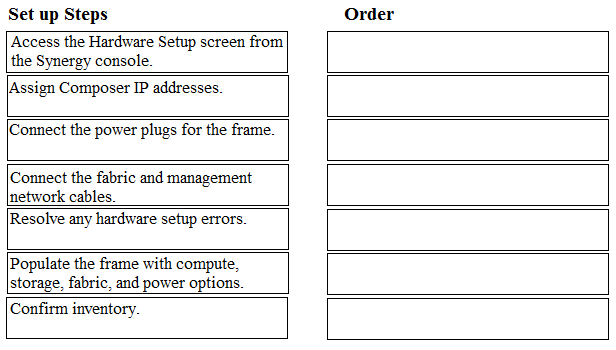
DRAG DROP -
Use the arrow or click and drag the steps on the left to set up a new HPE Synergy 12000 Frame into the correct order on the right.
Select and Place:
Refer to the exhibit.
A customer has an HPE Synergy 2-frame configuration, as shown. The customer has a new project and needs to increase the number of compute modules.
What is the maximum number of compute nodes that the customer's fabric could support?
A24
B36
C48
D60
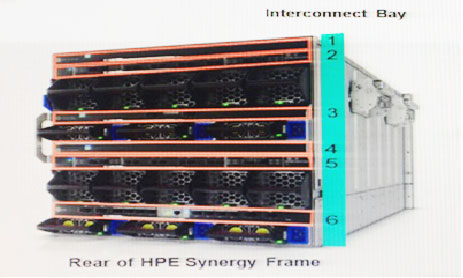
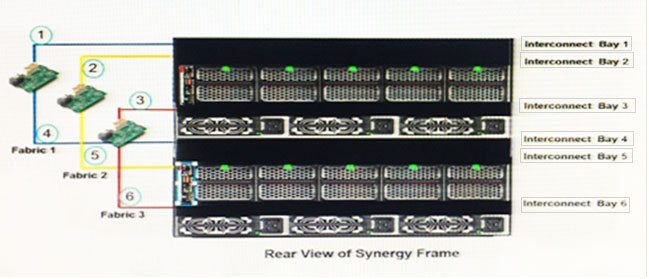
Refer to the exhibit.
How should a Synergy integrator pair interconnect bays to set up redundant fabrics in an HPE Synergy 12000 Frame?
AInterconnect bays 1 and 2; bays 3 and 4; bays 5 and 6.
BInterconnect bays 1 and 4; bays 2 and 5; bays 3 and 6.
CInterconnect bays 1 and 6; bays 2 and 5; bays 3 and 4.
DInterconnect bays 1 and 3; bays 2 and 4; bays 5 and 6.
While troubleshooting a hardware issue, a Synergy integrator needs to provide HPE Support with a new support dump.
What must the integrator be aware of when generating a support dump?
AWhen creating a new support dump, the previous support dump is deleted.
BOnly two support dumps can exist on an appliance at any one time.
CRoot level privileges are required to create a support dump.
DManagement tasks are suspended during support dump creation.
A customer has a single frame with seven compute modules in bays 1-7. The customer also has an HPE Synergy 12Gb SAS Connection Module in slot 1. The customer recently made a change to require high availability for its storage.
What should the Synergy integrator do to meet the customer's requirement for high availability?
AInstall an additional HPE D3940 storage module to support bays 7-12.
BMove the compute module from bay 7 to bay 12.
CAdd another HPE Synergy 12Gb SAS Connection Module to bay 4.
DMove the mezzanine Card to slot 2 on each compute module.
A customer needs a consolidated infrastructure view for HPE Synergy and HPE BladeSystem c7000 enclosures.
Which approach should the Synergy integrator take to meet the customer's needs?
AEnable federation in the HPE OneView appliance and add remote HPE OneView instances.
BAdd remote enclosures to monitor the BladeSystem c7000 enclosures.
CDeploy HPE OneView Global Dashboard.
DExtend the Synergy out-of-band management ring to the c7000 Onboard Administrator ports.
Which utility compares currently running firmware with the upgrade firmware for the HPE Synergy 40Gb F8 Switch Module, which allows minimal downtime during the upgrade?
ASMU
BSUM
CVCSU
DISSU
A customer has the following requirements for an HPE Synergy solution:
✑ Data for the internal application needs to be stored in the frame.
✑ Compute modules need to have access to a large database on an external storage array.
✑ The Synergy infrastructure should be managed with HPE OneView.
How should a Synergy integrator configure the module installation?
Atwo SAS Connection Modules into bays 1 and 2; two Synergy 40Gb F8 switch module into bays 3 and 4; two Brocade 16 Gb/12 Fibre Channel switches into bays 5 and 6
Btwo SAS Connection Modules into bays 1 and 4; two HPE Synergy Virtual Connect SE 40Gb F8 modules into bays 3 and 6
Ctwo SAS Connection Modules into bays 1 and 2; two HPE Synergy Virtual Connect SE 40Gb F8 modules into bays 3 and 4
Dtwo SAS Connection Modules into bays 1 and 4; two Synergy 40Gb F8 switch module into bays 2 and 5; two Brocade 16 Gb/12 Fibre Channel switches into bays 3 and 6
A customer is using HPE Synergy Composer to manage the compute module and 3PAR volume attachments. The datastore attached to VMware servers has run out of space.
What is the most efficient procedure the Synergy integrator should follow to extend the volume with minimum effect on the compute modules?
ASet the volume to maintenance mode and increase the volume in 3PAR SSMC.
BCreate a snapshot and increase the capacity of the snapshot directly in the Synergy Composer.
CIncrease the capacity of the volume in the combined profile form.
DIncrease the capacity of the volume directly in the Synergy Composer.
In a 3-frame HPE Synergy environment, how should a Synergy integrator place the Image Streamer modules to allow for redundancy to all of the management connections?
Aone Image Streamer module in each Synergy frame (3 total)
Bone Image Streamer module in frame 2 and a second Image Streamer Module in frame 3 (2 total)
Ctwo Image Streamer modules in the frame 1 (2 total)
Dtwo Image Streamer modules in frame 2 and two Image Streamer Module in frame 3 (4 total)
HOTSPOT -
A customer needs to incorporate the HPE Synergy D3940 Composable Storage Module into its environment.
Click the adapter associated with the fabric in which the customer should install the P542 controller.
Hot Area:
A customer attempts to use an HPE Synergy Composer to discover an HPE BladeSystem c7000 enclosure.
The customer is unable to migrate the HPE BladeSystem c7000 enclosure into the HPE Synergy Composer.
What is preventing the customer from completing this task?
AThe migration must be initiated from the HPE OneView managing the HPE BladeSystem c7000 enclosure.
BThe HPE BladeSystem c7000 enclosure must be cabled to the Synergy management network.
CThe HPE OneView managing the HPE BladeSystem c700 enclosure must be upgraded to HPE OneView 3.0 before the Synergy Composer can migrate.
DThe Synergy Composer only supports HPE Synergy products.
A customer that uses a third-party storage array plants to set up Fibre Channel (FC) zones with the new HPE Synergy 12000 Frame.
Which tool creates the FC zones in a Synergy solution?