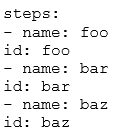
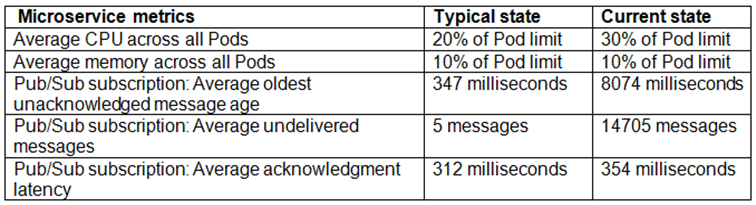
Your company follows Site Reliability Engineering principles. You are writing a postmortem for an incident, triggered by a software change that severely affected users. You want to prevent severe incident from happening in the future. What should you do?
AIdentify engineers responsible for the incident and escalate to the senior management.
BEnsure that test cases that catch errors of this type are run successfully before new software releases.
CFollow up with the employees who reviewed the changes and prescribe practices they should follow in the future.
DDesign a policy that will require on-call teams to immediately call engineers and management to discuss a plan of action if an incident occurs.
Your organization uses a change advisory board (CAB) to approve all changes to an existing service. You want to revise this process to eliminate any negative impact on the software delivery performance. What should you do? (Choose two.)
AReplace the CAB with a senior manager to ensure continuous oversight from development to deployment.
BLet developers merge their own changes, but ensure that the team's deployment platform can roll back changes if any issues are discovered.
CMove to a peer-review based process for individual changes that is enforced at code check-in time and supported by automated tests.
DBatch changes into larger but less frequent software releases.
EEnsure that the team's development platform enables developers to get fast feedback on the impact of their changes.
Your organization has a containerized web application that runs on-premises. As part of the migration plan to Google Cloud, you need to select a deployment strategy and platform that meets the following acceptance criteria:
The platform must be able to direct traffic from Android devices to an Android-specific microservice.
The platform must allow for arbitrary percentage-based traffic splitting
The deployment strategy must allow for continuous testing of multiple versions of any microservice.
What should you do?
ADeploy the canary release of the application to Cloud Run. Use traffic splitting to direct 10% of user traffic to the canary release based on the revision tag.
BDeploy the canary release of the application to App Engine. Use traffic splitting to direct a subset of user traffic to the new version based on the IP address.
CDeploy the canary release of the application to Compute Engine. Use Anthos Service Mesh with Compute Engine to direct 10% of user traffic to the canary release by configuring the virtual service.
DDeploy the canary release to Google Kubernetes Engine with Anthos Service Mesh. Use traffic splitting to direct 10% of user traffic to the new version based on the user-agent header configured in the virtual service.
Your team is running microservices in Google Kubernetes Engine (GKE). You want to detect consumption of an error budget to protect customers and define release policies. What should you do?
ACreate SLIs from metrics. Enable Alert Policies if the services do not pass.
BUse the metrics from Anthos Service Mesh to measure the health of the microservices.
CCreate a SLO. Create an Alert Policy on select_slo_burn_rate.
DCreate a SLO and configure uptime checks for your services. Enable Alert Policies if the services do not pass.
Your organization wants to collect system logs that will be used to generate dashboards in Cloud Operations for their Google Cloud project. You need to configure all current and future Compute Engine instances to collect the system logs, and you must ensure that the Ops Agent remains up to date. What should you do?
AUse the gcloud CLI to install the Ops Agent on each VM listed in the Cloud Asset Inventory,
BSelect all VMs with an Agent status of Not detected on the Cloud Operations VMs dashboard. Then select Install agents.
CUse the gcloud CLI to create an Agent Policy.
DInstall the Ops Agent on the Compute Engine image by using a startup script
You are configuring the frontend tier of an application deployed in Google Cloud. The frontend tier is hosted in nginx and deployed using a managed instance group with an Envoy-based external HTTP(S) load balancer in front. The application is deployed entirely within the europe-west2 region, and only serves users based in the United Kingdom. You need to choose the most cost-effective network tier and load balancing configuration. What should you use?
APremium Tier with a global load balancer
BPremium Tier with a regional load balancer
CStandard Tier with a global load balancer
DStandard Tier with a regional load balancer
You recently deployed your application in Google Kubernetes Engine (GKE) and now need to release a new version of the application. You need the ability to instantly roll back to the previous version of the application in case there are issues with the new version. Which deployment model should you use?
APerform a rolling deployment, and test your new application after the deployment is complete.
BPerform A/B testing, and test your application periodically after the deployment is complete.
CPerform a canary deployment, and test your new application periodically after the new version is deployed.
DPerform a blue/green deployment, and test your new application after the deployment is complete.
You are building and deploying a microservice on Cloud Run for your organization. Your service is used by many applications internally. You are deploying a new release, and you need to test the new version extensively in the staging and production environments. You must minimize user and developer impact. What should you do?
ADeploy the new version of the service to the staging environment. Split the traffic, and allow 1% of traffic through to the latest version. Test the latest version. If the test passes, gradually roll out the latest version to the staging and production environments.
BDeploy the new version of the service to the staging environment. Split the traffic, and allow 50% of traffic through to the latest version. Test the latest version. If the test passes, send all traffic to the latest version. Repeat for the production environment.
CDeploy the new version of the service to the staging environment with a new-release tag without serving traffic. Test the new-release version. If the test passes, gradually roll out this tagged version. Repeat for the production environment.
DDeploy a new environment with the green tag to use as the staging environment. Deploy the new version of the service to the green environment and test the new version. If the tests pass, send all traffic to the green environment and delete the existing staging environment. Repeat for the production environment.
Your team deploys applications to three Google Kubernetes Engine (GKE) environments: development, staging, and production. You use GitHub repositories as your source of truth. You need to ensure that the three environments are consistent. You want to follow Google-recommended practices to enforce and install network policies and a logging DaemonSet on all the GKE clusters in those environments. What should you do?
AUse Google Cloud Deploy to deploy the network policies and the DaemonSet. Use Cloud Monitoring to trigger an alert if the network policies and DaemonSet drift from your source in the repository.
BUse Google Cloud Deploy to deploy the DaemonSet and use Policy Controller to configure the network policies. Use Cloud Monitoring to detect drifts from the source in the repository and Cloud Functions to correct the drifts.
CUse Cloud Build to render and deploy the network policies and the DaemonSet. Set up Config Sync to sync the configurations for the three environments.
DUse Cloud Build to render and deploy the network policies and the DaemonSet. Set up a Policy Controller to enforce the configurations for the three environments.
You are creating Cloud Logging sinks to export log entries from Cloud Logging to BigQuery for future analysis. Your organization has a Google Cloud folder named Dev that contains development projects and a folder named Prod that contains production projects. Log entries for development projects must be exported to dev_dataset, and log entries for production projects must be exported to prod_dataset. You need to minimize the number of log sinks created, and you want to ensure that the log sinks apply to future projects. What should you do?
ACreate a single aggregated log sink at the organization level.
BCreate a log sink in each project.
CCreate two aggregated log sinks at the organization level, and filter by project ID.
DCreate an aggregated log sink in the Dev and Prod folders.
You need to build a CI/CD pipeline for a containerized application in Google Cloud. Your development team uses a central Git repository for trunk-based development. You want to run all your tests in the pipeline for any new versions of the application to improve the quality. What should you do?
A
Install a Git hook to require developers to run unit tests before pushing the code to a central repository.2. Trigger Cloud Build to build the application container. Deploy the application container to a testing environment, and run integration tests.3. If the integration tests are successful, deploy the application container to your production environment, and run acceptance tests.
B
Install a Git hook to require developers to run unit tests before pushing the code to a central repository. If all tests are successful, build a container.2. Trigger Cloud Build to deploy the application container to a testing environment, and run integration tests and acceptance tests.3. If all tests are successful, tag the code as production ready. Trigger Cloud Build to build and deploy the application container to the production environment.
C
Trigger Cloud Build to build the application container, and run unit tests with the container.2. If unit tests are successful, deploy the application container to a testing environment, and run integration tests.3. If the integration tests are successful, the pipeline deploys the application container to the production environment. After that, run acceptance tests.
D
Trigger Cloud Build to run unit tests when the code is pushed. If all unit tests are successful, build and push the application container to a central registry.2. Trigger Cloud Build to deploy the container to a testing environment, and run integration tests and acceptance tests.3. If all tests are successful, the pipeline deploys the application to the production environment and runs smoke tests
You are managing an application that runs in Compute Engine. The application uses a custom HTTP server to expose an API that is accessed by other applications through an internal TCP/UDP load balancer. A firewall rule allows access to the API port from 0.0.0.0/0. You need to configure Cloud Logging to log each IP address that accesses the API by using the fewest number of steps. What should you do first?
AEnable Packet Mirroring on the VPC.
BInstall the Ops Agent on the Compute Engine instances.
CEnable logging on the firewall rule.
DEnable VPC Flow Logs on the subnet.
Your company runs an ecommerce website built with JVM-based applications and microservice architecture in Google Kubernetes Engine (GKE). The application load increases during the day and decreases during the night. Your operations team has configured the application to run enough Pods to handle the evening peak load. You want to automate scaling by only running enough Pods and nodes for the load. What should you do?
AConfigure the Vertical Pod Autoscaler, but keep the node pool size static.
BConfigure the Vertical Pod Autoscaler, and enable the cluster autoscaler.
CConfigure the Horizontal Pod Autoscaler, but keep the node pool size static.
DConfigure the Horizontal Pod Autoscaler, and enable the cluster autoscaler.
Your organization wants to increase the availability target of an application from 99.9% to 99.99% for an investment of $2,000. The application's current revenue is $1,000,000. You need to determine whether the increase in availability is worth the investment for a single year of usage. What should you do?
ACalculate the value of improved availability to be $900, and determine that the increase in availability is not worth the investment.
BCalculate the value of improved availability to be $1,000, and determine that the increase in availability is not worth the investment.
CCalculate the value of improved availability to be $1,000, and determine that the increase in availability is worth the investment.
DCalculate the value of improved availability to be $9,000, and determine that the increase in availability is worth the investment.
A third-party application needs to have a service account key to work properly. When you try to export the key from your cloud project, you receive an error: “The organization policy constraint iam.disableServiceAccounKeyCreation is enforced.” You need to make the third-party application work while following Google-recommended security practices.
What should you do?
AEnable the default service account key, and download the key.
BRemove the iam.disableServiceAccountKeyCreation policy at the organization level, and create a key.
CDisable the service account key creation policy at the project's folder, and download the default key.
DAdd a rule to set the iam.disableServiceAccountKeyCreation policy to off in your project, and create a key.
Your team is writing a postmortem after an incident on your external facing application. Your team wants to improve the postmortem policy to include triggers that indicate whether an incident requires a postmortem. Based on Site Reliability Engineering (SRE) practices, what triggers should be defined in the postmortem policy? (Choose two.)
AAn external stakeholder asks for a postmortem
BData is lost due to an incident.
CAn internal stakeholder requests a postmortem.
DThe monitoring system detects that one of the instances for your application has failed.
EThe CD pipeline detects an issue and rolls back a problematic release.
You are creating a CI/CD pipeline in Cloud Build to build an application container image. The application code is stored in GitHub. Your company requires that production image builds are only run against the main branch and that the change control team approves all pushes to the main branch. You want the image build to be as automated as possible. What should you do? (Choose two.)
ACreate a trigger on the Cloud Build job. Set the repository event setting to ‘Pull request’.
BAdd the OWNERS file to the Included files filter on the trigger.
CCreate a trigger on the Cloud Build job. Set the repository event setting to ‘Push to a branch’
DConfigure a branch protection rule for the main branch on the repository.
EEnable the Approval option on the trigger.
You are building the CI/CD pipeline for an application deployed to Google Kubernetes Engine (GKE). The application is deployed by using a Kubernetes Deployment, Service, and Ingress. The application team asked you to deploy the application by using the blue/green deployment methodology. You need to implement the rollback actions. What should you do?
ARun the kubectl rollout undo command.
BDelete the new container image, and delete the running Pods.
CUpdate the Kubernetes Service to point to the previous Kubernetes Deployment.
DScale the new Kubernetes Deployment to zero.
You have an application that runs in Google Kubernetes Engine (GKE). The application consists of several microservices that are deployed to GKE by using Deployments and Services. One of the microservices is experiencing an issue where a Pod returns 403 errors after the Pod has been running for more than five hours. Your development team is working on a solution, but the issue will not be resolved for a month. You need to ensure continued operations until the microservice is fixed. You want to follow Google-recommended practices and use the fewest number of steps. What should you do?
ACreate a cron job to terminate any Pods that have been running for more than five hours.
BAdd a HTTP liveness probe to the microservice's deployment.
CMonitor the Pods, and terminate any Pods that have been running for more than five hours.
DConfigure an alert to notify you whenever a Pod returns 403 errors.
You are running a web application deployed to a Compute Engine managed instance group. Ops Agent is installed on all instances. You recently noticed suspicious activity from a specific IP address. You need to configure Cloud Monitoring to view the number of requests from that specific IP address with minimal operational overhead. What should you do?
AConfigure the Ops Agent with a logging receiver. Create a logs-based metric.B Create a script to scrape the web server log. Export the IP address request metrics to the Cloud Monitoring API.
CUpdate the application to export the IP address request metrics to the Cloud Monitoring API.
DConfigure the Ops Agent with a metrics receiver.
You want to share a Cloud Monitoring custom dashboard with a partner team. What should you do?
AProvide the partner team with the dashboard URL to enable the partner team to create a copy of the dashboard.
BExport the metrics to BigQuery. Use Looker Studio to create a dashboard, and share the dashboard with the partner team.
CCopy the Monitoring Query Language (MQL) query from the dashboard, and send the ML query to the partner team.
DDownload the JSON definition of the dashboard, and send the JSON file to the partner team.
You use Terraform to manage an application deployed to a Google Cloud environment. The application runs on instances deployed by a managed instance group. The Terraform code is deployed by using a CI/CD pipeline. When you change the machine type on the instance template used by the managed instance group, the pipeline fails at the terraform apply stage with the following error message:
You need to update the instance template and minimize disruption to the application and the number of pipeline runs.
What should you do?
ADelete the managed instance group, and recreate it after updating the instance template.
BAdd a new instance template, update the managed instance group to use the new instance template, and delete the old instance template.
CRemove the managed instance group from the Terraform state file, update the instance template, and reimport the managed instance group.
DSet the create_before_destroy meta-argument to true in the lifecycle block on the instance template.
Your company’s security team needs to have read-only access to Data Access audit logs in the _Required bucket. You want to provide your security team with the necessary permissions following the principle of least privilege and Google-recommended practices. What should you do?
AAssign the roles/logging.viewer role to each member of the security team.
BAssign the roles/logging.viewer role to a group with all the security team members.
CAssign the roles/logging.privateLogViewer role to each member of the security team.
DAssign the roles/logging.privateLogViewer role to a group with all the security team members.
You are currently planning how to display Cloud Monitoring metrics for your organization’s Google Cloud projects. Your organization has three folders and six projects:
You want to configure Cloud Monitoring dashboards to only display metrics from the projects within one folder. You need to ensure that the dashboards do not display metrics from projects in the other folders. You want to follow Google-recommended practices. What should you do?
ACreate a single new scoping project.
BCreate new scoping projects for each folder.
CUse the current app-one-prod project as the scoping project.
DUse the current app-one-dev, app-one-staging, and app-one-prod projects as the scoping project for each folder.
Your company runs services by using multiple globally distributed Google Kubernetes Engine (GKE) clusters. Your operations team has set up workload monitoring that uses Prometheus-based tooling for metrics, alerts, and generating dashboards. This setup does not provide a method to view metrics globally across all clusters. You need to implement a scalable solution to support global Prometheus querying and minimize management overhead. What should you do?
AConfigure Prometheus cross-service federation for centralized data access.
BConfigure workload metrics within Cloud Operations for GKE.
CConfigure Prometheus hierarchical federation for centralized data access.
DConfigure Google Cloud Managed Service for Prometheus.