An administrator identifies that the next major Chrome release, Chrome 130, has an issue with one of their critical business applications. The company’s Chrome browsers are currently on version 129.0.6568.91. The administrator needs to prevent browsers from updating to Chrome 130, while allowing continued updates within the Chrome 129 major version.
Which target version prefix should the administrator use in the updates setting to achieve this?
A129(.+)
B
C129.0.
D129...*
0
Question 2
Manage user and device settings
0
Question 3
Manage user and device settings
0
Question 4
Manage user and device settings
0
Question 5
Manage Chrome browser updates
0
That's the end of the Preview
This exam has 50 community-verified practice questions. Create a free account to access all questions, comments, and explanations.
Topics covered:
Manage Chrome browser settings and policiesManage Chrome browser updatesManage extensions and appsManage user and device settingsMonitor and troubleshoot Chrome browserManage Chrome browser security
An organization using Chrome browser on Windows has policies from group policy and Chrome Enterprise Core. In what order are the policies applied?
ABy the precedence hierarchy
BFrom least restrictive to most restrictive
CCloud policy takes precedence
DGroup policy takes precedence
An administrator decides to shorten the default time that a browser may be inactive before automatic deletion from the Google Admin console.
What policy must be selected for the Device Token Management policy to allow devices to re-enroll in the Google Admin console?
ARevoke Token
BInvalidate Token
CRenew Token
DDelete Token
An administrator is using Organizational Units (OU) to apply different Chrome browser settings to different types of devices. The administrator needs to ensure that the browsers are placed in the correct OU.
Which token must the administrator generate and apply?
ADevice Management Token
BEnrollment Token
CBrowser Policy Token
DCloud Management Token
What is the schedule for Chrome stable channel major releases?
AThe second Tuesday of every month
BOnce a quarter (every three months)
CWhenever new features are added
DEvery 28 days (every four weeks)
Question 6
Manage extensions and apps
0
Question 7
Manage extensions and apps
Question 8
Manage extensions and apps
Question 9
Manage extensions and apps
Question 10
Manage Chrome browser updates
Question 11
Manage user and device settings
Question 12
Manage extensions and apps
Question 13
Manage Chrome browser updates
Question 14
Manage Chrome browser settings and policies
Question 15
Manage Chrome browser updates
Question 16
Manage Chrome browser settings and policies
Question 17
Manage Chrome browser updates
Question 18
Manage user and device settings
Question 19
Manage Chrome browser updates
Question 20
Manage Chrome browser updates
Ask AstroTutor
0
Ask AstroTutor
0
Ask AstroTutor
0
Ask AstroTutor
0
Ask AstroTutor
0
Ask AstroTutor
0
Ask AstroTutor
0
Ad
Want a break from the ads?
Become a Supporter and enjoy a completely ad-free experience, plus unlock Learn Mode, Exam Mode, AstroTutor AI, and more.
Ask AstroTutor
0
Ask AstroTutor
0
Ask AstroTutor
0
Ask AstroTutor
0
Ask AstroTutor
0
Ask AstroTutor
0
Ask AstroTutor
0
Which operating system must be used to self-host a Chrome extension?
AWindows 11
BLinux
CmacOS
DChromeOS
A company is reviewing the permissions of extensions that are popular among employees. The security team wants to make sure all extensions in the environment have these capabilities disabled:
Modify to internal home page internal acme.com
Access to the storage -
Access to history -
Which actions should be taken in the company default extension Permissions and URLs fields to meet the security team’s requirements?
AAdd *.acme.com to runtime blocked hosts; Disable storage permission; Disable history permission
BAdd *.acme.com to runtime blocked hosts; Enable storage permission; Enable history permission
CAdd internal.acme.com to runtime blocked hosts; Disable storage permission; Disable history permission
DAdd internal.acme.com to runtime blocked hosts; Enable storage permission; Enable history permission
An external entity is conducting a penetration test on an organization’s Chrome Browser environment. They report that a significant number of Manifest V2 (MV2) extensions are installed, none of which are critical to business operations. IT leadership has requested either block or upgrade.
How should an administrator proceed?
ACollect the extension IDs and configure an installation policy of block.
BConfigure the Manifest V2 availability policy.
CConfigure the installation mode to reflect removed for each extension ID.
DAuto-upgrade the extensions from MV2 to MV3.
Company A uses an extension that is critical to business operations. The company currently pins the version of the extension. They received an updated version of the extension that delivers new functionality. The Chrome administrator notices that the new version now requests all available permissions, while the previous version only requested four permissions.
Which action should the Chrome administrator recommend to address this security issue?
AUse the extension’s blocked hosts list to block access to risky websites.
BBlock the extension until a new version is available that requires fewer permissions.
CCustomize permissions for the extension to match the permissions of the previous version.
DContinue using version pining until the company contacts the developer for more information on the code change.
To reduce risk, an organization is required to maintain a minimum Chrome browser version. The organization allows updates but finds that not all browsers are within one major version of the stable release.
Which policy option would help an admin enforce Chrome browser updates to the latest major stable version via automatic updates?
AAuto-update check period
BRollback to target version
CComponent updates
DRelaunch notification
A small business wants to have all of their MacOS devices enroll in Chrome Enterprise Core. They do not have a Mobile Device Management solution but do maintain a base image for their Mac computers.
Where should they put the enrollment token?
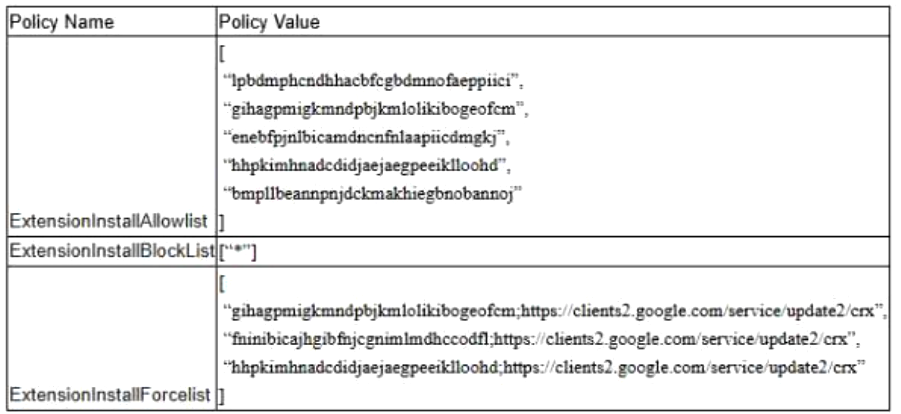
The browser administrators at a company have configured the following extension policies:
An employee at the company wants to install an extension from the Chrome Web Store called Grammar Friend with the extension ID “fninibicajhgibfnjcgnimlmdhccodfl”.
What will happen when the user goes to the Grammar Friend page in the Chrome Web Store?
AThe Add to Chrome button will be available to click and the user can install the extension.
BA blue banner that says “This item’s installation is required by your organization” will appear and the Remove from Chrome button will be grayed out.
CThe Remove from Chrome button will be available because the extension is already installed.
DA red banner that says “Your administrator has blocked this item (ID: fninibicajhgibfnjcgnimlmdhccodfl)” will appear and the Add to Chrome button will be grayed out.
The security team requires Chrome to be updated on computers that only have intranet access with no available internet connectivity. These computers cannot be restarted, and Chrome is not updating.
How can Chrome be updated?
ARun auto-update.
BUse a target version.
CUse force relaunch after period.
DRun the Chrome installer.
An administrator is modifying a policy at the top-level organizational unit (OU), and there is an OU below that should not accept this modification.
What can the administrator do to be certain of this?
ASet the policy to locally applied at the child OU
BSet the policy to locally applied at the parent OU
CTurn off inheritance for all policies
DSet policy precedence to Child > Parent
A company has multiple departments including Engineering, Marketing, Sales, and HR. Each department has different needs and schedules for Chrome updates. For instance, the Engineering team requires the latest updates as soon as they are available to ensure they have the latest features and security patches. However, the HR department prefers a more stable environment and only wants updates after they have been thoroughly tested.
Which feature in the Google Admin console can an administrator use to meet the company’s requirements?
ACreate different user groups for each department
BCreate organizational units for each department
CSet device policies for each department
DCreate active directory forest for each department
A Chrome administrator is using both Cloud policies and Local policies to apply settings to Chrome browsers. The administrator wants to ensure that on Windows computers, the Cloud policies will have precedence if Cloud and Local policies conflict.
What Registry value can be created under HKEY_LOCAL_MACHINE\SOFTWARE\Policies\Google\Chrome to achieve this?
Which percentage of Chrome is recommended during Beta before general availability?
A10%
B2%
C1%
D5%
An organization is deploying 50 new devices which will be managed by a Mobile Device Management solution.
Which method should be used to enroll the Chrome browser on those devices into Chrome Enterprise Core?
AUse Google Admin to generate an enrollment token and distribute it using mobile device management software.
BUse Google Admin console bulk enrollment feature to generate a set of unique tokens, and then distribute them via secure file sharing platform.
CGenerate a single device enrollment token and email it to all users, instructing them to enroll their devices individually.
DUse Google Admin to generate 50 individual device registration keys and distribute them using mobile device management software.
An IT administrator manages a large organization that uses Chrome browser across multiple platforms, including Windows, macOS, and Linux. The organization has diverse user needs and varying levels of risk associated with different departments, for which the administrator must determine the most efficient method to manage Chrome updates across the organization.
Why is it advantageous to manage Chrome update policies using the Google Admin console instead of the Group Policy Management Console (GPMC)?
AThe Google Admin console does not allow administrators to view the browser version of any given managed device as Group Policy does.
BGroup Policy does not support Chrome update policies.
CThe Google Admin console is only applicable to devices with ChromeOS, making it more secure.
DGroup Policy does not support platforms other than Windows.
An organization has a compatibility issue with an internal website after the latest Chrome update. The decision is made to revert any updates to the working version and stop Chrome from updating beyond the working version. For security, Chrome needs to continue updating older versions to the latest compatible version.
Which configuration would an administrator set?