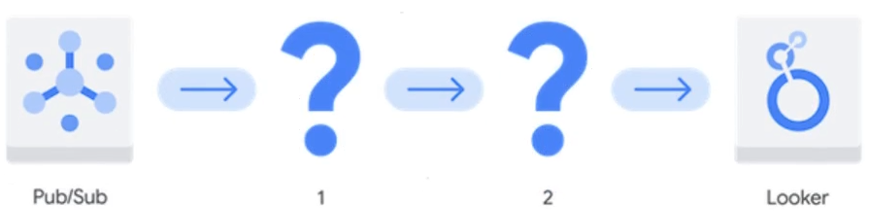
Your company is building a near real-time streaming pipeline to process JSON telemetry data from small appliances. You need to process messages arriving at a Pub/Sub topic, capitalize letters in the serial number field, and write results to BigQuery. You want to use a managed service and write a minimal amount of code for underlying transformations. What should you do?
AUse a Pub/Sub to BigQuery subscription, write results directly to BigQuery, and schedule a transformation query to run every five minutes.
BUse a Pub/Sub to Cloud Storage subscription, write a Cloud Run service that is triggered when objects arrive in the bucket, performs the transformations, and writes the results to BigQuery.
CUse the “Pub/Sub to BigQuery” Dataflow template with a UDF, and write the results to BigQuery.
DUse a Pub/Sub push subscription, write a Cloud Run service that accepts the messages, performs the transformations, and writes the results to BigQuery.
You want to process and load a daily sales CSV file stored in Cloud Storage into BigQuery for downstream reporting. You need to quickly build a scalable data pipeline that transforms the data while providing insights into data quality issues. What should you do?
ACreate a batch pipeline in Cloud Data Fusion by using a Cloud Storage source and a BigQuery sink.
BLoad the CSV file as a table in BigQuery, and use scheduled queries to run SQL transformation scripts.
CLoad the CSV file as a table in BigQuery. Create a batch pipeline in Cloud Data Fusion by using a BigQuery source and sink.
DCreate a batch pipeline in Dataflow by using the Cloud Storage CSV file to BigQuery batch template.
Your retail company wants to predict customer churn using historical purchase data stored in BigQuery. The dataset includes customer demographics, purchase history, and a label indicating whether the customer churned or not. You want to build a machine learning model to identify customers at risk of churning. You need to create and train a logistic regression model for predicting customer churn, using the customer_data table with the churned column as the target label. Which BigQuery ML query should you use?
A
B
C
D
Your company has several retail locations. Your company tracks the total number of sales made at each location each day. You want to use SQL to calculate the weekly moving average of sales by location to identify trends for each store. Which query should you use?
A
B
C
D
Your organization has a BigQuery dataset that contains sensitive employee information such as salaries and performance reviews. The payroll specialist in the HR department needs to have continuous access to aggregated performance data, but they do not need continuous access to other sensitive data. You need to grant the payroll specialist access to the performance data without granting them access to the entire dataset using the simplest and most secure approach. What should you do?
AUse authorized views to share query results with the payroll specialist.
BCreate row-level and column-level permissions and policies on the table that contains performance data in the dataset. Provide the payroll specialist with the appropriate permission set.
CCreate a table with the aggregated performance data. Use table-level permissions to grant access to the payroll specialist.
DCreate a SQL query with the aggregated performance data. Export the results to an Avro file in a Cloud Storage bucket. Share the bucket with the payroll specialist.
Your organization stores highly personal data in BigQuery and needs to comply with strict data privacy regulations. You need to ensure that sensitive data values are rendered unreadable whenever an employee leaves the organization. What should you do?
AUse AEAD functions and delete keys when employees leave the organization.
BUse dynamic data masking and revoke viewer permissions when employees leave the organization.
CUse customer-managed encryption keys (CMEK) and delete keys when employees leave the organization.
DUse column-level access controls with policy tags and revoke viewer permissions when employees leave the organization.
You have millions of customer feedback records stored in BigQuery. You want to summarize the data by using the large language model (LLM) Gemini. You need to plan and execute this analysis using the most efficient approach. What should you do?
AQuery the BigQuery table from within a Python notebook, use the Gemini API to summarize the data within the notebook, and store the summaries in BigQuery.
BUse a BigQuery ML model to pre-process the text data, export the results to Cloud Storage, and use the Gemini API to summarize the pre- processed data.
CCreate a BigQuery Cloud resource connection to a remote model in Vertex Al, and use Gemini to summarize the data.
DExport the raw BigQuery data to a CSV file, upload it to Cloud Storage, and use the Gemini API to summarize the data.
You are a Looker analyst. You need to add a new field to your Looker report that generates SQL that will run against your company's database. You do not have the Develop permission. What should you do?
ACreate a new field in the LookML layer, refresh your report, and select your new field from the field picker.
BCreate a calculated field using the Add a field option in Looker Studio, and add it to your report.
CCreate a table calculation from the field picker in Looker, and add it to your report.
DCreate a custom field from the field picker in Looker, and add it to your report.
Your company has developed a website that allows users to upload and share video files. These files are most frequently accessed and shared when they are initially uploaded. Over time, the files are accessed and shared less frequently, although some old video files may remain very popular.
You need to design a storage system that is simple and cost-effective. What should you do?
ACreate a single-region bucket with Autoclass enabled.
BCreate a single-region bucket. Configure a Cloud Scheduler job that runs every 24 hours and changes the storage class based on upload date.
CCreate a single-region bucket with custom Object Lifecycle Management policies based on upload date.
DCreate a single-region bucket with Archive as the default storage class.
You have a Dataflow pipeline that processes website traffic logs stored in Cloud Storage and writes the processed data to BigQuery. You noticed that the pipeline is failing intermittently. You need to troubleshoot the issue. What should you do?
AUse Cloud Logging to identify error groups in the pipeline's logs. Use Cloud Monitoring to create a dashboard that tracks the number of errors in each group.
BUse Cloud Logging to create a chart displaying the pipeline’s error logs. Use Metrics Explorer to validate the findings from the chart.
CUse Cloud Logging to view error messages in the pipeline's logs. Use Cloud Monitoring to analyze the pipeline's metrics, such as CPU utilization and memory usage.
DUse the Dataflow job monitoring interface to check the pipeline's status every hour. Use Cloud Profiler to analyze the pipeline’s metrics, such as CPU utilization and memory usage.
You are working with a large dataset of customer reviews stored in Cloud Storage. The dataset contains several inconsistencies, such as missing values, incorrect data types, and duplicate entries. You need to clean the data to ensure that it is accurate and consistent before using it for analysis. What should you do?
AUse the PythonOperator in Cloud Composer to clean the data and load it into BigQuery. Use SQL for analysis.
BUse BigQuery to batch load the data into BigQuery. Use SQL for cleaning and analysis.
CUse Storage Transfer Service to move the data to a different Cloud Storage bucket. Use event triggers to invoke Cloud Run functions to load the data into BigQuery. Use SQL for analysis.
DUse Cloud Run functions to clean the data and load it into BigQuery. Use SQL for analysis.
Your company’s ecommerce website collects product reviews from customers. The reviews are loaded as CSV files daily to a Cloud Storage bucket. The reviews are in multiple languages and need to be translated to Spanish. You need to configure a pipeline that is serverless, efficient, and requires minimal maintenance. What should you do?
ALoad the data into BigQuery using Dataproc. Use Apache Spark to translate the reviews by invoking the Cloud Translation API. Set BigQuery as the sink.
BUse a Dataflow templates pipeline to translate the reviews using the Cloud Translation API. Set BigQuery as the sink.
CLoad the data into BigQuery using a Cloud Run function. Use the BigQuery ML create model statement to train a translation model. Use the model to translate the product reviews within BigQuery.
DLoad the data into BigQuery using a Cloud Run function. Create a BigQuery remote function that invokes the Cloud Translation API. Use a scheduled query to translate new reviews.
You have a Dataproc cluster that performs batch processing on data stored in Cloud Storage. You need to schedule a daily Spark job to generate a report that will be emailed to stakeholders. You need a fully-managed solution that is easy to implement and minimizes complexity. What should you do?
AUse Cloud Composer to orchestrate the Spark job and email the report.
BUse Dataproc workflow templates to define and schedule the Spark job, and to email the report.
CUse Cloud Run functions to trigger the Spark job and email the report.
DUse Cloud Scheduler to trigger the Spark job, and use Cloud Run functions to email the report.
You manage a Cloud Storage bucket that stores temporary files created during data processing. These temporary files are only needed for seven days, after which they are no longer needed. To reduce storage costs and keep your bucket organized, you want to automatically delete these files once they are older than seven days. What should you do?
ASet up a Cloud Scheduler job that invokes a weekly Cloud Run function to delete files older than seven days.
BConfigure a Cloud Storage lifecycle rule that automatically deletes objects older than seven days.
CDevelop a batch process using Dataflow that runs weekly and deletes files based on their age.
DCreate a Cloud Run function that runs daily and deletes files older than seven days.
You recently inherited a task for managing Dataflow streaming pipelines in your organization and noticed that proper access had not been provisioned to you. You need to request a Google-provided IAM role so you can restart the pipelines. You need to follow the principle of least privilege. What should you do?
ARequest the Dataflow Developer role.
BRequest the Dataflow Viewer role.
CRequest the Dataflow Worker role.
DRequest the Dataflow Admin role.
You work for a healthcare company that has a large on-premises data system containing patient records with personally identifiable information (PII) such as names, addresses, and medical diagnoses. You need a standardized managed solution that de-identifies PII across all your data feeds prior to ingestion to Google Cloud. What should you do?
AUse Cloud Run functions to create a serverless data cleaning pipeline. Store the cleaned data in BigQuery.
BUse Cloud Data Fusion to transform the data. Store the cleaned data in BigQuery.
CLoad the data into BigQuery, and inspect the data by using SQL queries. Use Dataflow to transform the data and remove any errors.
DUse Apache Beam to read the data and perform the necessary cleaning and transformation operations. Store the cleaned data in BigQuery.
Your organization’s ecommerce website collects user activity logs using a Pub/Sub topic. Your organization’s leadership team wants a dashboard that contains aggregated user engagement metrics. You need to create a solution that transforms the user activity logs into aggregated metrics, while ensuring that the raw data can be easily queried. What should you do?
ACreate a Dataflow subscription to the Pub/Sub topic, and transform the activity logs. Load the transformed data into a BigQuery table for reporting.
BCreate an event-driven Cloud Run function to trigger a data transformation pipeline to run. Load the transformed activity logs into a BigQuery table for reporting.
CCreate a Cloud Storage subscription to the Pub/Sub topic. Load the activity logs into a bucket using the Avro file format. Use Dataflow to transform the data, and load it into a BigQuery table for reporting.
DCreate a BigQuery subscription to the Pub/Sub topic, and load the activity logs into the table. Create a materialized view in BigQuery using SQL to transform the data for reporting
Your organization plans to move their on-premises environment to Google Cloud. Your organization’s network bandwidth is less than 1 Gbps. You need to move over 500 ТВ of data to Cloud Storage securely, and only have a few days to move the data. What should you do?
ARequest multiple Transfer Appliances, copy the data to the appliances, and ship the appliances back to Google Cloud to upload the data to Cloud Storage.
BConnect to Google Cloud using VPN. Use Storage Transfer Service to move the data to Cloud Storage.
CConnect to Google Cloud using VPN. Use the gcloud storage command to move the data to Cloud Storage.
DConnect to Google Cloud using Dedicated Interconnect. Use the gcloud storage command to move the data to Cloud Storage.
Your company currently uses an on-premises network file system (NFS) and is migrating data to Google Cloud. You want to be able to control how much bandwidth is used by the data migration while capturing detailed reporting on the migration status. What should you do?
AUse a Transfer Appliance.
BUse Cloud Storage FUSE.
CUse Storage Transfer Service.
DUse gcloud storage commands.
You work for a home insurance company. You are frequently asked to create and save risk reports with charts for specific areas using a publicly available storm event dataset. You want to be able to quickly create and re-run risk reports when new data becomes available. What should you do?
AExport the storm event dataset as a CSV file. Import the file to Google Sheets, and use cell data in the worksheets to create charts.
BCopy the storm event dataset into your BigQuery project. Use BigQuery Studio to query and visualize the data in Looker Studio.
CReference and query the storm event dataset using SQL in BigQuery Studio. Export the results to Google Sheets, and use cell data in the worksheets to create charts.
DReference and query the storm event dataset using SQL in a Colab Enterprise notebook. Display the table results and document with Markdown, and use Matplotlib to create charts.
You work for an online retail company. Your company collects customer purchase data in CSV files and pushes them to Cloud Storage every 10 minutes. The data needs to be transformed and loaded into BigQuery for analysis. The transformation involves cleaning the data, removing duplicates, and enriching it with product information from a separate table in BigQuery. You need to implement a low-overhead solution that initiates data processing as soon as the files are loaded into Cloud Storage. What should you do?
AUse Cloud Composer sensors to detect files loading in Cloud Storage. Create a Dataproc cluster, and use a Composer task to execute a job on the cluster to process and load the data into BigQuery.
BSchedule a direct acyclic graph (DAG) in Cloud Composer to run hourly to batch load the data from Cloud Storage to BigQuery, and process the data in BigQuery using SQL.
CUse Dataflow to implement a streaming pipeline using an OBJECT_FINALIZE notification from Pub/Sub to read the data from Cloud Storage, perform the transformations, and write the data to BigQuery.
DCreate a Cloud Data Fusion job to process and load the data from Cloud Storage into BigQuery. Create an OBJECT_FINALI ZE notification in Pub/Sub, and trigger a Cloud Run function to start the Cloud Data Fusion job as soon as new files are loaded.
You need to create a data pipeline that streams event information from applications in multiple Google Cloud regions into BigQuery for near real-time analysis. The data requires transformation before loading. You want to create the pipeline using a visual interface. What should you do?
APush event information to a Pub/Sub topic. Create a Dataflow job using the Dataflow job builder.
BPush event information to a Pub/Sub topic. Create a Cloud Run function to subscribe to the Pub/Sub topic, apply transformations, and insert the data into BigQuery.
CPush event information to a Pub/Sub topic. Create a BigQuery subscription in Pub/Sub.
DPush event information to Cloud Storage, and create an external table in BigQuery. Create a BigQuery scheduled job that executes once each day to apply transformations.
Your organization’s business analysts require near real-time access to streaming data. However, they are reporting that their dashboard queries are loading slowly. After investigating BigQuery query performance, you discover the slow dashboard queries perform several joins and aggregations.
You need to improve the dashboard loading time and ensure that the dashboard data is as up-to-date as possible. What should you do?
ADisable BigQuery query result caching.
BModify the schema to use parameterized data types.
CCreate a scheduled query to calculate and store intermediate results.
DCreate materialized views.
Your organization needs to store historical customer order data. The data will only be accessed once a month for analysis and must be readily available within a few seconds when it is accessed. You need to choose a storage class that minimizes storage costs while ensuring that the data can be retrieved quickly. What should you do?
AStore the data in Cloud Storage using Nearline storage.
BStore the data in Cloud Storage using Coldline storage.
CStore the data in Cloud Storage using Standard storage.
DStore the data in Cloud Storage using Archive storage.
Your organization needs to implement near real-time analytics for thousands of events arriving each second in Pub/Sub. The incoming messages require transformations. You need to configure a pipeline that processes, transforms, and loads the data into BigQuery while minimizing development time. What should you do?
AUse a Google-provided Dataflow template to process the Pub/Sub messages, perform transformations, and write the results to BigQuery.
BCreate a Cloud Data Fusion instance and configure Pub/Sub as a source. Use Data Fusion to process the Pub/Sub messages, perform transformations, and write the results to BigQuery.
CLoad the data from Pub/Sub into Cloud Storage using a Cloud Storage subscription. Create a Dataproc cluster, use PySpark to perform transformations in Cloud Storage, and write the results to BigQuery.
DUse Cloud Run functions to process the Pub/Sub messages, perform transformations, and write the results to BigQuery.