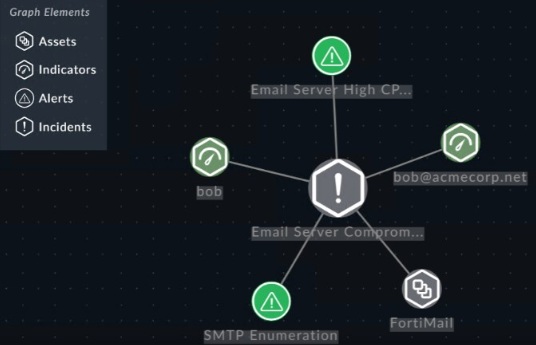
Review the incident report.
An attacker identified employee names, roles, and email patterns from public press releases, which were then used to craft tailored emails. The emails were directed to recipients to review an attached agenda using a link hosted off the corporate domain.
Which two MITRE ATT&CK tactics best fit this report? (Choose two.)
ADiscovery
BInitial Access
CDefense Evasion
DReconnaissance
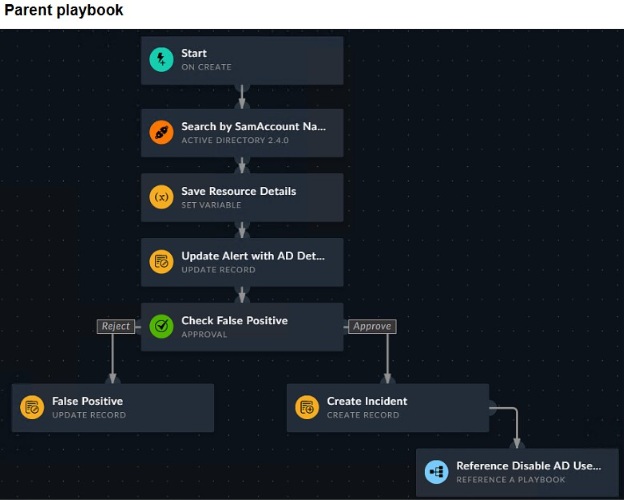
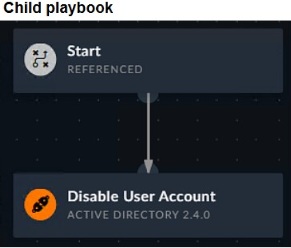
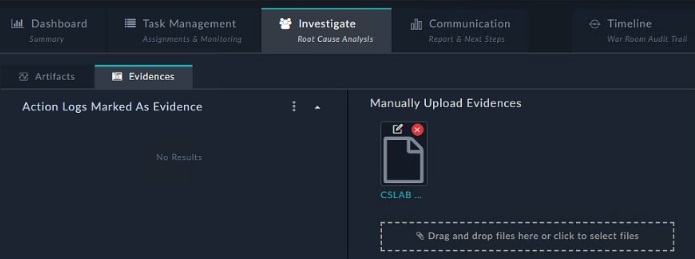
Refer to the exhibit.
How do you add a piece of evidence to the Action Logs Marked As Evidence area?
ABy creating an evidence collection task and attaching a file
BBy linking an indicator to the war room
CBy tagging output or a workspace comment with the keyword Evidence
DBy executing a playbook with the Save Execution Logs option enabled
Review the incident report.
Packet captures show a host maintaining periodic TLS sessions that imitate normal HTTPS traffic but run on TCP 8443 to a single external host. An analyst flags the traffic as potential command-and-control. During the same period, the host issues frequent DNS queries with oversized TXT payloads to an attacker-controlled domain, transferring staged files.
Which two MITRE ATT&CK techniques best describe this activity? (Choose two.)
AExploitation of Remote Services
BNon-Standard Port
CExfiltration Over Alternative Protocol
DHide Artifacts
A partner organization recently had sensitive data exfiltrated by a well-known adversary group. You are tasked with threat hunting to see your organization is also affected.
Which action must you take first?
AUse threat intelligence to enrich the IP addresses of all destinations.
BReview the tactics, techniques, and procedures of the adversary.
CUse a packet analyzer to capture and review all traffic flows on critical devices.
DReview historical logs to establish a baseline for normal bandwidth usage.
Question 6
SOAR Playbook Development
0
Question 7
SOAR Playbook Development
Question 8
SOAR Incident Handling and Threat Hunting
Question 9
SOC Concepts and Frameworks
Question 10
SOAR Playbook Development
Question 11
SOAR Playbook Development
Question 12
SOAR Playbook Development
Question 13
Detection Capabilities
Question 14
Detection Capabilities
Question 15
SOAR Playbook Development
Question 16
Detection Capabilities
Question 17
SOAR Incident Handling and Threat Hunting
Question 18
SOAR Incident Handling and Threat Hunting
Question 19
SOAR Incident Handling and Threat Hunting
Question 20
SOAR Incident Handling and Threat Hunting
Question 21
SOAR Playbook Development
Question 22
SOAR Playbook Development
Question 23
Detection Capabilities
Ask AstroTutor
0
Ask AstroTutor
0
Ask AstroTutor
0
Ask AstroTutor
0
Ask AstroTutor
0
Ask AstroTutor
0
Ask AstroTutor
0
Ad
Want a break from the ads?
Become a Supporter and enjoy a completely ad-free experience, plus unlock Learn Mode, Exam Mode, AstroTutor AI, and more.
Ask AstroTutor
0
Ask AstroTutor
0
Ask AstroTutor
0
Ask AstroTutor
0
Ask AstroTutor
0
Ask AstroTutor
0
Ask AstroTutor
0
Ask AstroTutor
0
Ask AstroTutor
0
Ask AstroTutor
0
You are trying to create a playbook that creates a manual task that shows a list of public IPv6 addresses.
You were successful in extracting all IP addresses om a previous action into a variable called ip_list, which has a mix of private and public IPv4 and IPv6 addresses. Now, you must filter the results to display only public IPv6 addresses.
Which two Jinja expressions can accomplish this task? (Choose two.)
A{{ vars.ip_list | ipaddr(!private) | ipv6 }}
B{{ vars.ip_list | ipv6 | ipaddr(‘public’) }}
C{{ vars.ip_list | ipv6addr(‘public’) }}
D{{ vars.ip_list | ipaddr(‘public’) | ipv6 }}
You want to automate a workflow on FortiSOAR so that whenever an incident with critical severity is moved to the containment phase, it is automatically reassigned to an L3 analyst as the incident lead.
Which two steps will accomplish this task? (Choose two.)
ACreate a Find Record step to find matching incidents.
BCreate a Condition step to check the incident phase and update the incident lead.
CCreate an Update Record step to set the incident lead.
DCreate an On Update trigger with trigger conditions that match the containment phase and critical severity.
ESet the playbook schedule to run persistently.
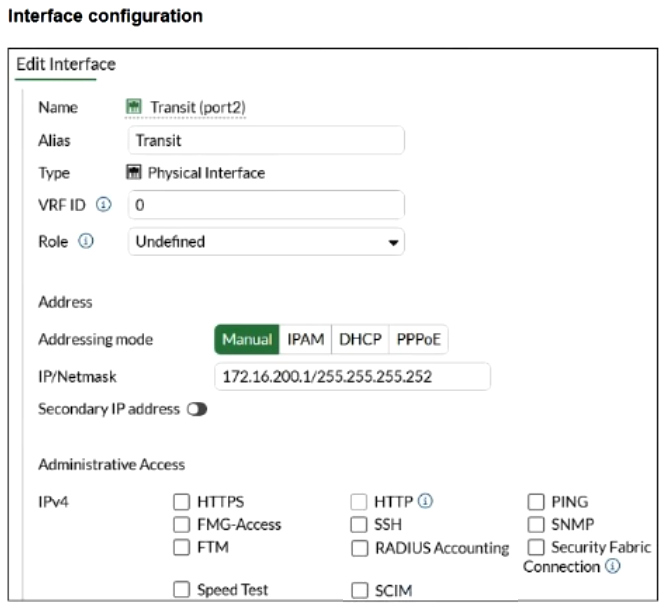
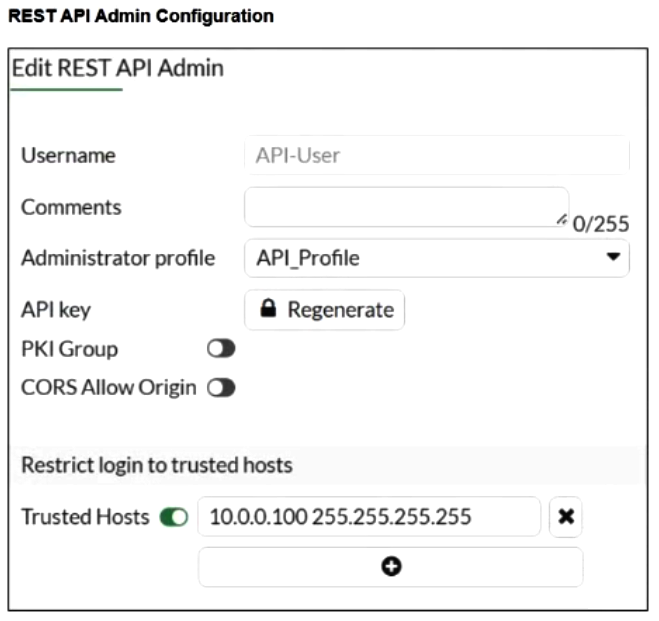
Refer to the exhibit.
You must configure the FortiGate connector to allow FortiSOAR to perform actions on a firewall. However, the connection fails.
Which two configurations are required? (Choose two.)
ATrusted hosts must be enabled and the FortiSOAR IP address must be permitted.
BAn API administrator must be created on FortiGate with the appropriate profile, along with a generated API key to configure on the connector.
CThe VDOM name must be specified, or set to VDOM_1, if VDOMs are not enabled on FortiGate.
DHTTPS must be enabled on the FortiGate interface that FortiSOAR will communicate with.
DRAG DROP -
Match the FortiSIEM device type to its description.
Select each FortiSIEM device type in the left column, hold and drag it to the blank space next to its corresponding description in the column on the right. Once you match a device type to its description, you can move it again if you want to change your answer by clicking on the device type name. You need to match four device types to its description in the work area.
When configuring an Ingest Bulk Feed playbook step, which two restrictions must you consider? (Choose two.)
AIt will not trigger On Create triggers.
BIt is slower than the Create Record step.
CIt will not trigger On Update triggers.
DIt cannot use step output from a connector action.
When you use a manual trigger to save user input as a variable, what is the correct Jinja expression to reference the variable?
A{{ vars.item.<variable_name> }}
B{{ vars.input.params.<variable_name> }}
C{{ globalVars.<variable_name> }}
D{{ vars.steps.<variable_name> }}
What are three capabilities of the built-in FortiSOAR Jinja editor? (Choose three.)
AIt renders output by combining Jinja expressions and JSON input.
BIt checks the validity of a Jinja expression.
CIt loads the environment JSON of a recently executed playbook.
DIt defines conditions to trigger a playbook step.
EIt creates new records in bulk.
Refer to the exhibit.
What are the two mistakes in the incident subpattern rule configuration? (Choose two.)
AThe aggregate operator is incorrect.
BThe Group By attributes conflict with each other.
CThe subpattern is missing a time window definition.
DThe mandatory Event Type attribute is missing.
Which three factors does the FortiSIEM rules engine use to determine the count when it evaluates the aggregate condition COUNT (Matched Events) on a specific subpattern? (Choose three.)
AData source
BGroup By attributes
CIncident action
DTime window
ESearch filter
Which three statements accurately describe step utilities in a playbook step? (Choose three.)
AThe Mock Output step utility uses HTML format to simulate real outputs.
BThe Loop step utility can only be used once in each playbook step.
CThe Condition step utility behavior changes depending on if a loop exists for that step.
DThe Timeout step utility sets a maximum execution time for the step and terminates playbook execution, if exceeded.
EThe Variables step utility stores the output of the step directly in the step itself.
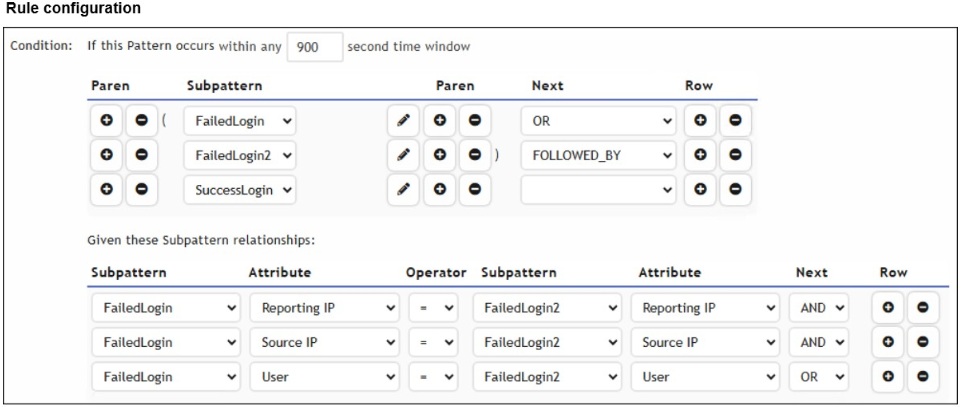
Refer to the exhibit.
Based on the configuration shown in the exhibit, what are two misconfigurations? (Choose two.)
AThe time window should be lowered from 900 seconds to reduce false positives.
BThe subpattern relationships between FailedLogin and FailedLogin2 should be removed.
CA logical operator is missing in the SuccessLogin subpattern to evaluate the subpattern relationships.
DThe SuccessLogin subpattern is not correlated with any FailedLogin or FailedLogin2 attributes.
Refer to the exhibits.
You are searching for permitted traffic to public destination IP addresses outside of North America. Your investigation shows that one local computer is communicating with destination IP addresses that fit the criteria. However, you also notice that some of those IP addresses are duplicates, and you must aggregate the results.
Which three steps do you need to use to configure the Group By and Display Fields window to show only aggregated results? (Choose three.)
AAdd the SUM (Matched Events) attribute row.
BSort the Destination IP attribute row by descending order.
CAdd the Count (Matched Events) attribute row.
DRemove the Raw Event Log attribute row.
ERemove the Event Receive Time attribute row.
You configured a queue called L1 Analysts, and generated shifts to cover morning, evenings, and overnight shifts, with two members covering each shift.
However, you noticed that all members of the queue are assigned ingested alerts in a round-robin fashion, instead of only users who are currently on shift.
What is the problem?
AThe shift lead needs to disable automatic shift handover.
BThe Queueable option is disabled for the alerts module.
CThe queue rules conflict with the user assignment rules.
DShift-based assignment is disabled.
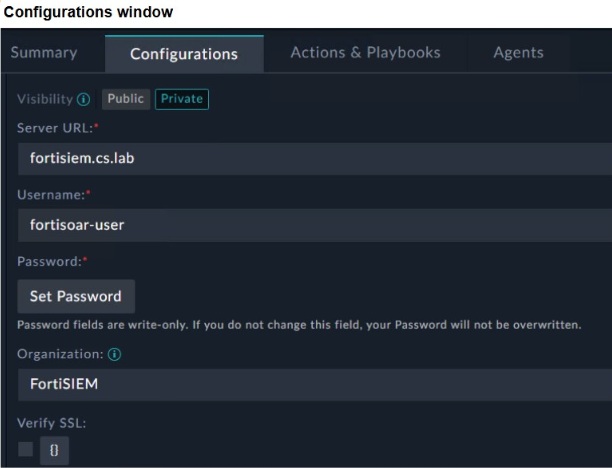
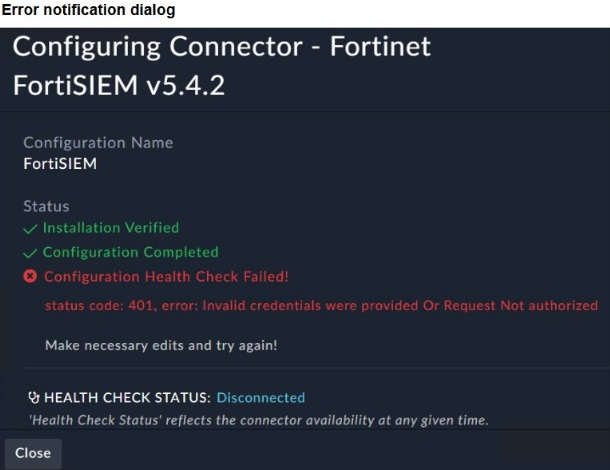
Refer to the exhibits.
You configured the FortiSIEM connector on FortiSOAR. However, when you try to save the configuration, you see the error shown in the exhibit.
What are two possible causes? (Choose two.)
AThe Visibility option must be set to Public.
BFortiSOAR cannot reach FortiSIEM.
CThe organization should be Super.
DThe user credentials do not match FortiSIEM.
Refer to the exhibits.
How is the investigation and remediation output generated on FortiSIEM?
ABy using FortiAI to summarize the incident
BBy exporting an incident
CBy running an incident report
DBy viewing the Context tab of an incident
Refer to the exhibit.
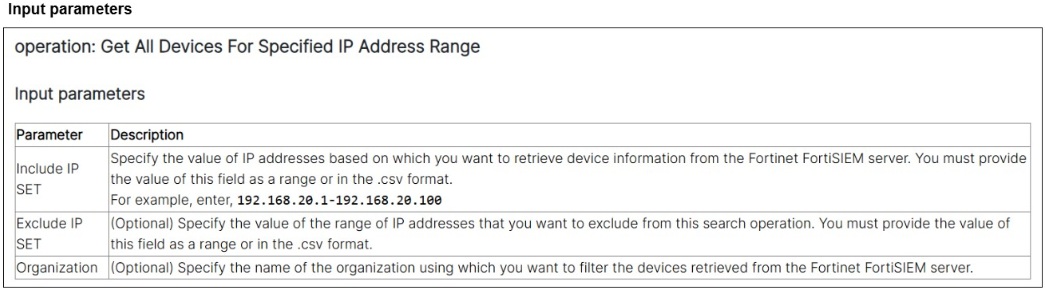
A list of FortiSIEM connector actions is shown.
You want to create a playbook on FortiSOAR that allows you to accomplish the following:
Manually input a range of IP addresses.
Use the connector action in the exhibit to retrieve a list of devices from the FortiSIEM configuration management database (CMDB) within that IP address range.
For each returned result, create an asset record based on the IP address of the device.
Which combination and order of step operations fulfills the requirements with the fewest required playbook steps?
A
Connector action, 2) Create record, 3) Update record
B
On create trigger, 2) Connector action, 3) Code snippet, 4) Create record
C
Manual trigger, 2) Connector action, 3) Create record
D
Manual trigger, 2) Set variable, 3) Connector action, 4) Create record, 5) Update record
Refer to the exhibit.
You created a threat hunting playbook to perform a search query using the FortiSIEM connector. However, when you run the playbook, you do not see any output.
Which step must you take first in your troubleshooting process?
AConfirm that the event logs matching your criteria exist on FortiSIEM.
BConfigure a Set Variable step to save the output.
CConfirm that the FortiSIEM connector is up.
DCheck the documentation for the input and output for the action.
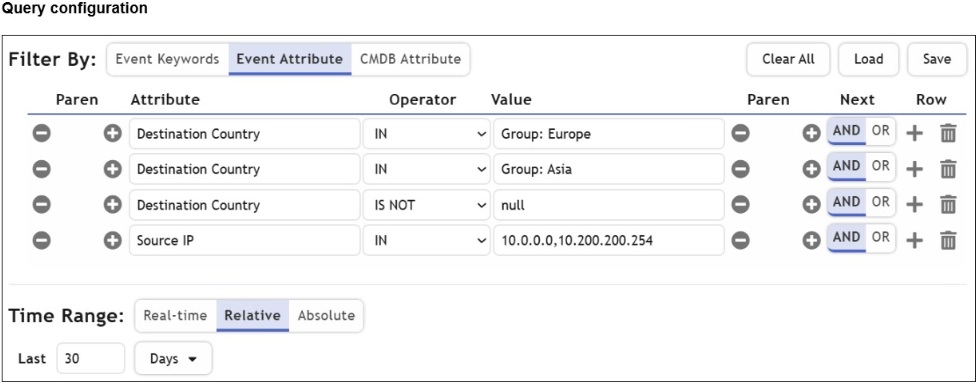
Refer to the exhibit.
You are trying to find traffic flows to destinations that are in Europe or Asia, for hosts in the local LAN segment. However, the query returns no results. Assume these logs exist on FortiSIEM.
Which three mistakes can you see in the query shown in the exhibit? (Choose three.)
AThe logical operator for the first row (Group: Europe) must be OR.
BThe null value cannot be used with the IS NOT operator.
CThe time range must be Absolute for queries that use configuration management database (CMDB) groups.
DThe Source IP row operator must be BETWEEN 10.0.0.0, 10.200.200.254.
EThere are missing parentheses between the first row (Group: Europe) and the second row (Group: Asia).