FCSS-LED-AR-7-6 Practice Exam — 70 Free Fortinet Questions
Ask AstroTutor
Refer to the exhibits.
A FortiSwitch is successfully managed by FortiGate. FortiAP is connected to port1 of the managed FortiSwitch.
On FortiGate, the VLAN AP is configured to detect and manage FortiAP, along with a DHCP server for the VLAN AP. Additionally, the VLAN AP is assigned to port1 of FortiSwitch.
However, FortiGate is unable to detect or manage FortiAP.
Which FortiGate misconfiguration is preventing the detection of FortiAP?
AThe VLAN is not tagged correctly on the FortiSwitch uplink port.
BThe FortiAP firmware is incompatible with the FortiGate firmware version.
CThe CAPWAP ports (UDP 5246 and 5247) are not open on FortiGate.
DSecurity Fabric is disabled in the administrative access options of the VLAN.
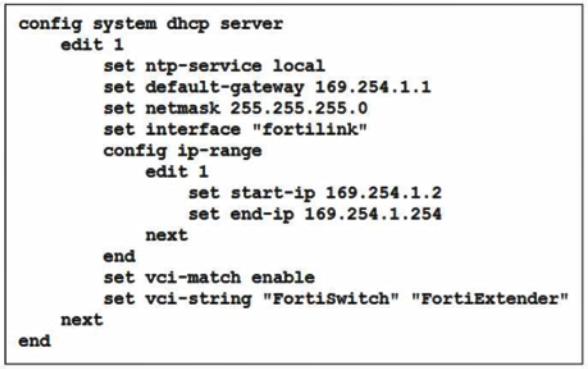
You are adding a new FortiSwitch to FortiGate for management. All necessary settings have been configured on FortiGate, but FortiSwitch remains offline. The cabling has been verified and is correctly connected.
Which misconfiguration might be preventing FortiGate from detecting FortiSwitch?
AThe DHCP server setting vci-string is misconfigured.
BThe Fortilink interface has the wrong interface member.
CThe Fortilink interface setting ip-managed-by-fortiipam must be enabled.
DThe Fortilink interface setting type must be physical.
A company is deploying a new FortiGate using zero-touch provisioning to streamline its setup. The IT team has already registered the FortiGate serial number of FortiManager and preconfigured its settings in advance. FortiGate is in its factory default state. However, after connecting FortiGate to the network, FortiManager does not automatically initiate the provisioning process.
Which two scenarios are likely to cause this issue? (Choose two.)
AThe pre-shared key set on FortiManager does not match the one set on FortiGate.
BThe DNS server doesn’t have the A or AAAA records configured.
CZero-touch provisioning is disabled on FortiManager.
DThe serial number added on FortiManager does not match the FortiGate serial number.
Refer to the exhibit.
What can you conclude if you are accessing the FortiSwitch ports menu on FortiManager?
AThe ADOM is configured to support FortiSwitch central management.
BFortiSwitch is in standalone mode.
CThe ADOM is configured to support FortiSwitch per-device-management.
DFortiSwitch is in transparent mode.
Refer to the exhibits.
The exhibits show the WTP profile and VAP CLI configurations on FortiGate managing a remote AP.
The AP is designed to grant a remote employee access to company network resources, including the database and AD servers. The employee can reach company resources but is unable to access a local printer at home.
What two solutions are required to fix this issue? (Choose two.)
AConfigure the S231F wtp-profile to add a split tunneling ACL with a destination subnet of 192.168.1.1/24, using the command set dest-ip 192.168.1.1/24
BConfigure the EmployeeHome VAP profile for local bridging using the command set local-bridging enable.
CConfigure the EmployeeHome VAP profile to disable host isolation using the command set intra-vap-privacy disable.
DConfigure the S231F wtp profile to enable split tunneling to the AP subnet using the command set split-tunneling-acl-local-ap-subnet enable.
Question 6
Core Exam
0
Question 7
Core Exam
Question 8
Core Exam
Question 9
Core Exam
Question 10
Elective Exams
Question 11
Core Exam
Question 12
Core Exam
Question 13
Core Exam
Question 14
Core Exam
Question 15
Core Exam
Question 16
Elective Exams
Question 17
Core Exam
Question 18
Elective Exams
Question 19
Core Exam
Question 20
Elective Exams
Question 21
Elective Exams
Question 22
Core Exam
Question 23
Core Exam
Question 24
Core Exam
Question 25
Core Exam
Ask AstroTutor
0
Ask AstroTutor
0
Ask AstroTutor
0
Ask AstroTutor
0
Ask AstroTutor
0
Ask AstroTutor
0
Ask AstroTutor
0
Ad
Want a break from the ads?
Become a Supporter and enjoy a completely ad-free experience, plus unlock Learn Mode, Exam Mode, AstroTutor AI, and more.
Ask AstroTutor
0
Ask AstroTutor
0
Ask AstroTutor
0
Ask AstroTutor
0
Ask AstroTutor
0
Ask AstroTutor
0
Ask AstroTutor
0
Ask AstroTutor
0
Ask AstroTutor
0
Ask AstroTutor
0
Ask AstroTutor
0
Ask AstroTutor
0
When troubleshooting a FortLink connectivity issue between FortiGate and FortiSwitch, why is it important to verify their time and date settings?
ATime synchronization is critical for the CAPWAP DTLS tunnel.
BTime and date are used to determine the encryption algorithm on FortiLink.
CIncorrect time synchronization may disrupt the FortiLink discovery protocol (LLDP or MCLAG).
DMatching time settings ensure proper STP convergence on the FortiLink interface.
Refer to the exhibits.
You have configured RADIUS single sign-on (RSSO) on a FortiGate device, ensuring that all settings are correct and the integration with the RADIUS server is correctly established.
Communication between FortiGate and the RADIUS server is happening through port3. After testing, you notice that while user authentication and RSSO activity are functioning as expected, the RADIUS server does not display session logs or detailed usage information.
What is the most likely reason for this issue?
AMisconfigured RADIUS shared password
BDisabled rsso-radius-response
CMisconfigured interface port3
DMismatched user radius sso-attribute and radius attribute value
Refer to the exhibits.
Examine the network diagram and packet capture shown in the exhibit.
During packet capture analysis, a RADIUS Access-Request packet was detected being sent from FortiSwitch to FortiAuthenticator and passing through FortiGate. The capture shows that the User-Name attribute in the RADIUS Access-Request packet contains the client MAC address.
Why is the client MAC address contained in the User-Name attribute of the RADIUS Access-Request packet?
AFortiAuthenticator is authenticating the client based on the device hostname.
BFortiAuthenticator is performing machine authentication
CMAC address-based authentication is being used for the client through MAC Authentication Bypass (MAB).
DFortiGate is authenticating the client using 802.1X authentication.
A network administrator is configuring a RADIUS server on FortiGate to authenticate remote users. The administrator configures FortiGate to forward authentication requests to FortiAuthenticator, which then proxies these requests to a Windows Active Directory (AD) server using LDAP.
Which is the primary benefit of using FortiAuthenticator in this configuration?
AFortiAuthenticator encrypts the RADIUS authentication traffic between FortiGate and the AD server, securing communication.
BThis configuration provides a solution to the CHAP-to-LDAP dilemma, enabling MSCHAPv2 authentication.
CFortiAuthenticator simplifies the configuration by allowing FortiGate to use LDAP directly for authentication without the need for RADIUS.
DThe configuration allows FortiGate to directly authenticate remote users against Windows Active Directory without the need for an intermediate proxy.
How does the Syslog-based single sign-on (SSO) feature in FortiAuthenticator function to correlate user activity with authentication events across multiple network devices?
AIt uses syslog messages to monitor authentication events and correlate them with user activities.
BIt modifies user credentials based on the outcome of authentication events.
CIt relies on external servers to analyze syslog messages for user authentication.
DIt authenticates users through a captive portal by monitoring login attempts.
Refer to the exhibit.
The exhibit shows an LDAP server configuration with the Username setting has been expanded to display its full content.
The administrator has configured the LDAP settings on FortiGate and is troubleshooting for authentication issues.
As part of the troubleshooting steps, the administrator runs the command dsquery user -samid student on the Windows Active Directory (AD) server with an IP address 10.0.1.10 and received the output CN=student, CN=Users, DC=trainingAD, DC=training, DC=lab.
Based on the dsquery output, which LDAP setting on FortiGate is misconfigured?
AThe Common Name Identifier is incorrectly set, causing authentication failures.
BThe Bind Type is incorrectly configured, preventing FortiGate from connecting to the LDAP server.
CThe Distinguished Name setting is incorrectly configured, causing issues with user authentication.
DSever IP/Name is misconfigured so FortiGate can’t reach the LDAP server.
In public key infrastructure (PKI), what is the primary role of a certificate revocation list (CRL)?
ATo enable certificate authorities to update certificates with new public key information.
BTo list expired certificates and ensure they are not used for encryption.
CTo provide information about the revocation status of certificates in real time.
DTo maintain a list of certificates that have been revoked by the certificate authority (CA) before their expiration date.
Refer to the exhibits.
A network administrator is configuring RADIUS single sign-on (RSSO) on FortiGate to dynamically assign users to specific user groups based on RADIUS accounting messages.
Which two configuration steps are required to ensure RSSO user group matching work correctly? (Choose two.)
AConfigure FortiGate to send RADIUS authentication requests instead of relying on accounting messages.
BSet the rsso-endpoint-attribute to define which RADIUS attribute will be used to extract username.
CConfigure the sso-attribute in the RSSO agent settings to specify which RADIUS attribute will be used for group matching.
DEnable the RSSO agent service on FortiGate to actively poll RADIUS servers for authentication requests.
Refer to the exhibits.
An LDAP server has been successfully configured on FortiGate, which forward LDAP authentication requests to a Windows Active Directory (AD) server. Wireless users report that they are unable to authenticate. Upon troubleshooting, you find that authentication fails when using MSCHAPv2.
What is the most likely reason for this issue?
AFortiGate does not support MSCHAPv2 for LDAP authentication.
BThe FortiGate LDAP configuration is missing the correct Bind DN.
CA firewall policy is missing an LDAP authentication rule.
DThe Windows AD server requires LDAPS (LDAP over SSL) for authentication.
When deploying a FortiSwitch in a network managed through FortiLink, how does the FortiGate facilitate communication to the FortiSwitch?
AFortiGate establishes communication with FortiSwitch using a pre-configured VLAN without requiring DHCP.
BFortiSwitch requires internet access to register its license in order to connect with FortiGate over FortiLink.
CFortiSwitch initially requires to be configured with static IP addresses to function over FortiLink.
DFortiGate acts as a DHCP server and provides the FortiAP with an IP address over FortiLink.
Refer to the exhibits.
The exhibits show the VAP configuration, Wi-Fi SSIDs, and zone table.
Which two statements describe how FortiGate handles VLAN assignment for wireless clients? (Choose two.)
AClients connecting to APs in the Floor 1 group will not be able to receive an IP address.
BClients connecting to APs in the Office group will be assigned to VLAN 102.
CAll clients connecting to the Corp Zone will receive an IP address from the 10.1.20.1/24 subnet.
DFortiGate will load balance clients using VLAN 101 and VLAN 102 and assign them an IP address from the 10.0.3.0/24 subnet.
Which statement about generating a certificate signing request (CSR) for a CER certificate is true?
AIn accurate or missing fields in the CSR will prevent the CA from validating the request, leading to the rejection of the certificate and possible delays in the deployment process.
BCSR fields are primarily used for internal recordkeeping by the requesting organization, and only the public key in the CSR must be accurate for successful certificate signing.
CThe fields in the CSR are primarily for documentation purposes; any missing or incorrect information will be automatically corrected by the CA during the signing process.
DIf key fields like the common name (CN) and organization (O) are incorrect, the certification authority (CA) will still issue the certificate, but it may not be trusted by certain applications or systems that rely on accurate field information for validation.
In a Windows environment using AD machine authentication, how does FortiAuthenticator ensure that a previously authenticated device is maintaining its network access once the device resumes operating after sleep or hibernation?
AIt sends a wake-on-LAN packet to trigger reauthentication.
BIt caches the MAC address of authenticated devices for a configurable period of time.
CIt temporarily assigns the device to a guest VLAN until full reauthentication is completed.
DIt uses machine authentication based on the device IP address.
What are three key components of the 802.1X authentication process? (Choose three.)
ASupplicant
BAuthentication Server
CAuthentication Service
DGateway
EAuthenticator
A network administrator is deploying a new FortiGate firewall and wants to enable zero-touch provisioning with FortiManager. The administrator has not manually configured the FortiManager IP address or FQDN on FortiGate. However, FortiGate can still discover FortiManager automatically.
In this situation, where can FortiGate learn the FortiManager IP address or FQDN for zero-touch provisioning?
ABy retrieving options 240 or 241 from a DHCP server
BBy querying the local ARP table for the FortiManager IP address.
CBy the default static route configuration on FortiGate.
DBy checking the FortiGate factory default configuration.
You have decided to manage multiple FortiSwitch devices using FortiManager and its FortiSwitch Manager feature.
Which two statements accurately describe FortiSwitch Manager feature functionality? (Choose two.)
AFortiSwitch Manager displays the following statuses for FortiSwitch: online, offline, unauthorized, and unknown.
BPer-device management is useful for deploying multiple switches with the same configuration.
CFortiSwitch Manager displays the following statuses for FortiSwitch: active, inactive, pending, and unknown.
DIn per-device management mode, you apply settings and profiles to individual FortiSwitch devices.
A conference center wireless network provides guest access through a captive portal, allowing unregistered users to self-register and connect to the network.
The IT team has been tasked with updating the existing configuration to enforce captive portal authentication over a secure HTTPS connection.
Which two steps should the administrator take to implement this change? (Choose two.)
AEnable HTTP redirect in the user authentication settings.
BUpdate the captive portal URL to use HTTPS on FortiGate and FortiAuthenticator.
CCreate a new SSID with the HTTPS captive portal URL.
DDisable HTTP administrative access on the guest SSID to enforce HTTPS connection.
You need to deploy FortiAPs at remote locations and want to avoid high latency by minimizing interference from FortiGate.
Which SSID traffic mode is best suited for this deployment?
AHybrid mode
BLocal mode
CBridge mode
DTunnel mode
In which two ways is layer 2 isolation applied to a quarantined device? (Choose two.)
ABy configuring route policy rules to restrict traffic.
BBy blocking communication based on the device’s MAC address.
CBy blocking communication based on the device’s IP address.
DBy assigning a null route based on the device’s IP address.
EBy assigning the quarantined device to a separate VLAN.
How does Syslog SSO on FortiAuthenticator establish user identity?
ABy directly communicating with the domain controller to retrieve user login events
BBy using predefined user credentials stored on ForitAuthenticator
CBy intercepting and decrypting network traffic to extract user credentials
DBy parsing syslog messages from network devices to extract user login events and associate them with IP addresses