About the Exam

This Technology Specialist exam validates the ability to design, implement, maintain, optimize, and troubleshoot advanced F5 BIG-IP LTM features. It is the second exam required for the F5 Certified! Technology Specialist, BIG-IP LTM certification and is aimed at professionals working with application delivery networks. Passing demonstrates understanding of BIG-IP LTM principles and the ability to integrate the platform into existing and new network environments.

Exam Topics

  • Troubleshoot Basic Virtual Server Connectivity Issues0–35%
  • Identify and Resolve Application Issues35–50%
  • Identify and Resolve LTM Device Issues15–35%

How to Use This Practice Exam

  1. Browse — Read each question, select your answer, and reveal the explanation.
  2. Exam Mode — Simulate real exam conditions with a timed session and score report.
  3. Learn Mode — Spaced repetition schedules questions you struggle with for long-term retention.

Download the Full Exam PDF

Get every question and answer in a clean, printable PDF built for offline study. Purchase once, keep permanent access, and re-download the latest version anytime.

Last updated June 24, 2026 at 8:20 PM

Topic filter
Retired questions
Question sort

QuestionQ1

Troubleshoot Basic Virtual Server Connectivity Issues

A client (10.10.1.30) connecting to an HTTPS virtual server (10.10.1.100) that has a clientssl profile is receiving an SSL error.

Which option will trace this issue?

  • A tcpdump -i external -X -e -nn -vvv -w /shared/ssl_problem.cap port 443 and host 10.10.1.30 ssldump -r /shared/ssl_problem.cap -n -x
  • B tcpdump -i external -s 0 -w /shared/ssl_problem.cap port 443 and host 10.10.10.30 and host 10.10.1.100 ssldump -r /shared/ssl_problem.cap -n -x
  • C tcpdump -i external -X -s 0 -vvv src host 10.10.10.30 and dst host 10.10.1.100 and port 443 > /shared/ssl_problem.cap ssldump -r /shared/ssl_problem.cap -n -x
  • D tcpdump -i external -X -e -nn -vv port 443 and host 10.10.1.100 and host 10.10.1.30 > /shared/ssl_problem.cap
Explanation

A packet capture of TCP port 443 involving client 10.10.1.30, saved as a pcap file with tcpdump -w, can be analyzed by ssldump to decode the TLS handshake and identify SSL errors. The capture filter includes the affected client and HTTPS port, and the resulting file is in the format ssldump -r expects.

Learn more

Community Discussion

No comments yet. Be the first to start the discussion!

QuestionQ2

Identify and Resolve Application Issues

Which three HTTP headers enable an application server to identify the client's language compatibility, browser, operating-system type, and compression compatibility?

Choose three
  • A Accept
  • B Accept-Encoding
  • C Accept-Language
  • D Host
  • E User-Agent
Explanation

Accept-Language expresses the natural languages preferred by the client, Accept-Encoding identifies acceptable response content codings such as compression formats, and User-Agent identifies the client software and can include browser and operating-system details. Accept concerns acceptable media types, and Host identifies the request’s target host.

Learn more

Community Discussion

No comments yet. Be the first to start the discussion!

QuestionQ3

Identify and Resolve Application Issues

Refer to the exhibit.

Question Image

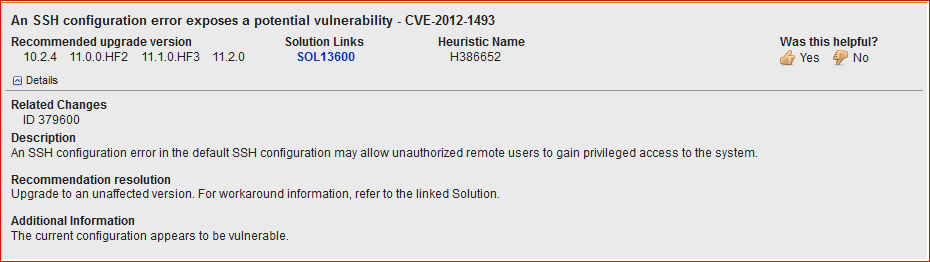
An LTM Specialist is working with an LTM 11.0.0 installation and has identified a security vulnerability, as shown in the exhibit. The LTM Specialist is assigned to apply the latest available hotfix to resolve the issue.

Which procedure resolves the issue?

  • A Browse to System > Software Management > Hotfix List. Import TMOS 11.2.0 to the available hotfix images. Select the imported hotfix image and installation location and click Install.
  • B Browse to System > Software Management > Hotfix List. Import 11.1.0.HF3 to the available hotfix images. Select the imported hotfix image and installation location and click Install.
  • C Browse to System > Software Management > Image List. Import TMOS 11.2.0 to the available hotfix images. Select the imported hotfix image and installation location and click Install.
  • D Browse to System > Software Management > Image List. Import 11.1.0.HF3 to the available hotfix images.
Explanation

F5 BIG-IP hotfix files are imported and installed from System > Software Management > Hotfix List. Version 11.1.0.HF3 is the latest hotfix shown for the vulnerability, whereas TMOS 11.2.0 is a full software image that would be handled through Image List. The hotfix is installed to a compatible 11.1.0 software volume.

Learn more

Community Discussion

No comments yet. Be the first to start the discussion!

QuestionQ4

Identify and Resolve LTM Device Issues

An LTM device is running BIG-IP v10.2.0 software. The LTM Specialist must upgrade the LTM device to BIG-IP v11.2.0 HF1. The LTM Specialist begins the upgrade by selecting the uploaded Hotfix and installing it to an unused volume. After 10 minutes, the LTM Specialist checks the upgrade status and sees that the process is stalled at 0%.

What should the LTM Specialist verify?

  • A the selected volume has sufficient space available
  • B the base software version exists on the LTM device
  • C the LTM device has been restarted into maintenance mode
  • D the LTM device has an available Internet connection via the management interface
Explanation

A BIG-IP hotfix can be applied only after its associated base software image is installed. BIG-IP v11.2.0 must therefore exist on the target volume before BIG-IP v11.2.0 HF1 can be installed.

Learn more

Community Discussion

No comments yet. Be the first to start the discussion!

QuestionQ5

Identify and Resolve LTM Device Issues

Refer to the exhibit.

Question Image

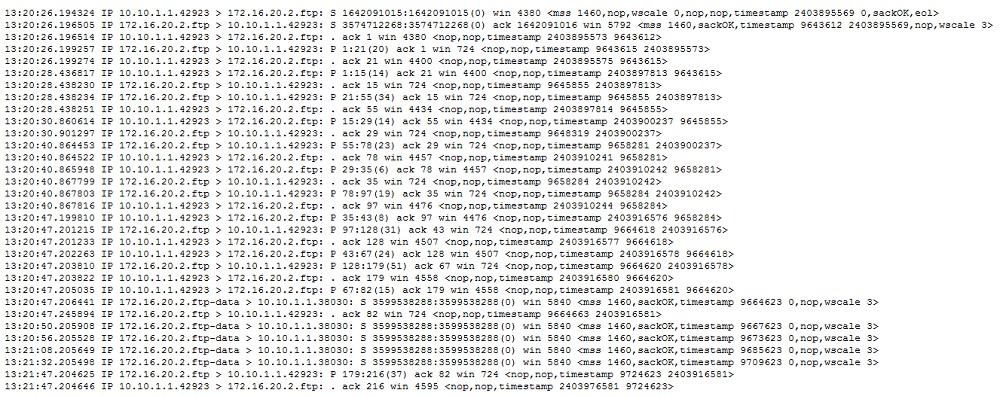
An LTM Specialist has configured a virtual server to load balance to a pool of FTP servers. File transfers are failing. The virtual server is configured as follows:

ltm virtual ftp_vs \{  
    destination 10.10.1.103:ftp  
    ip-protocol tcp  
    mask 255.255.255.255  
    pool ftp_pool  
    profiles \{  
        tcp \{ \}  
    \}  
    vlans-disabled  
\}  

Which change will resolve the problem?
  • A Add an FTP monitor to the pool.
  • B Add an FTP profile to the virtual server.
  • C Enable loose initiation in the TCP profile.
  • D Increase the TCP timeout value in the TCP profile.
Explanation

FTP uses a persistent control connection and a separate data connection. An FTP profile enables BIG-IP to process FTP control commands and manage the related active- or passive-mode data channel; a TCP-only virtual server does not provide that FTP-aware handling. F5 documents that the FTP profile supports both active and passive FTP data connections and is assigned to the virtual server.

Learn more

Community Discussion

No comments yet. Be the first to start the discussion!
Know a question that should be here? Contribute to this exam
Back home