About the Exam

This exam covers Cisco Secure Firewall and Cisco Secure Firewall Management Center, including policy configurations, integrations, deployments, management, and troubleshooting. It is intended for candidates pursuing CCNP Security and for those seeking the Cisco Certified Specialist - Securing Networks with Cisco Firewalls certification. Passing demonstrates knowledge of implementing and operating Cisco firewall technologies and can also count toward recertification.

Exam Topics

  • Deployment30%
  • Configuration30%
  • Management and Troubleshooting25%
  • Integration15%

How to Use This Practice Exam

  1. Browse — Read each question, select your answer, and reveal the explanation.
  2. Exam Mode — Simulate real exam conditions with a timed session and score report.
  3. Learn Mode — Spaced repetition schedules questions you struggle with for long-term retention.

Download the Full Exam PDF

Get every question and answer in a clean, printable PDF built for offline study. Purchase once, keep permanent access, and re-download the latest version anytime.

Last updated July 15, 2026 at 9:58 PM

Topic filter
Retired questions
Question sort

QuestionQ1

Configuration

A network engineer needs to disable the HTTP response page and interactive blocking for the entire access control policy in Cisco Secure Firewall Management Center. What must be selected for Block Response Page and Interactive Block Response Page?

  • A View
  • B Custom
  • C System
  • D None
Explanation

Selecting None for both response-page settings disables the HTTP response page and blocks sessions without interaction or explanation. Cisco documents that this selection also quickly disables interactive blocking for the entire access control policy.

Learn more

Community Discussion

No comments yet. Be the first to start the discussion!

QuestionQ2

Integration

An organization has deployed Cisco Firepower without IPS capabilities and now wants to enable traffic inspection. It must detect protocol anomalies and use Snort rule sets to identify malicious behavior. How can this be achieved?

  • A Modify the network discovery policy to detect new hosts to inspect.
  • B Modify the access control policy to redirect interesting traffic to the engine.
  • C Modify the intrusion policy to determine the minimum severity of an event to inspect.
  • D Modify the network analysis policy to process the packets for inspection.
Explanation

A network analysis policy governs packet decoding and preprocessing for inspection, including traffic normalization and identification of protocol anomalies. That preprocessing prepares traffic for evaluation by Snort intrusion rules, which detect malicious patterns.

Learn more

Community Discussion

No comments yet. Be the first to start the discussion!

QuestionQ3

Configuration

An engineer needs to export a packet capture from Cisco Secure Firewall Management Center to help troubleshoot an issue on a Secure Firewall Threat Defense device. When the engineer browses to the Secure Firewall Management Center URL below:

https:///capture/CAPI/pcap/sample.pcap

The engineer receives a 403: Forbidden error rather than the PCAP file. Which action fixes the issue?

  • A Disable the proxy setting on the client browser.
  • B Disable the HTTPS server and use HTTP.
  • C Enable HTTPS in the device platform policy.
  • D Enable the proxy setting in the device platform policy.
Explanation

Downloading a Threat Defense capture through the /capture/<capture-name>/pcap/<file-name> HTTPS endpoint requires the HTTPS server to be enabled on the relevant device data interface through its platform policy. Enabling HTTPS makes that capture-download service available; an outbound proxy setting or browser proxy setting does not provide this service.

Learn more

Community Discussion

No comments yet. Be the first to start the discussion!

QuestionQ4

Configuration

Question Image

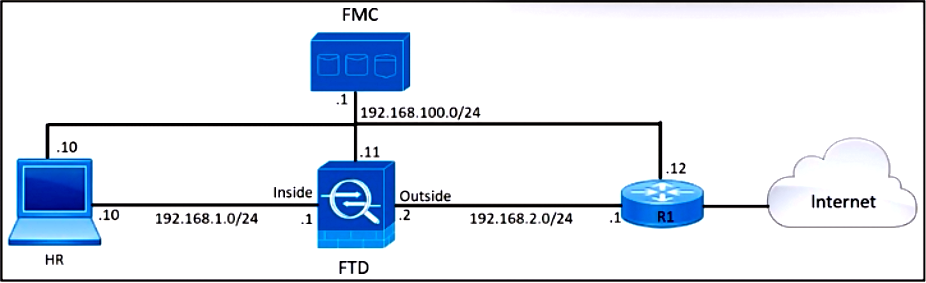
Refer to the exhibit. An engineer needs to create a QoS policy in Cisco Firepower Management Center that limits HTTP and HTTPS traffic from HR users. Set both the upload and download limit for HTTP and HTTPS traffic to 5 Mb/s.

Drag & Drop
192.168.1.0/24
192.168.2.0/24
HTTP-HTTPS
HTTP-HTTPS-QoS
5 Mb/s
Interfaces in Destination Interface Objects
Name
Apply QoS On
Download/Upload Limit
Source Interface Networks
Destination Interface Networks
Destination Ports
Explanation

HR hosts are in 192.168.1.0/24 and send web traffic through the FTD toward the outside network 192.168.2.0/24. The QoS rule therefore matches that source network, the outside-facing destination interface network, and the HTTP/HTTPS port object. Applying QoS on the interfaces specified by the destination interface object enforces rate limiting on the outbound interface, with both upload and download set to the required 5 Mb/s.

Learn more

Community Discussion

No comments yet. Be the first to start the discussion!

QuestionQ5

Configuration

An engineer creates a new rule while configuring an Access Control Policy. After the policy is deployed, the rule does not work as expected, and its associated hit counters remain at zero. What is causing this error?
  • A An incorrect application signature was used in the rule.
  • B The wrong source interface for Snort was selected in the rule.
  • C The rule was not enabled after being created.
  • D Logging is not enabled for the rule.
Explanation

Access-control rules match traffic based on their configured source and destination security zones, which correspond to the interfaces through which traffic enters and exits the device. Selecting the wrong source interface prevents the intended traffic from matching the rule, so the rule does not take effect and its hit counter remains zero. Logging settings do not determine rule hit counts.

Learn more

Community Discussion

No comments yet. Be the first to start the discussion!
Know a question that should be here? Contribute to this exam
Back home