I wasn’t able to verify the official SUP-2023 exam objectives from Apple’s public pages
Ask AstroTutor
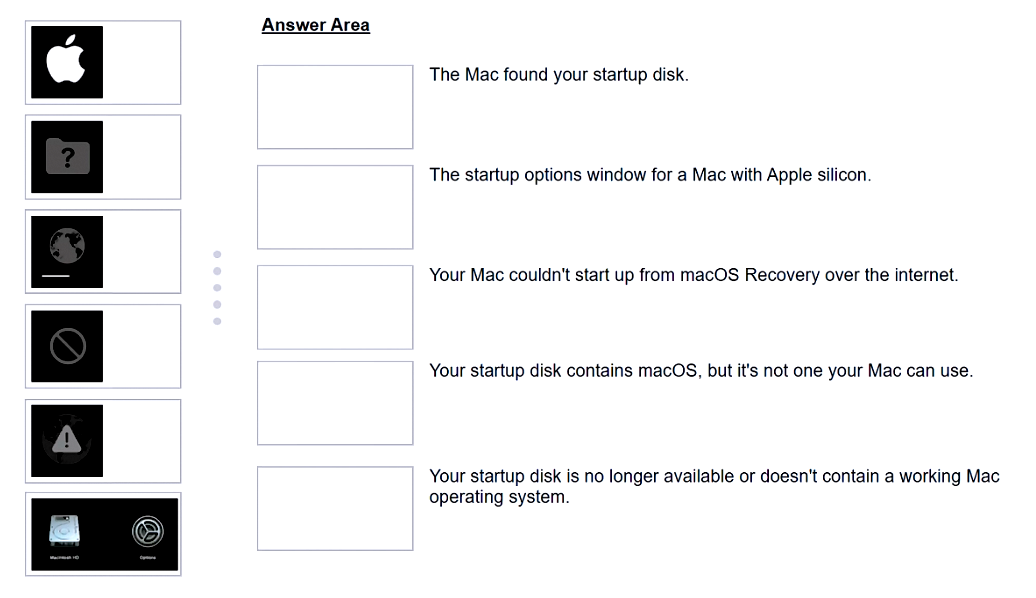
DRAG DROP -
Match the startup icons on the left to the descriptions on the right by dragging the responses to the correct target areas. Responses may be used once, more than once, or not at all.
0
Question 2
I wasn’t able to verify the official SUP-2023 exam objectives from Apple’s public pages
0
Question 3
I wasn’t able to verify the official SUP-2023 exam objectives from Apple’s public pages
0
Question 4
I wasn’t able to verify the official SUP-2023 exam objectives from Apple’s public pages
0
Question 5
I wasn’t able to verify the official SUP-2023 exam objectives from Apple’s public pages
Scenario -
ACME, Inc.'s administrators are planning to switch to an eSIM exclusive environment. Users are upgrading their iPhone with models that support ONLY eSIM.
Which feature MUST ACME's carrier support so that users can seamlessly continue to use their lines with eSIM-only iPhone models?
AeSIM Plan Transfer
BeSIM Quick Transfer
CeSIM Convert
DeSIM Carrier Transfer
Which two types of Activation Lock are available to organizations? (Choose two.)
AIndividual-linked
BDevice-linked
CUser-linked
DPersonal
EOrganization
Scenario -
Sarah works at ACME, Inc. and asks why the new iOS isn't available on her iPhone.
Which setting should you check to find out if ACME manages her iPhone?
APrivacy & Security > Device Management
BControl Center > Device Profile
CGeneral > Software Update
DGeneral > VPN & Device Management
EGeneral > Profile & Device Management
Which macOS Recovery feature is available ONLY on Mac computers with Apple silicon from the macOS Recovery Utilities menu in macOS?
ARecovery diagnostics
BRecovery log
CShare disk
DStartup Security Utility
Question 6
I wasn’t able to verify the official SUP-2023 exam objectives from Apple’s public pages
0
Question 7
I wasn’t able to verify the official SUP-2023 exam objectives from Apple’s public pages
Question 8
I wasn’t able to verify the official SUP-2023 exam objectives from Apple’s public pages
Question 9
I wasn’t able to verify the official SUP-2023 exam objectives from Apple’s public pages
Question 10
I wasn’t able to verify the official SUP-2023 exam objectives from Apple’s public pages
Question 11
I wasn’t able to verify the official SUP-2023 exam objectives from Apple’s public pages
Question 12
I wasn’t able to verify the official SUP-2023 exam objectives from Apple’s public pages
Question 13
I wasn’t able to verify the official SUP-2023 exam objectives from Apple’s public pages
Question 14
I wasn’t able to verify the official SUP-2023 exam objectives from Apple’s public pages
Question 15
I wasn’t able to verify the official SUP-2023 exam objectives from Apple’s public pages
Question 16
I wasn’t able to verify the official SUP-2023 exam objectives from Apple’s public pages
Question 17
I wasn’t able to verify the official SUP-2023 exam objectives from Apple’s public pages
Question 18
I wasn’t able to verify the official SUP-2023 exam objectives from Apple’s public pages
Question 19
I wasn’t able to verify the official SUP-2023 exam objectives from Apple’s public pages
Question 20
I wasn’t able to verify the official SUP-2023 exam objectives from Apple’s public pages
Question 21
I wasn’t able to verify the official SUP-2023 exam objectives from Apple’s public pages
Question 22
I wasn’t able to verify the official SUP-2023 exam objectives from Apple’s public pages
Question 23
I wasn’t able to verify the official SUP-2023 exam objectives from Apple’s public pages
Question 24
I wasn’t able to verify the official SUP-2023 exam objectives from Apple’s public pages
Question 25
I wasn’t able to verify the official SUP-2023 exam objectives from Apple’s public pages
Ask AstroTutor
0
Ask AstroTutor
0
Ask AstroTutor
0
Ask AstroTutor
0
Ask AstroTutor
0
Ask AstroTutor
0
Ask AstroTutor
0
Ad
Want a break from the ads?
Become a Supporter and enjoy a completely ad-free experience, plus unlock Learn Mode, Exam Mode, AstroTutor AI, and more.
Ask AstroTutor
0
Ask AstroTutor
0
Ask AstroTutor
0
Ask AstroTutor
0
Ask AstroTutor
0
Ask AstroTutor
0
Ask AstroTutor
0
Ask AstroTutor
0
Ask AstroTutor
0
Ask AstroTutor
0
Ask AstroTutor
0
Ask AstroTutor
0
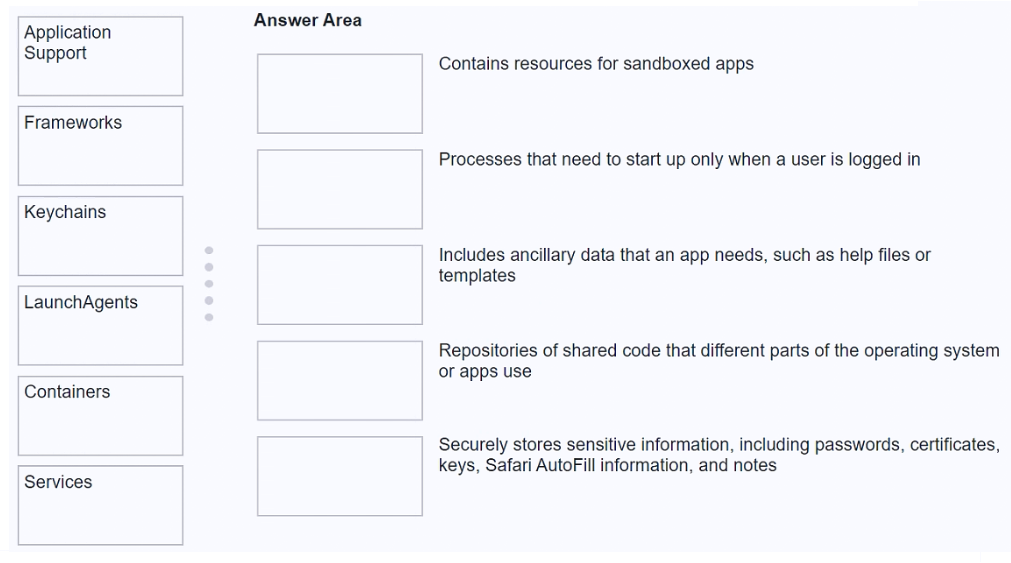
DRAG DROP -
Match the macOS library resources listed on the left to the descriptions on the right by dragging responses to the correct target areas. Responses may be used once, more than once, or not at all.
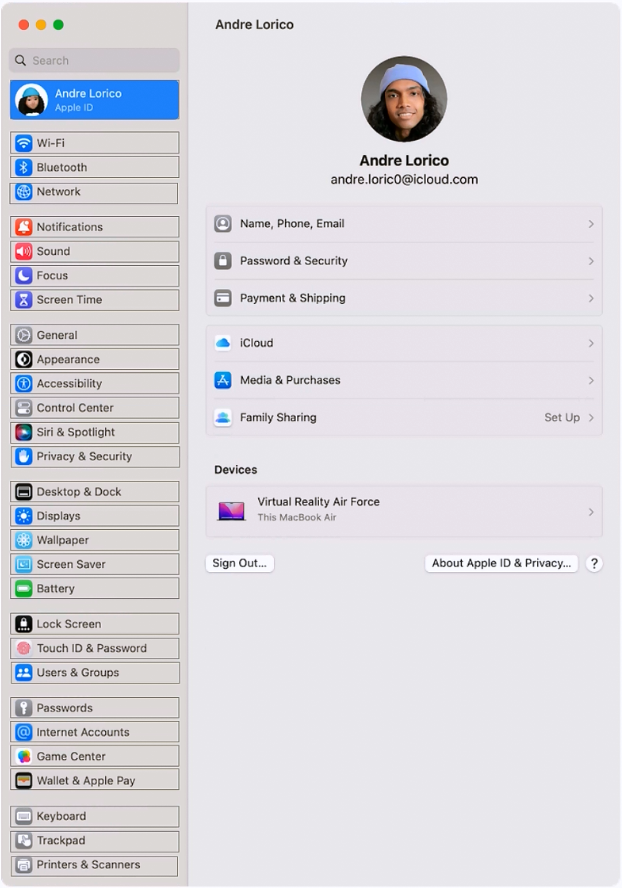
HOTSPOT -
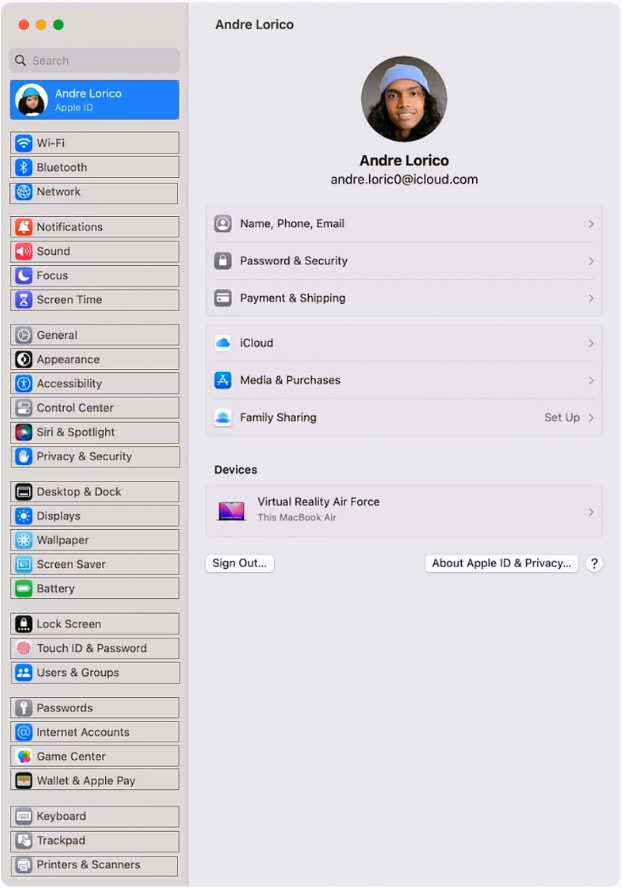
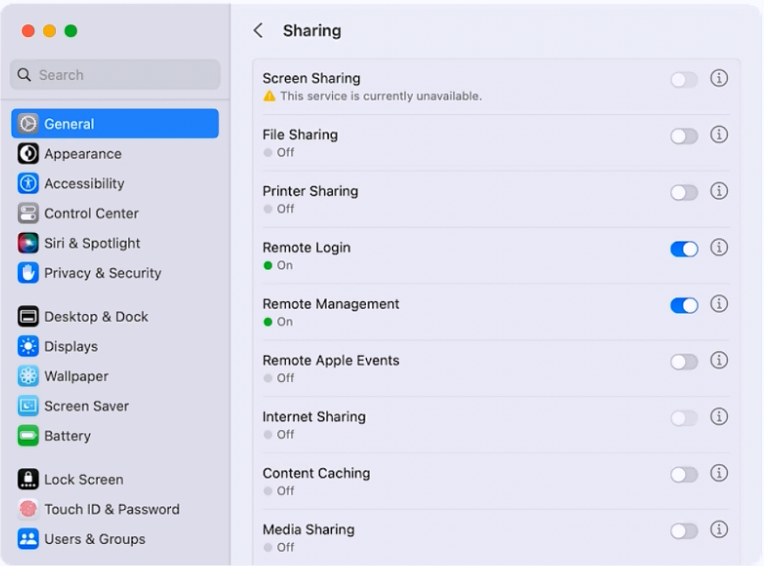
Select the setting in the sidebar that you should use to turn on firewall on your Mac.
How should you schedule an email to send in Mail on iPhone?
ATap Settings > Mail > Schedule and configure the send date and time.
BTouch and hold the mail body and configure the send date and time.
CTouch and hold the send button and set the send date and time.
DTap the calendar icon in the mail menu bar and configure the send date and time.
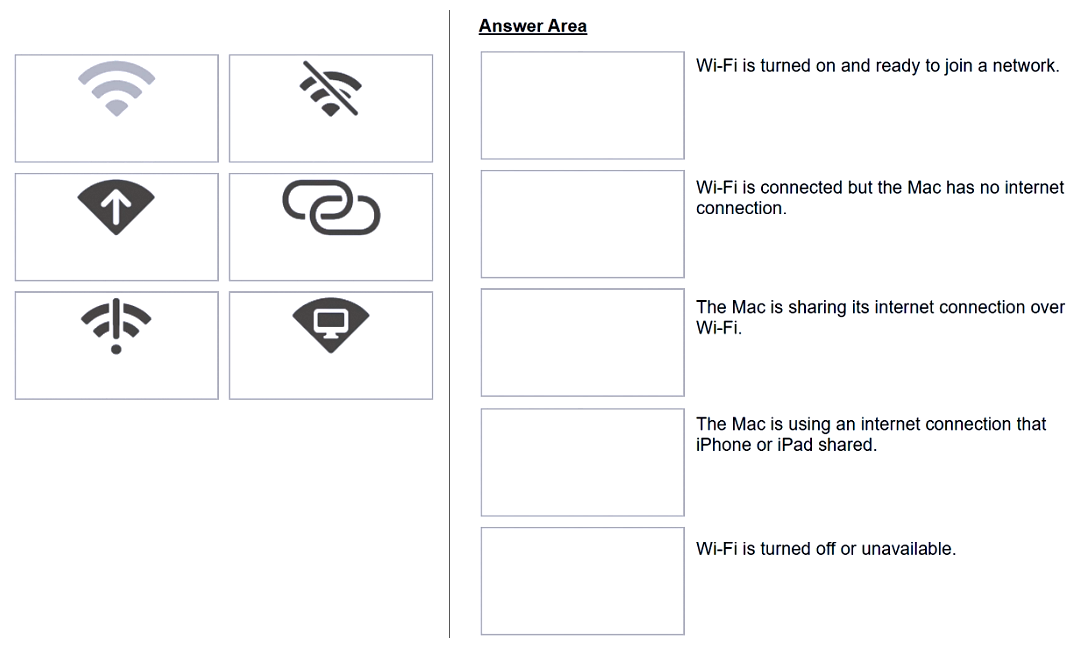
DRAG DROP -
Match the Wi-Fi menu bar icons on the left to the descriptions on the right by dragging the responses to the correct target areas. Responses may be used once, more than once. or not at all.
Which three conditions might require you to enter your passcode instead of using Face ID? (Choose three.)
AThe passcode has been entered incorrectly 5 times.
BThe device was in sleep for more than 8 hours.
CThe device has just been turned on or restarted.
DThe passcode hasn't been used to unlock the device in the last six and a half days and Face ID hasn't unlocked the device in the last 4 hours.
EThe device hasn't been unlocked for more than 48 hours.
HOTSPOT -
Select the setting in the sidebar that you should use to turn on FileVault.
Scenario -
You're ready to transfer a sysdiagnose from your iPad to your Mac.
Where in System Settings can you locate the log file on iPad?
ALogging > Debug Logging
BGeneral > Analytics & Improvements > Analytics Data
CPrivacy & Security > Analytics & Improvements > Analytics Data
DAnalytics > Analytics Data
How do you start up into fallback recoveryOS on a Mac with Apple silicon?
AFrom a shutdown state, double-press and hold the power button.
BFrom a shutdown state, press and hold the power button.
CFrom a shutdown state, press and release the power button.
DStart up in recoveryOS, then hold Shift while selecting the startup volume.
Scenario -
You configured a VPN server that supports the L2TP over IPSec protocol. You would like to add the VPN configuration to your Mac.
Which action menu option should you use to manually configure VPN in Network settings?
AAdd Service
BManage Virtual Interfaces
CSet Service Order
DAdd VPN Configuration
How do you reset the printing system from Printers & Scanners settings on a Mac?
AControl-click the printer, then choose Reset Printing System from the shortcut menu.