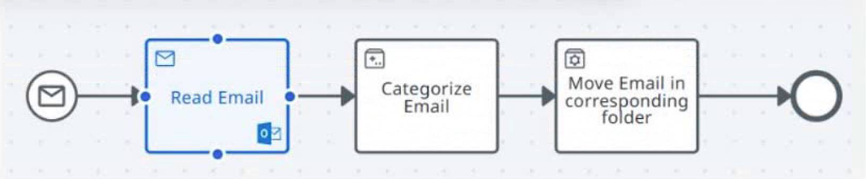
QuestionQ152Verified/UiPath Platform and Automation ComponentsCopy linkReport a problemAsk AstroTutorSave questionWhat type of task is highlighted? AReceive TaskBService TaskCConnector TaskDProcess TaskShow AnswerAnswerExplanationA Receive Task is represented by the envelope task icon and denotes a step that waits for an incoming message. UiPath Maestro identifies task types by the small icon within the task shape and defines a Receive Task as one that waits for a message to arrive.Learn moreUiPath Maestro — Tasks in BPMN modelingUiPath Maestro — Receive taskShow comments0Show commentsCommunity DiscussionNo comments yet. Be the first to start the discussion!
Community Discussion