Loading questions...
Updated
Want a break from the ads?
Become a Supporter and enjoy a completely ad-free experience, plus unlock Learn Mode, Exam Mode, AstroTutor AI, and more.
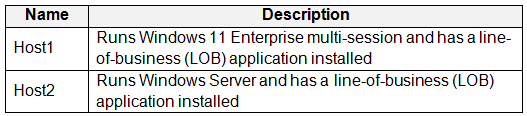
You have an Azure Virtual Desktop deployment that contains a host pool named Pool1. Pool1 contains two session hosts named Host1 and Host2.
You need to enable screen capture protection for the deployment.
What should you do?
You have an Azure Virtual Desktop host pool that contains 20 Windows 11 session hosts.
You create a Windows Defender Application Control (WDAC) policy named Policy1.xml.
You need to deploy Policy1.xml to the session hosts.
How should you prepare the policy, and to where should you copy the policy? To answer, select the appropriate options in the answer area.
NOTE: Each correct selection is worth one point.

You have an Azure Virtual Desktop deployment.
You plan to use a Conditional Access policy to enforce multi-factor authentication (MFA) when users connect to the deployment. The solution must meet the following requirements:
• Enforce MFA when a user connects to Azure Virtual Desktop by using a subscription feed.
• Enforce MFA when a user authenticates to a session host that has single sign-on (SSO) enabled.
You need to identify which cloud apps to use for the Conditional Access policy.
Which app should you use for each requirement? To answer, drag the appropriate apps to the correct requirements. Each app may be used once, more than once, or not at all. You may need to drag the split bar between panes or scroll to view content.
NOTE: Each correct selection is worth one point.

You have an Azure Virtual Desktop deployment that has just-in-time (JIT) VM access enabled.
You need to request access to a session host by using JIT VM access.
Which three virtual machine settings can you use to request access? To answer, select the appropriate settings in the answer area.
NOTE: Each selection is worth one point.

You have an Azure Virtual Desktop deployment that contains a host pool named Pool1.
Pool1 contains a session host named Host1 that is Azure AD-joined.
You need to verify whether a Windows license is assigned to Host1.
What should you do?
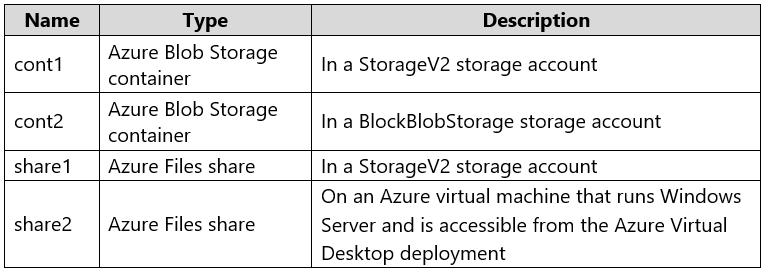
You have an Azure Virtual Desktop deployment and the Azure Storage accounts shown in the following table.

You plan to create FSLogix profile containers and store the containers in the storage accounts.
You need to identify which storage accounts support the FSLogix profile containers, and then order the accounts from highest to lowest redundancy.
Which three storage accounts should you identify in sequence? To answer, move the appropriate accounts from the list of accounts to the answer area and arrange them in the correct order.

HOTSPOT -
You have an Azure subscription that contains the storage accounts shown in the following table.

The subscription contains the vaults shown in the following table.

The subscription contains the Azure Virtual Desktop host pools shown in the following table.

For each of the following statements, select Yes if the statement is true. Otherwise, select No.
NOTE: Each correct selection is worth one point.

You have an Azure subscription that contains an Azure Compute Gallery named Gallery1 and a virtual machine named Template1. Template1 has custom apps and settings configured.
You plan to deploy Azure Virtual Desktop session hosts by using a custom virtual machine image. The solution must meet the following requirements:
• The custom image must be stored in Gallery1.
• The custom image must be based on Template1.
• All new session hosts must have unique computer names and identifiers.
You need to create the custom image.
What should you do in the Azure portal?
HOTSPOT -
You have an Azure Virtual Desktop deployment that contains 10 session hosts and a RemoteApp named App1.
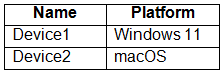
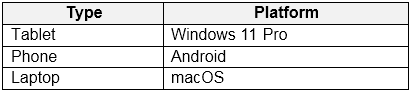
You have users that connect to the deployment by using the clients shown in the following table.

You enable screen capture protection on all the session hosts.
Which users can connect to a session host by using the full desktop, and which users can connect to App1? To answer, select the appropriate options in the answer area.
NOTE: Each correct selection is worth one point.

You have an Azure Virtual Desktop deployment that contains two Azure regions.
You plan to implement a disaster recovery solution for user profiles. The solution must meet the following requirements:
• Users must retain their user profiles if a single region fails.
• Administrative effort must be minimized.
What should you include in the recommendation?
HOTSPOT -
You have an Azure Virtual Desktop deployment that uses Cloud Cache to store user profiles.
You plan to deploy Microsoft Defender Antivirus exclusions to the session hosts by using the following PowerShell script.

Use the drop-down menus to select the answer choice that completes each statement based on the information presented in the graphic.
NOTE: Each correct selection is worth one point.

HOTSPOT -
You have an Azure subscription that contains the virtual machines shown in the following table.

You create a shared image gallery as shown in the SharedGallery1 exhibit. (Click the SharedGallery1 tab.)

You create an image definition as shown in the Image1 exhibit. (Click the Image1 tab.)

For each of the following statements, select Yes if the statement is true. Otherwise, select No.
NOTE: Each correct selection is worth one point.
Hot Area:

You deploy multiple Azure Virtual Desktop session hosts that have only private IP addresses.
You need to ensure that administrators can initiate an RDP session to the session hosts by using the Azure portal.
What should you implement?
HOTSPOT -
You have an Azure virtual machine named VM1 that runs Windows 10 Enterprise multi-session.
You plan to add language packs to VM1 and create a custom image of VM1 for an Azure Virtual Desktop host pool.
You need to ensure that modern apps can use the additional language packs when you deploy session hosts by using the custom image.
Which command should you run first? To answer, select the appropriate options in the answer area.
NOTE: Each correct selection is worth one point.
Hot Area:

You have an Azure Virtual Desktop host pool named Pool1 and an Azure Storage account named Storage1. Storage1 stores FSLogix profile containers in a share folder named share1.
You create a new group named Group1. You provide Group1 with permission to sign in to Pool1.
You need to ensure that the members of Group1 can store the FSLogix profile containers in share1. The solution must use the principle of least privilege.
Which two privileges should you assign to Group1? Each correct answer presents part of the solution.
NOTE: Each correct selection is worth one point.
DRAG DROP -
You plan to deploy Azure Virtual Desktop.
You need to create Azure NetApp Files storage to store FSLogix profile containers.
Which four actions should you perform in sequence after you register the NetApp Resource Provider? To answer, move the appropriate actions from the list of actions to the answer area and arrange them in the correct order.
NOTE: More than one order of answer choices is correct. You will receive credit for any of the correct orders you select.
Select and Place:

DRAG DROP -
You have a Azure Virtual Desktop deployment.
You have a session host named Host1 that has the disk layout shown in the exhibit. (Click the Exhibit tab.)

You plan to deploy an app that must be installed on D. The app requires 500 GB of disk space.
You need to add a new data disk that will be assigned the drive letter D. The solution must maintain the current performance of Host1.
Which four actions should you perform in sequence? To answer, move the appropriate actions from the list of actions to the answer area and arrange them in the correct order.
Select and Place:

You have an Azure Virtual Desktop host pool that runs Windows 10 Enterprise multi-session.
You need to configure automatic scaling of the host pool to meet the following requirements:
✑ Distribute new user sessions across all running session hosts.
✑ Automatically start a new session host when concurrent user sessions exceed 30 users per host.
What should you include in the solution?
You have an Azure Virtual Desktop host pool named Pool1.
You are troubleshooting an issue for a Remote Desktop client that stopped responding.
You need to restore the default Remote Desktop client settings and unsubscribe from all workspaces.
Which command should you run?
You have an Azure Virtual Desktop host pool that contains 20 Windows 10 Enterprise multi-session hosts.
Users connect to the Azure Virtual Desktop deployment from computers that run Windows 10.
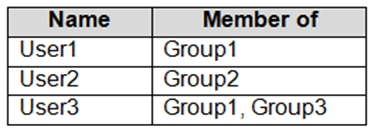
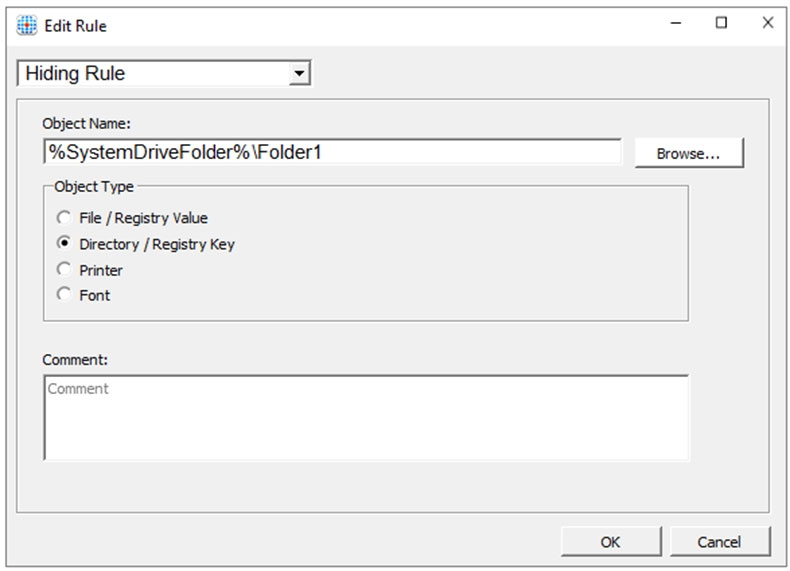
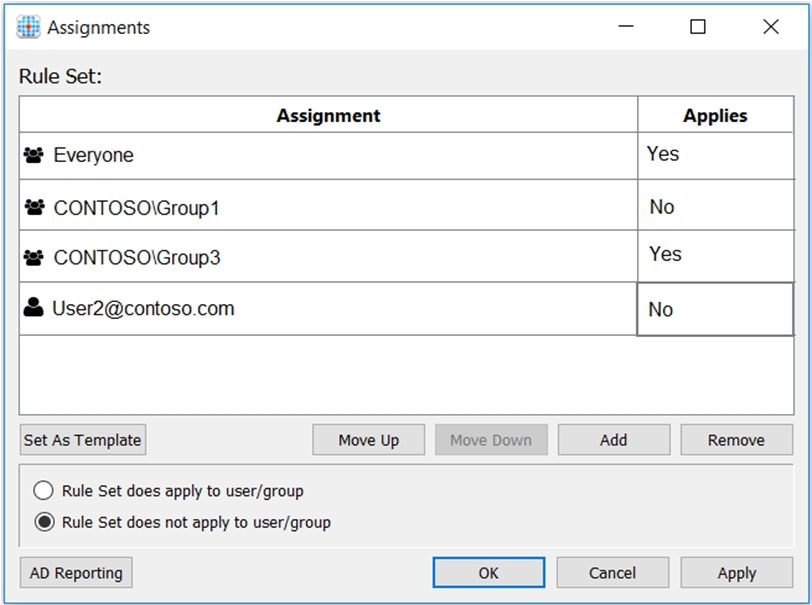
You plan to implement FSLogix Application Masking.
You need to deploy Application Masking rule sets. The solution must minimize administrative effort.
To where should you copy the rule sets?
You have an Azure Virtual Desktop host pool named Pool1 and an Azure Automation account named Account1. Pool1 is integrated with an Azure Active Directory
Domain Services (Azure AD DS) managed domain named contoso.com.
You plan to configure scaling for Pool1 by using Azure Automation runbooks.
You need to authorize the runbooks to manage the scaling of Pool1. The solution must minimize administrative effort.
What should you configure?
You have an Azure Virtual Desktop host pool named Pool1 that runs Windows 10 Enterprise multi-session hosts.
You need to use Performance Monitor to troubleshoot a low frame quality issue that is affecting a current use session to Pool1.
What should you run to retrieve the user session ID?
HOTSPOT -
You have an Azure Virtual Desktop deployment.
You plan to create the host pools shown in the following table.

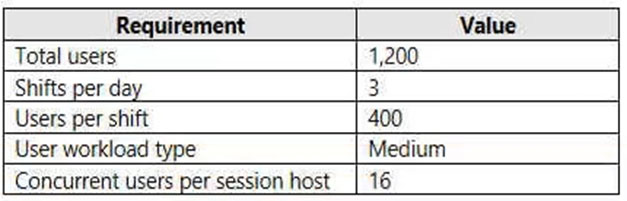
You need to recommend the virtual machine size for each host pool. The solution must minimize costs.
Which size should you recommend for each pool? To answer, select the appropriate options in the answer area.
NOTE: Each correct selection is worth one point.
Hot Area:

You deploy an Azure Virtual Desktop host pool named Pool1.
You have an Azure Storage account named store1 that stores FSLogix profile containers in a share named profiles.
You need to configure the path to the storage containers for the session hosts.
Which path should you use?
You plan to deploy Azure Virtual Desktop session host virtual machines based on a preconfigured master image. The master image will be stored in a shared image gallery.
You create a virtual machine named Image1 to use as the master image. You install applications and apply configuration changes to Image1.
You need to ensure that the new session host virtual machines created based on Image1 have unique names and security identifiers.
What should you do on Image1 before you add the image to the shared image gallery?