Migrate SAP workloads to AzureDesign and implement an infrastructure to support SAP workloads on AzureDesign and implement high availability and disaster recovery (HADR)Maintain SAP workloads on Azure
You plan to deploy an SAP workload to an Azure virtual machine with the following storage types:
An SAPMNT file share hosted in Azure premium files
Application files stored on Azure Premium managed disks
During testing, you use the E20ds v4 virtual machine SKU.
You find that the connection bandwidth to the SAPMNT share is too low and that available paging-file disk space is insufficient.
You need to increase the available bandwidth and disk space while minimizing costs. What should you do?
Select
For SAPMNT:
For the paging file:
After the migration is finished, what size should be configured for the ExpressRoute circuit connecting to the New York office in order to satisfy the stated business goals and technical requirements?
A500 Mbps
B1,000 Mbps
C2,000 Mbps
D5,000 Mbps
You have a highly available SAP NetWeaver deployment on Azure that uses a third-party solution to cluster the ABAP SAP Central Services (ASCS) components.
You need to recommend a solution that reduces the cost of shared storage for these components.
What should you include in the recommendation?
AAzure NetApp Files
BAzure shared disks
CAzure Data Share
DStorage Spaces Direct
You have an SAP HANA on Azure (Large Instances) deployment.
You need to create health-check log files for the deployment.
What should you do?
AFrom a SSH session on the HANA Large Instances node, run /opt/sgi/health_check/microsoft_tdi.sh.
BFrom the Azure portal, select Diagnose and solve problems.
CFrom the Azure portal, select New support request.
DFrom a SSH session on the HANA Large Instances node, run /var/lib/waagent/Microsoft.AzureCAT.AzureEnhancedMonitoring.MonitorX64Linux-1.0.0.82/AzureEnhancedMonitoring -monitor.
QuestionQ6
Design and implement an infrastructure to support SAP workloads on Azure
0
Community Discussion
No comments yet. Be the first to start the discussion!
QuestionQ7
Design and implement high availability and disaster recovery (HADR)
QuestionQ8
Design and implement an infrastructure to support SAP workloads on Azure
QuestionQ9
Design and implement an infrastructure to support SAP workloads on Azure
QuestionQ10
Maintain SAP workloads on Azure
QuestionQ11
Design and implement high availability and disaster recovery (HADR)
QuestionQ12
Design and implement an infrastructure to support SAP workloads on Azure
QuestionQ13
Maintain SAP workloads on Azure
QuestionQ14
Maintain SAP workloads on Azure
QuestionQ15
Design and implement high availability and disaster recovery (HADR)
QuestionQ16
Migrate SAP workloads to Azure
QuestionQ17
Maintain SAP workloads on Azure
QuestionQ18
Design and implement an infrastructure to support SAP workloads on Azure
QuestionQ19
Design and implement an infrastructure to support SAP workloads on Azure
QuestionQ20
Design and implement high availability and disaster recovery (HADR)
QuestionQ21
Design and implement an infrastructure to support SAP workloads on Azure
QuestionQ22
Migrate SAP workloads to Azure
QuestionQ23
Design and implement high availability and disaster recovery (HADR)
QuestionQ24
Maintain SAP workloads on Azure
QuestionQ25
Design and implement an infrastructure to support SAP workloads on Azure
Save question
0
Community Discussion
No comments yet. Be the first to start the discussion!
Save question
0
Community Discussion
No comments yet. Be the first to start the discussion!
Save question
0
Community Discussion
No comments yet. Be the first to start the discussion!
Save question
0
Community Discussion
No comments yet. Be the first to start the discussion!
Save question
0
Community Discussion
No comments yet. Be the first to start the discussion!
Save question
0
Community Discussion
No comments yet. Be the first to start the discussion!
Save question
0
Community Discussion
No comments yet. Be the first to start the discussion!
Ad
Want a break from the ads?
Go ad-free and unlock Learn Mode, Exam Mode, AstroTutor AI and every premium tool — everything you need to walk in prepared, and confident.
No comments yet. Be the first to start the discussion!
Save question
0
Community Discussion
No comments yet. Be the first to start the discussion!
Save question
0
Community Discussion
No comments yet. Be the first to start the discussion!
Save question
0
Community Discussion
No comments yet. Be the first to start the discussion!
Save question
0
Community Discussion
No comments yet. Be the first to start the discussion!
Save question
0
Community Discussion
No comments yet. Be the first to start the discussion!
Save question
0
Community Discussion
No comments yet. Be the first to start the discussion!
Save question
0
Community Discussion
No comments yet. Be the first to start the discussion!
Save question
0
Community Discussion
No comments yet. Be the first to start the discussion!
Save question
0
Community Discussion
No comments yet. Be the first to start the discussion!
Save question
0
Community Discussion
No comments yet. Be the first to start the discussion!
Save question
0
Community Discussion
No comments yet. Be the first to start the discussion!
You deploy SAP HANA by using SAP HANA on Azure (Large Instances).
For each of the following statements, select Yes if the statement is true. Otherwise, select No.
Yes or No
Yes
No
Statements
You can use SAP HANA Studio to monitor CPU, memory, network, and storage usage for SAP HANA on Azure (Large Instances).
Azure Extension for SAP is required to monitor the performance of SAP HANA on Azure (Large Instances).
You can use the SAP HANA HW Configuration Check Tool (HWCCT) to monitor SAP HANA running on SAP HANA on Azure (Large Instances).
You have an SAP production landscape in Azure in the North Europe Azure region.
You need to recommend a disaster-recovery solution that ensures services remain available in the West Europe Azure region if the North Europe region is unavailable. The solution must meet these requirements:
Support the minimum recovery time objective (RTO) and recovery point objective (RPO).
Support a two-node SAP Central Services (SCS) cluster.
Minimize costs.
What should the recommendation include?
AAzure Resource Mover
BAzure Site Recovery
CAzure Center for SAP solutions
DAzure Migrate
ESAP Landscape Management (LaMa)
You have an on-premises SAP landscape and plan to deploy SAP HANA on Azure (Large Instances) into that landscape.
Recommend a networking solution that:
Ensures low latency between HANA Large Instances and SAP applications
Supports use of SAP Solution Manager on-premises
How should the network be configured?
Select
To connect to HANA Large Instances, use:
Place Azure virtual machines in the same:
For transitive routing, use:
You plan to deploy a production SAP landscape on Azure.
You need to recommend a solution that minimizes latency between the application servers and the SAP HANA database server.
What should you include in the recommendation?
ADeploy the virtual machines to a proximity placement group.
BRoute all traffic between the virtual machines through an Azure Standard Load Balancer.
CRoute all traffic between the virtual machines through load-balanced network virtual appliances (NVAs).
DDeploy the virtual machines to the same subnet.
You have an Azure subscription named Sub1 that contains a virtual machine named VM1.
You have an SAP RISE managed workload integrated with Sub1.
You plan to use the SAP table connector to ingest data from the managed workload into Azure Data Factory.
What should you configure on VM1?
Aa self-hosted integration runtime
Ban Azure Databricks runtime
Can Azure File Sync agent
Dan on-premises data gateway
You plan to deploy a highly available SAP NetWeaver system on Azure virtual machines running SUSE Linux Enterprise Server (SLES) for SAP Applications.
Configure a load balancer in front of the ABAP Central Services (ASCS) tier while minimizing the number of required load-balancing rules. What should you configure?
Select
Load balancer type:
Load balancer configuration:
You have an Azure subscription named Sub1 that contains multiple virtual machines.
You have an SAP RISE managed workload.
For Sub1, you are designing a hub-and-spoke architecture that will provide the following:
Connectivity from the virtual machines to the managed workload
Connectivity from the virtual machines to the SAP Business Technology Platform (BTP)
You need to recommend a connectivity solution that minimizes network latency and maximizes throughput.
What should the recommendation include?
Select
For connectivity to RISE:
For connectivity to SAP BTP:
You have 100 Azure virtual machines hosting SAP workloads, with the SAP Host Agent and SAP Adaptive Extensions installed.
You plan to deallocate the virtual machines outside business hours.
You need to change the managed disk type of the virtual machines while they are deallocated. The solution must minimize administrative effort.
What should you use?
ASAP Information Lifecycle Management (ILM)
BSAP Landscape Management (LaMa)
CAzure Functions
DAzure Automation
You have an SAP environment on Azure that contains a single-tenant SAP HANA server at instance 03.
You need to monitor network throughput from an SAP application server to the SAP HANA server.
How do you complete the script?
Select
$HANA = -Name HANAP01-NIC -ResourceGroupName Production
$APP = Get-AzVM -Name AppP01 -ResourceGroupName Production
New-AzNetworkWatcherConnectionMonitor -NetworkWatcher (Get-AzNetworkWatcher)
-Name HANA -DestinationAddress (($HANA).IpConfigurations.PrivateIPAddress)
-DestinationPort -SourceResourceId $APP.Id
You have an SAP environment in Azure that uses Azure Recovery Services to back up an SAP application server. You need to test restoring a file from that server.
Which three actions should you perform, in sequence?
Drag & Drop
Download and run the mount disk executable
From Azure Cloud Shell, run the Get-AzBackupItem cmdlet
From Backup dashboard menu, select File Recovery
Recover the file and unmount the disk
From Azure Cloud Shell, run the Get-AzBackupRecoveryPoint cmdlet
You have an on-premises SAP AnyDB deployment running on an operating system that is not supported in Azure.
You need to migrate the deployment to Azure by replatforming it and migrating to SAP HANA. The solution must meet these requirements:
Minimize administrative effort.
Minimize downtime.
What should you use?
AAzure Migrate
BAzure Database Migration Service
CSAP Software Provisioning Manager
DSAP Software Update Manager
You have an Azure subscription containing a Microsoft Entra Domain Services domain-joined Microsoft SQL Server Always On availability group named SQLGroup1 and a virtual machine named VM1.
VM1 hosts an SAP workload and uses SQLGroup1.
You deploy Azure Monitor for SAP solutions.
You need to configure the SQL Server provider.
Which authentication mode should you use?
AActive Directory - Integrated
BWindows Authentication
CSQL Server Authentication
DMicrosoft Entra ID - Password
You plan to deploy a highly available SAP development landscape in Azure.
You need to automate the deployment. The solution must meet these requirements:
Ensure that SAP services can be managed by using the Azure portal.
Create a reproducible deployment.
Minimize administrative effort.
What should you use?
Select
To create the deployment:
To perform the deployment:
You have two Azure subscriptions.
You plan to deploy virtual machines in both subscriptions. The virtual machines will host SAP workloads. As part of the deployment, the virtual machines will be placed in an availability zone named Availability Zone 1 in each subscription.
You need to ensure that the virtual machines reside in the same physical datacenter.
What should you do first?
AUse the Check Zone Peers REST API.
BDeploy the virtual machines to the same availability set.
CDeploy the virtual machines to the same proximity group.
DUse the List By Location REST API.
You have an existing SAP production landscape in Azure. The SAP application virtual machines use static IP addresses.
You need to replicate the virtual machines to a different Azure region by using Azure Site Recovery. The source and target subnets use different address ranges.
Which three actions should you take? Each correct answer represents part of the solution.
NOTE: Each correct selection is worth one point.
Choose three
ACreate a recovery plan.
BStop the virtual machines.
CCreate a backup policy
DModify the networking configuration.
EReplicate the virtual machines.
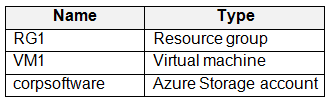
You have an Azure subscription containing the resources shown in the following table.
You plan to deploy an SAP production landscape.
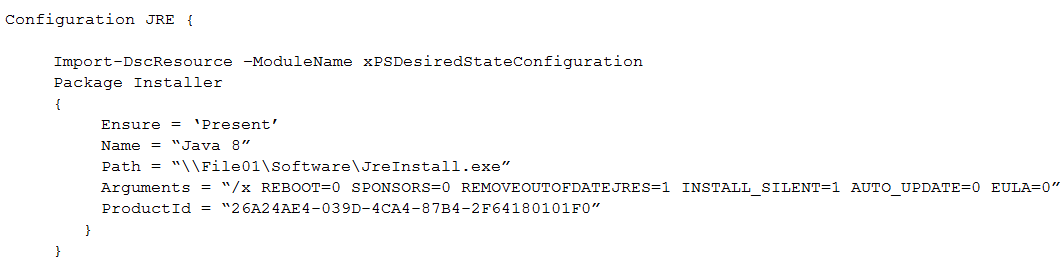
You create the following PowerShell Desired State Configuration (DSC) and publish the DSC configuration to corpsoftware.
You have an on-premises SAP HANA database. The database is 20 TB and includes tables as large as 100 GB.
You need to migrate the database to Azure. The solution must meet these requirements:
Support table splitting.
Minimize administrative effort.
Which migration method should you use?
AAzure Migrate
BSAP Database Migration Option (DMO)
CSAP classical migration
DAzure Database Migration Service
You have an SAP landscape on Azure that includes the virtual machines shown in the following table.
You need to ensure that the Application Server role remains available if a single Azure datacenter fails.
What should you include in the solution?
AAzure Virtual WAN
BAzure Basic Load Balancer
CAzure Application Gateway v2
DAzure AD Application Proxy
You have an SAP on Azure deployment that has been operating for 180 days.
You need to confirm that the virtual machines are sized to maximize use of the resources allocated to them. The solution must minimize administrative effort.
What should you use?
AAzure Advisor
BSAP Quick Sizer
CAzure Monitor for SAP solutions
DVM insights
You intend to deploy an SAP landscape on Azure virtual machines. The landscape will include three virtual machines assigned the SAP Web Dispatcher role. The virtual machines will reside in the same availability set.
You need to configure a traffic-distribution solution for the Web Dispatcher. The solution must meet the following requirements:
Users must be able to reach the Web Dispatcher URL if a virtual machine fails.
Community Discussion