QuestionQ22

VerifiedManage Azure identities and governance

You have a Microsoft Entra tenant named contoso.onmicrosoft.com that contains the users shown in the following table.

Question Image

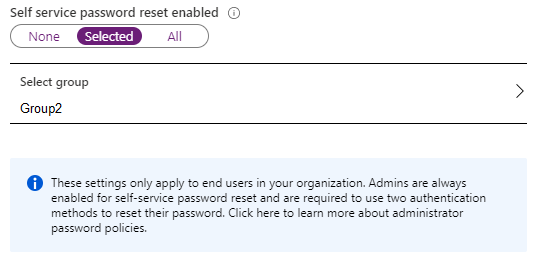
You enable password reset for contoso.onmicrosoft.com as shown in the Password Reset exhibit.
Question Image

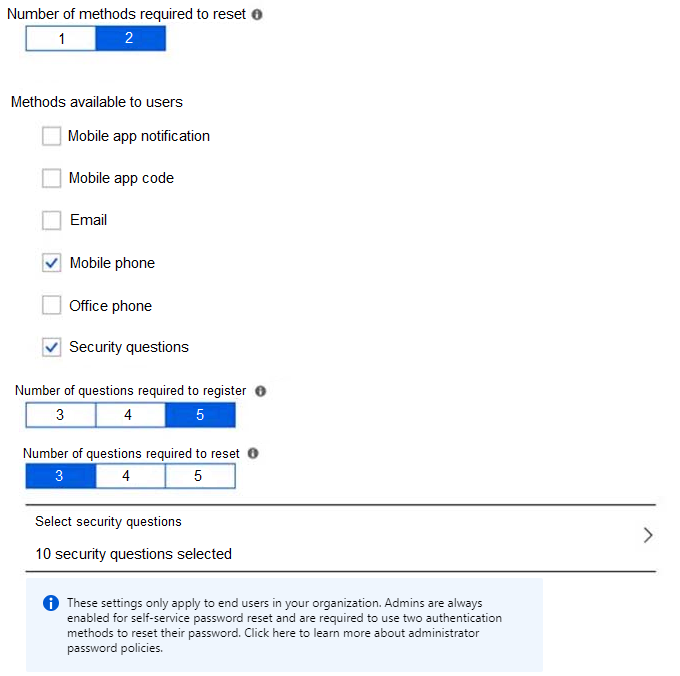
You configure the authentication methods for password reset as shown in the Authentication Methods exhibit.
Question Image

For each of the following statements, select Yes if the statement is true. Otherwise, select No.

Yes or No
StatementsYesNo
After User2 answers three security questions correctly, he can reset his password immediately.
If User1 forgets her password, she can reset the password by using the mobile phone app.
User3 can add security questions to the password reset process
Explanation

Self-service password reset is enabled only for the selected group, which is Group2, so only Group2 users are covered unless they hold an administrative role. User2 is covered, but the policy requires two authentication methods to reset a password; security questions count as one method, and three correct answers only satisfy the configured question requirement for that single method, not the full two-method reset requirement. User1 is not in Group2 and has no admin role, so she is not enabled for SSPR under this configuration. User3 has the User Administrator role. Configuring SSPR, including adding security questions to the reset process, requires at least the Authentication Policy Administrator role, so User3 can't do it. Administrator accounts are also always enabled for SSPR under a separate strong two-gate policy; administrators must use two methods and cannot use security questions for password reset. The exhibit shows the legacy Password reset > Authentication methods page: methods other than security questions are now managed in Entra ID > Authentication methods > Policies, while security questions can still be enabled only in the legacy SSPR policy.

Learn more

Community Discussion

No comments yet. Be the first to start the discussion!