QuestionQ26
Manage extensions and appsBrowser administrators at a company have configured these extension policies:
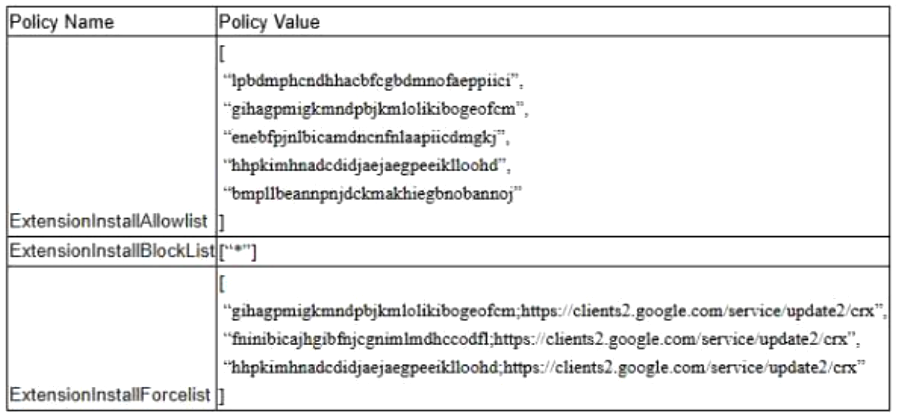
An employee wants to install an extension from the Chrome Web Store named Grammar Friend, with extension ID “fninibicajhgibfnjcgnimlmdhccodfl”.
What occurs when the user opens the Grammar Friend page in the Chrome Web Store?
- A The Add to Chrome button will be available to click and the user can install the extension.
- B A blue banner that says “This item’s installation is required by your organization” will appear and the Remove from Chrome button will be grayed out.
- C The Remove from Chrome button will be available because the extension is already installed.
- D A red banner that says “Your administrator has blocked this item (ID: fninibicajhgibfnjcgnimlmdhccodfl)” will appear and the Add to Chrome button will be grayed out.
Community Discussion