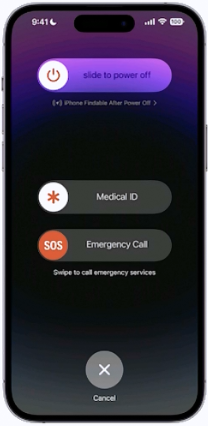
QuestionQ33Verified/Protecting Devices and DataCopy linkReport a problemAsk AstroTutorSave questionUse this image to answer the following question. How do you access this screen on an iPhone?APress and hold the side button and one of the volume buttons until the Emergency SOS slider appears.BPress the side button then one of the volume buttons. The Emergency Call slider appears.CRapidly press the volume up button five times. The Emergency Call slider appears.DPress and hold the side button, then drag the Emergency Call slider to call emergency services.Show AnswerAnswerExplanationOn an iPhone with Face ID, simultaneously pressing and holding the side button and either volume button displays the power-off and Emergency SOS sliders.Learn moreLearn gestures for iPhone models with Face ID — Apple SupportShow comments0Show commentsCommunity DiscussionNo comments yet. Be the first to start the discussion!
Community Discussion