About the Exam

UiPath-STEPv1 is UiPath's Software Testing Engineer Professional certification. It validates advanced skills in building end-to-end test automation workflows using UiPath Test Suite and delivering AI-powered, data-driven testing solutions for enterprise-scale applications. The certification is intended for roles such as Test Automation Engineer, Automation Developer, and Test Manager.

Exam Topics

  • Advanced Data Manipulation0%
  • Debugging0%
  • Advanced UI automation0%
  • REFramework0%
  • Orchestrator0%
  • Attended Automation0%
  • Autopilot0%
  • API Automation0%
  • Resource Management0%
  • Generic Automation Development0%

How to Use This Practice Exam

  1. Browse — Read each question, select your answer, and reveal the explanation.
  2. Exam Mode — Simulate real exam conditions with a timed session and score report.
  3. Learn Mode — Spaced repetition schedules questions you struggle with for long-term retention.

Download the Full Exam PDF

Get every question and answer in a clean, printable PDF built for offline study. Purchase once, keep permanent access, and re-download the latest version anytime.

Last updated May 14, 2026 at 11:06 PM

Topic filter
Retired questions
Question sort

QuestionQ1

Resource Management

Which users can import projects in Test Manager?

  • A Only users who are specifically designated by the admin.
  • B Only users with the Import Project permission assigned.
  • C Any user who has a valid Test Manager License.
  • D Anyone with access to the project.
Explanation

Any user who holds a valid Test Manager license is permitted to import projects in UiPath Test Manager.

Learn more

Community Discussion

No comments yet. Be the first to start the discussion!

QuestionQ2

Orchestrator

What sequence of events takes place when execution of a Test Set begins in UiPath Test Manager?

  • A A Test Execution is created in the Execution section, Test Case Logs are generated for all test cases, including those from linked test sets, and results are updated only after all test cases have completed execution,
  • B A Test Execution is created in the Execution section, empty Test Case Logs are generated for each test case in the set, and these logs are filled with results as the execution progresses.
  • C Empty Test Case Logs are created in the Execution section, a Test Execution is generated for each test case, and results are filled sequentially as each test case completes its execution.
  • D A Test Execution is created in the Execution section, Test Case Logs are generated only for automated lest cases, and results are updated in real-time for both manual and automated tests.
Explanation

When a test set begins running, UiPath Test Manager creates a Test Execution in the Execution section to contain its results. It generates an empty Test Case Log for every test case in the test set and fills each log with results and related information as execution proceeds.

Learn more

Community Discussion

No comments yet. Be the first to start the discussion!

QuestionQ3

Debugging

A test case runs and throws an exception. Which recommended strategy fails the test case while taking a screenshot of the application's current state?

  • A Surround the test case in a Try CatchAdd a Verify Expression in the Catch block, configured in the following way:Expression: False -ContinueOnFailure: False
  • B Surround the test case in a Try CatchAdd a Verify Expression in the Finally block, configured in the following way:Expression: 1 > 2 -TakeScreenshotIfFailed: True
  • C Surround the test case in a Try CatchAdd a Verify Expression in the Catch block, configured in the following way:Expression: False -TakeScreenshotIfFailed: True
  • D Surround the test case in a Try CatchAdd a Verify Expression in the Catch block, configured in the following way:Expression: True -TakeScreenshotIfFailed: True
Explanation

A Catch block handles the thrown exception. A Verify Expression configured with Expression: False produces a failed verification, and TakeScreenshotIfFailed: True captures a screenshot of the target process when that verification fails. UiPath documents TakeScreenshotIfFailed for this purpose in its Verify Expression activity documentation.

Learn more

Community Discussion

No comments yet. Be the first to start the discussion!

QuestionQ4

Orchestrator

After a schedule has been created in UiPath Test Manager, which options are available for that existing schedule?

  • A Edit, Delete, Duplicate
  • B Edit, Delete, Pause, Resume
  • C Edit, Delete, De-activate/activate
  • D Edit, Delete, Duplicate, Pause, Resume
Explanation

An existing UiPath Test Manager schedule can be edited, deleted, deactivated so that it no longer runs, and activated again to resume running according to its configuration.

Learn more

Community Discussion

No comments yet. Be the first to start the discussion!

QuestionQ5

Advanced Data Manipulation

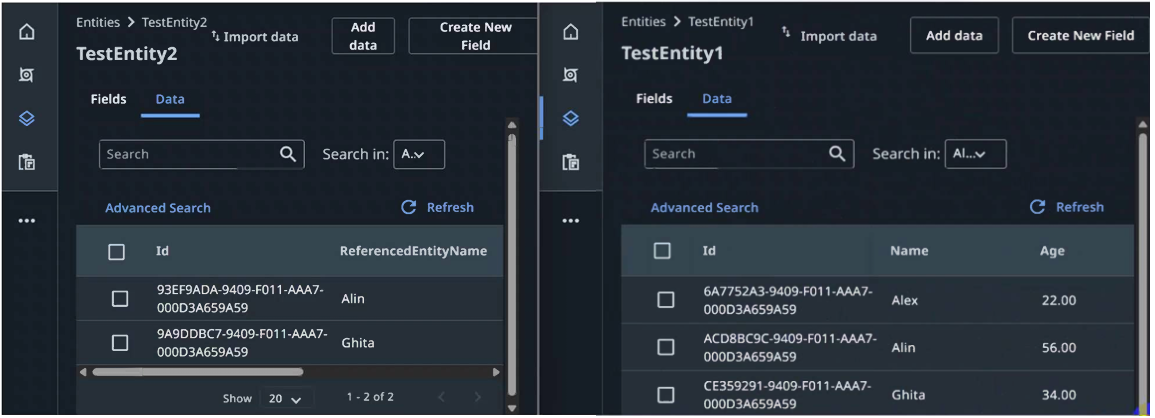
A test case obtains its test data from an entity named TestEntity2. TestEntity2 contains one reference-type field, ReferencedEntityName, which references the Name field in TestEntity1. Both entities are shown below.
Question Image

Within a UiPath Studio test case, you must process the ReferencedEntityName field from the generated testEntity2 argument.

What is the correct way to access the value for each record, such as Alin or Ghita?
  • A You are not able access the Name field from TestEntity1.
  • B Using testEntity2.ReferencedEntityName.Name
  • C Using testEntity2.ReferencedEntityName
  • D Using testEntity2.Name
Explanation

A UiPath Data Service Relationship field is imported into Studio as the related entity type, allowing access to that related entity's fields. ReferencedEntityName is the referenced TestEntity1 record, so its Name property returns the related display value.

Learn more

Community Discussion

No comments yet. Be the first to start the discussion!
Know a question that should be here? Contribute to this exam
Back home