Development Best PracticesUiPath StudioUiPath REFrameworkOrchestrator and Automation CloudUI AutomationData ManipulationIntegration and API AutomationTesting and Debugging
While working on an RPA testing project, you encountered the following activity in one of the workflows included in the project.
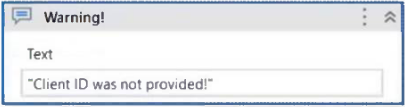
Which action can you perform in your mocked file to replace the MessageBox functionality with a LogMessage during mock testing?
ASynchronize mock.
BCreate mock workflow.
CSurround activity with mock.
DRemove mock activity.
How does UiPath Autopilot work when it generates workflows in Studio Web?
AIt automatically completes the entire workflow without any user intervention or confirmation.
BIt generates workflows from natural language prompts and predefined prompt examples, providing a visual preview before building the automation.
CIt generates workflows based on an input Process Design Document, providing a visual preview before building the automation.
DIt exclusively focuses on creating annotations inside sequences without considering the overall workflow context.
Which prerequisite is required before running the InitAllApplications TestCase?
AInvoke InitAllSettings XAML file in Given.
BInvoke KillAllProcesses XAML file in Given.
CInvoke SetTransactionStatus XAML file in Given.
DInvoke CloseAllApplications XAML file in Given.
A developer must select a layout that integrates activities into a functioning structure while developing a workflow file. The chosen layout should address every possible case and transition while supporting processes that cannot be readily modeled by loops and if statements.
Which of the following layouts is best suited for this scenario?
ASequence
BFlowchart
CState Machine
DGlobal Exception Handler
QuestionQ7
UI Automation
0
Community Discussion
No comments yet. Be the first to start the discussion!
QuestionQ8
Orchestrator and Automation Cloud
QuestionQ9
Orchestrator and Automation Cloud
QuestionQ10
UiPath Studio
QuestionQ12
Data Manipulation
QuestionQ13
UI Automation
QuestionQ14
Data Manipulation
QuestionQ15
Testing and Debugging
QuestionQ16
Data Manipulation
QuestionQ17
Integration and API Automation
QuestionQ18
UiPath Studio
QuestionQ19
UiPath Studio
QuestionQ20
Data Manipulation
QuestionQ21
UI Automation
QuestionQ22
UiPath Studio
QuestionQ23
UiPath REFramework
QuestionQ24
UI Automation
QuestionQ25
Orchestrator and Automation Cloud
QuestionQ26
Testing and Debugging
QuestionQ27
UiPath Studio
Save question
0
Community Discussion
No comments yet. Be the first to start the discussion!
Save question
0
Community Discussion
No comments yet. Be the first to start the discussion!
Save question
0
Community Discussion
No comments yet. Be the first to start the discussion!
Save question
0
Community Discussion
No comments yet. Be the first to start the discussion!
Save question
0
Community Discussion
No comments yet. Be the first to start the discussion!
Save question
0
Community Discussion
No comments yet. Be the first to start the discussion!
Save question
0
Community Discussion
No comments yet. Be the first to start the discussion!
Ad
Want a break from the ads?
Go ad-free and unlock Learn Mode, Exam Mode, AstroTutor AI and every premium tool — everything you need to walk in prepared, and confident.
No comments yet. Be the first to start the discussion!
Save question
0
Community Discussion
No comments yet. Be the first to start the discussion!
Save question
0
Community Discussion
No comments yet. Be the first to start the discussion!
Save question
0
Community Discussion
No comments yet. Be the first to start the discussion!
Save question
0
Community Discussion
No comments yet. Be the first to start the discussion!
Save question
0
Community Discussion
No comments yet. Be the first to start the discussion!
Save question
0
Community Discussion
No comments yet. Be the first to start the discussion!
Save question
0
Community Discussion
No comments yet. Be the first to start the discussion!
Save question
0
Community Discussion
No comments yet. Be the first to start the discussion!
Save question
0
Community Discussion
No comments yet. Be the first to start the discussion!
Save question
0
Community Discussion
No comments yet. Be the first to start the discussion!
Save question
0
Community Discussion
No comments yet. Be the first to start the discussion!
Which of the following code samples can initialize the ListSource property of a Dropdown element in a UiPath APP?
AAppsDataSource.from({“Option1”, “Option2”})
BAppsDataSource.from(New List(Of String) From {“Option1”, “Option2”})
CNew List(Of String) From {“Option1”, “Option2”}
DNew String
What does the Interval filter on the Orchestrator's Monitoring page do?
AIt enables you to sort the displayed data based on job priorities.
BIt allows you to choose between background and foreground processes for the displayed data.
CIt allows you to allocate licenses per machine for the displayed data.
DIt allows you to control the granularity of the displayed data and check the health of your system in either the last day or the last hour.
You need to create a process in which multiple events occur simultaneously, and triggers must process those events at the same time in an attended automation.
How can you configure this parallel trigger execution?
AUse the Run Local Triggers activity to manage the simultaneous execution of multiple triggers within the project.
BUse the Enable Local Trigger activity to run all triggers at the same time once they are enabled.
CUse the Trigger Scope activity to handle all events in a sequential manner rather than parallel.
DRely on the Form Builder to set up multiple events and manage their execution based on user input.
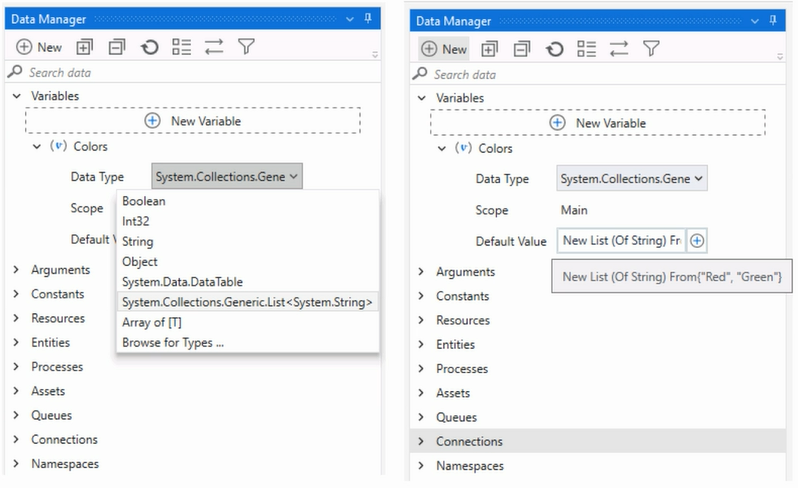
A developer needs to add items to a list of strings by using the Invoke Method activity. The list is declared as follows:
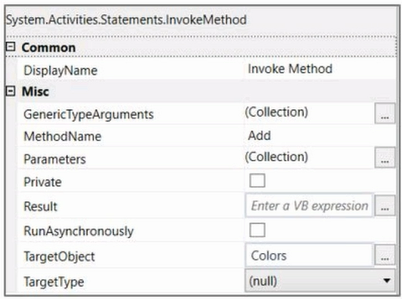
The Invoke Method activity has these properties:
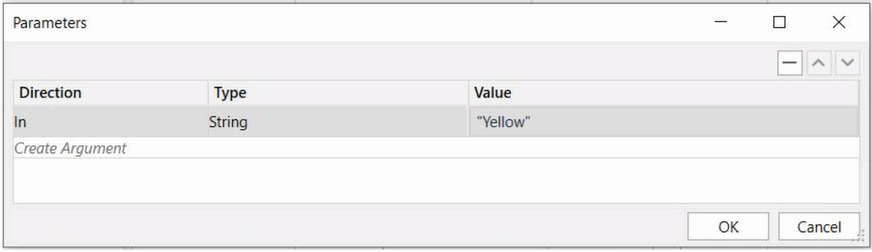
The Parameters property is configured as follows:
Based on the information displayed in the exhibits, what is the outcome of the Invoke Method activity?
AInvoke Method activity will throw an error.
BColors will contain items in the following order: “Red”, “Green”, “Yellow”.
CColors will contain items in the following order: “Yellow:”, “Red”, “Green”.
DColors will contain items in the following order: “Red”, “Green”
An email is received from a customer as free text and contains a review of a product. Which activity can identify whether the review is positive or negative?
AText interpretation activity.
BGet Text activity.
CCategorize Text activity, setting the Categories properties as “positive” and “negative”.
DSentiment Analysis activity.
What is the main purpose of the Event Inspection Tool in UiPath UI Explorer?
ATo create comprehensive test cases by capturing all possible user interactions with an application.
BTo debug workflow execution by monitoring system events that occur during automation runtime.
CTo automatically generate selectors for UI elements by recording all possible interactions with an application interface.
DTo identity the type of native events triggered when interacting with UI elements.
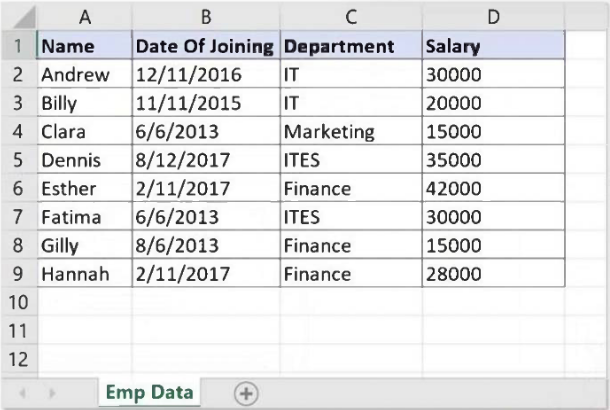
Data from an Excel file is read into a data table named dtEmployee, as shown in the following graphic:
A developer must filter the data table to retrieve all rows for employees in the Finance and IT departments whose Salary is below 30,000. Which expression produces the required results?
AdtEmployee.Select("([Department]='IT' AND [Department]='Finance') AND [Salary] < 30000")
BdtEmployee.Select("[Department]='IT OR [Department]='Finance' OR [Salary] < 30000")
CdtEmployee.Select("[Department]='IT' OR [Department]= 'Finance' AND [Salary] < 30000")
DdtEmployee.Select("([Department]='IT' OR [Department]='Finance') AND [Salary] < 30000")
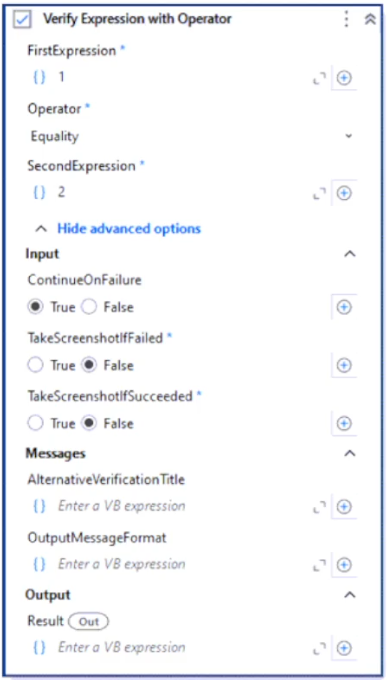
Assume the Verify Expression with Operator activity from the UiPath.Testing.Activities package has the following property configuration:
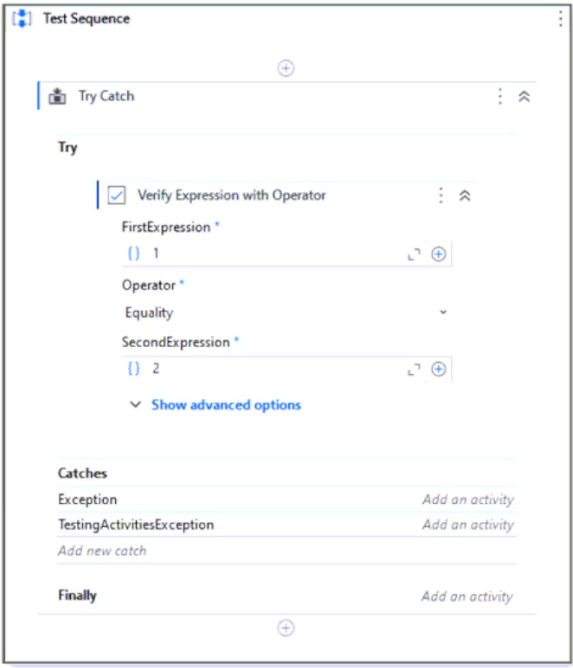
The activity is used within a Try-Catch activity. The Catch block is set to System.Exception and UiPath.Testing.Exception.TestingActivitiesException, as shown below:
During execution of the sequence shown above, which block of the Try-Catch activity is entered first after the Verify Expression with Operator activity executes?
AThe TestingActivitiesException sequence from the Catches block within the Try-Catch activity.
BNone of the other blocks within the Try-Catch activity will be executed.
CThe Exception sequence from the Catches block within the Try-Catch activity.
DThe Finally block within the Try-Catch activity.
Which expression correctly converts the string variable “DateString,” with the value “03/03/2023 16:23:11,” to a Date Time variable?
To retrieve every Outlook email that contains the word "UiPath" in its subject, which filtering property and filter schema should a developer use?
AProperty: FilterByMessageIds -Schema: "@SQL=""urn:schemas:httpmail:subject'"' like 'UiPath%'"
BProperty: Filter -Schema: "@SQL=""urn:schemas:httpmail:subject"" like 'UiPath%'"
CProperty: Filter -Schema: "@SQL=""urn:schemas:httpmail:subject"" like '%UiPath%'"
DProperty: FilterByMessageIds -Schema: "@SQL=""urn:schemas:httpmail:subject"" like '%UiPath%'"
What is the function of the Invoke Code activity in UiPath?
AInvokes VB.NET or C# code, optionally passing it a list of input arguments.
BInvokes VB.NET or Java code, optionally passing it a list of input arguments.
CInvokes VB.NET code, optionally passing it a list of input arguments.
DInvokes Java code, optionally passing it a list of input arguments.
What occurs when a process is changed in UiPath Studio and linked to a widget in UiPath Assistant?
AWhen a process is modified in UiPath Studio, UiPath Assistant will create a duplicate widget instead of updating the existing one.
BUiPath Assistant does not automatically connect to modified processes and requires assistance from Orchestrator to recognize updates.
CThe updated process from UiPath Studio is reflected in the linked widget in UiPath Assistant, allowing users to run the latest version of the process.
DModifications made in UiPath Studio require the manual re-installation of the widget in UiPath Assistant to reflect updated changes.
In UiPath Studio, which option best demonstrates the practical benefit of using a JArray instead of a DataTable when processing JSON?
APreferring JArray for performance reasons when working with any structured dataset, including Excel files.
BJArray should always be used in UiPath whenever dealing with any kind of JSON, regardless of its structure.
CWhen extracting key-value pairs from a single flat JSON object without any arrays involved.
DIterating through an array of JSON objects where each object has dynamic or missing fields.
How does Picture-in-Picture (PiP) allow users to work efficiently while attended automation is running?
AIt duplicates the screen view so the user and robot can act simultaneously on the same window.
BIt pauses the automation until the user stops interacting with the desktop.
CIt allows automation to run in a separate session without blocking the main desktop.
DIt guarantees all processes run faster by using parallel desktop execution.
According to the Installing on Mac guide, what condition is required to run attended automations on macOS through UiPath Assistant?
AAutomations can run without Orchestrator as long as the user downloads the .nupkg files manually to a local folder.
BProvisioning in Orchestrator is optional for macOS robots if the Assistant is launched in developer mode.
CAny automation published from UiPath Studio, regardless of its platform tag, can be executed on macOS using Assistant.
DThe Robot must be provisioned in Orchestrator and connected via Interactive Sign-in or Machine Key, with automations published as cross-platform.
What is the recommended method for handling tabular data when building a REFramework transactional project in UiPath?
AUtilize a DataTable variable to store and process the tabular data.
BSave the tabular data in multiple CSV files for easier manipulation.
CUse separate variables to store each column of the tabular data.
DImplement custom activities to handle the tabular data.
A developer uses a Type Into activity with the Input Method set to Simulate. Which property must be enabled for the activity to run even if the target UI element is deactivated or read-only?
ADeselect at end.
BAlter disabled element.
CActivate.
DClick before typing.
Which logging level includes the following information by default?
Execution Started log entry — generated whenever a process starts.
Execution Ended log entry — generated whenever a process is finalized.
Transaction Started log entry — generated whenever the robot obtains a transaction item from Orchestrator.
Transaction Ended log entry — generated whenever the robot sets the transaction status to either Success or Failed.
Activity Information log entry — generated whenever an activity starts, faults, or finishes within a workflow.
Arguments and Variables Information log entry — displays the values of the variables and arguments used.
AVerbose
BTrace
CCritical
DInformation
Consider testing a workflow that calculates the sum of two numbers using the data-driven test data from the Excel file below:
When the workflow functionality is expanded to calculate the sum of three numbers, the data must also be updated to support the new scenario:
What steps should be taken to do this?
AClick Right on the Test Case and select Update Test Data.
BClick Right on the Test Case and select Add Test Data.
CClick Right on the Test Case and select Refresh Test Data.
DClick Right on the Test Case and select Remove Test Data.
A developer needs to add items to a list of strings by using the Invoke Method activity. The list is declared as follows:
The Invoke Method activity has these properties:
The Parameters property is configured as follows:
Based on the information in the exhibits, what is the outcome of the Invoke Method activity?
AAn exception will be thrown.
BColors will contain an item with the value "Yellow".
CColors will contain an item with an empty value.
DColors will contain an item with the value "Colors: Yellow".
Community Discussion