About the Exam

Validates the knowledge and skills required for skilled engineers to deploy, configure, manage, integrate, and troubleshoot Cortex XSOAR solutions in security operations environments. It is aimed at security operations engineers, security engineers, XSOAR specialists, SOC engineers, automation engineers, playbook developers, security architects, and support engineers. Passing demonstrates practical knowledge of onboarding, deployment, integration, playbook creation, automation scripting, content lifecycle management, and system troubleshooting with Cortex XSOAR.

Exam Topics

  • Planning, Installation, and Maintenance14%
  • Use Case Planning and Development22%
  • Playbook Development30%
  • Incident Interactions and Reporting16%
  • Threat Intelligence Management18%

How to Use This Practice Exam

  1. Browse — Read each question, select your answer, and reveal the explanation.
  2. Exam Mode — Simulate real exam conditions with a timed session and score report.
  3. Learn Mode — Spaced repetition schedules questions you struggle with for long-term retention.

Download the Full Exam PDF

Get every question and answer in a clean, printable PDF built for offline study. Purchase once, keep permanent access, and re-download the latest version anytime.

Last updated December 4, 2025 at 12:55 PM

Topic filter
Retired questions
Question sort

QuestionQ1

Playbook Development

A playbook task is configured to run an integration command that accepts no input and outputs information to the context. The integration has multiple instances configured.

Which action ensures that the integration command runs only once?

  • A Specify the using- parameter to target a specific integration instance to run.
  • B Click on Advanced Options  Limits to specify the minimum / maximum run limits for a command.
  • C Click on Performance  Run Limits to specify the maximum run count before the task exits.
  • D Specify the runlimit= parameter to limit the number of times a specific command will run.
Explanation

Specifying the using- parameter targets a particular integration instance. This prevents the command from being executed across the several configured instances, resulting in a single command execution.

Community Discussion

No comments yet. Be the first to start the discussion!

QuestionQ2

Planning, Installation, and Maintenance

When the Only allow these dashboards checkbox is selected for a user role, what is the primary impact on users assigned to that role?

  • A They are prompted to select their preferred dashboards upon login and can only modify these chosen dashboards.
  • B They can only view specified dashboards and make minor modifications.
  • C They will automatically have all dashboards that are shared with them added to their view.
  • D They will be restricted to viewing only the specified default dashboards and cannot make any modifications.
Explanation

In Cortex XSOAR, this setting confines the role to its designated default dashboards. Users cannot access additional dashboards or import, edit, create, duplicate, or share other dashboards, so their dashboard access is restricted to the specified defaults.

Learn more

Community Discussion

No comments yet. Be the first to start the discussion!

QuestionQ3

Playbook Development

Based on the image shown, what is the output after Test is clicked?
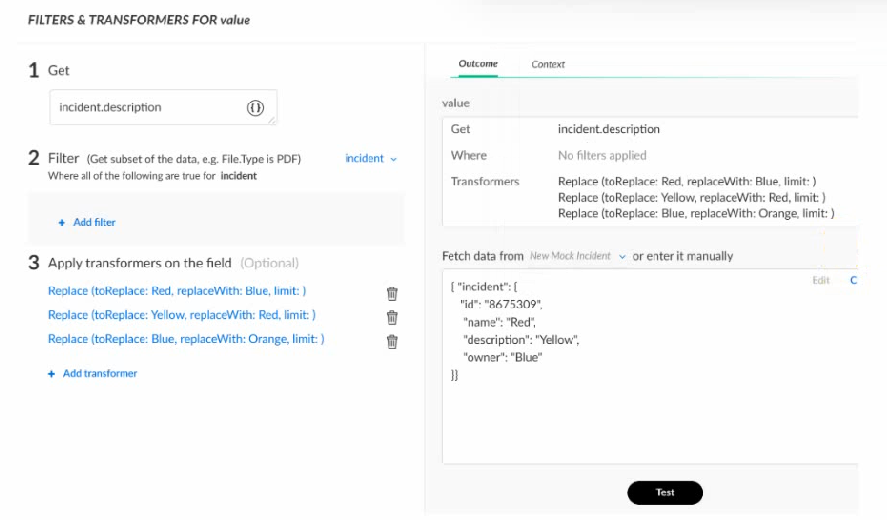
Question Image

  • A Orange
  • B Blue
  • C Yellow
  • D Red
Explanation

The incident.description test value is Yellow. Applying the three replacement transformers in order changes it from Yellow to Red, then Red to Blue, and finally Blue to Orange.

Community Discussion

No comments yet. Be the first to start the discussion!

QuestionQ4

Incident Interactions and Reporting

Which command can add or update an incident description that may be used in widgets?

  • A !setIncident description="This is an updated description."
  • B !Set key="description" value="This is an updated description."
  • C !Set key-"description" value-This is an updated description.
  • D !setIncident description=This is an updated description.
Explanation

Cortex XSOAR uses the setIncident command to set or update system incident fields, with each field supplied as a command argument. description is the field argument, and a multiword value must be enclosed in quotes.

Learn more

Community Discussion

No comments yet. Be the first to start the discussion!

QuestionQ5

Playbook Development

A playbook loop that queries Active Directory for user details, producing extensive data, is changed to extract newly acquired indicators of compromise (IOCs). This modification creates two critical issues:

  • Rate limits are reached on integrated reputation services.
  • Incidents are associated with hundreds of indicators.

Given the following settings, what would prevent these issues in this use case?

Incident Type: AD-Analysis -

Extract Indicators on Incident Creation: Use System Default (None)

Extract Indicators on Field Change: Inline

Task 1: ad-get-user -

Mark results as note: False -

Indicator Extract Mode: Inline -

Quiet Mode: False -

Task 2: ad-disable-account -

Mark results as note: True -

Indicator Extract Mode: None -

Quiet Mode: True -

Task 3: servicenow-update-Lickel.

Mark results as note: False -

Indicator Extract Mode: Use System Default

Quiet Mode: False

  • A SetAD-Analysis incident creation extraction to "Extract specific indicators."
  • B Set ad-get-user indicator extraction mode to None.
  • C Set servicenow-update-ticket indicator extraction mode to Inline.
  • D Disable the feature that allows marking task outputs as notes.
Explanation

Cortex XSOAR inline indicator extraction extracts and enriches indicators from a task’s results synchronously. An Active Directory user-details task can return large amounts of text containing many indicator-like values; setting its indicator extraction mode to None stops automatic extraction and enrichment from that task output, avoiding both reputation-service rate limiting and excessive incident-associated indicators.

Learn more

Community Discussion

No comments yet. Be the first to start the discussion!

That's the end of the preview

It's free

100% of the questions are free for all users.
No strings attached.

Topics covered
Planning, Installation, and MaintenanceUse Case Planning and DevelopmentPlaybook DevelopmentIncident Interactions and ReportingThreat Intelligence Management
Know a question that should be here? Contribute to this exam
Back home