About the Exam

Validates the ability to deploy, configure, optimize, troubleshoot, and perform administrative tasks on Nutanix Unified Storage technologies: Files, Objects, and Volumes. It is intended for IT professionals and IT architects with about 1-2 years of general IT experience and 6-12 months of data storage experience. Passing demonstrates practical competence with NUS deployment, configuration, monitoring, and troubleshooting.

Exam Topics

  • Section 1 – Deploy and Upgrade Nutanix Unified Storage25%
  • Section 2 – Configure and Utilize Nutanix Unified Storage25%
  • Section 3 – Analyze and Monitor Unified Storage25%
  • Section 4 – Troubleshoot Nutanix Unified Storage25%

How to Use This Practice Exam

  1. Browse — Read each question, select your answer, and reveal the explanation.
  2. Exam Mode — Simulate real exam conditions with a timed session and score report.
  3. Learn Mode — Spaced repetition schedules questions you struggle with for long-term retention.

Download the Full Exam PDF

Get every question and answer in a clean, printable PDF built for offline study. Purchase once, keep permanent access, and re-download the latest version anytime.

Last updated July 17, 2026 at 1:51 PM

Topic filter
Retired questions
Question sort

QuestionQ1

Section 1 – Deploy and Upgrade Nutanix Unified Storage

What is required before deploying Smart DR?

  • A Requires one-to-many shares.
  • B The primary and recovery file servers must have the same domain name.
  • C Open TCP port 7515 on all client network IPs (uni-directionally on the source and recovery file servers).
  • D The Files Manager must have at least three file servers.
Explanation

For an Active Directory deployment, the primary and recovery Nutanix Files servers must have the same domain name so that Smart DR can maintain compatible domain-based configuration and access behavior. Port 7515 connectivity is required bidirectionally between the relevant file-server networks, so a unidirectional requirement is insufficient.

Community Discussion

No comments yet. Be the first to start the discussion!

QuestionQ2

Section 4 – Troubleshoot Nutanix Unified Storage

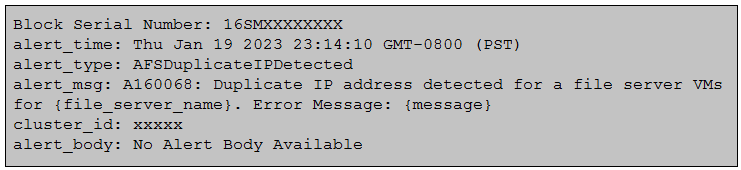
An administrator received an A160068 – AFSDuplicateIPDetected alert with the following alert details:
Question Image

Which error log should the administrator examine to identify the associated duplicate IP address?

  • A solver.log
  • B minerva_cvm.log
  • C tcpkill.log
  • D minerva_nvm.log
Explanation

For a Nutanix Files duplicate-IP detection event, the Minerva network-VM log records the duplicate IP address associated with the alert. The relevant log is minerva_nvm.log.

Community Discussion

No comments yet. Be the first to start the discussion!

QuestionQ3

Section 2 – Configure and Utilize Nutanix Unified Storage

Which binary image file extension is used by File Analytics?

  • A ISO
  • B QCOW2
  • C JSON
  • D VMDK
Explanation

Nutanix File Analytics is deployed as a VM on Nutanix AHV and uses a QCOW2 virtual disk image. QCOW2 is the native QEMU copy-on-write disk-image format used for this deployment.

Community Discussion

No comments yet. Be the first to start the discussion!

QuestionQ4

Section 4 – Troubleshoot Nutanix Unified Storage

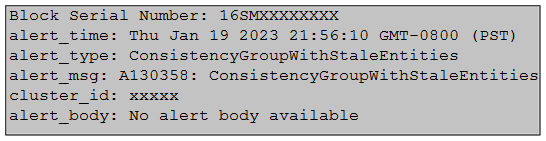
An administrator receives alert A130358 – ConsistencyGroupWithStaleEntities with the following alert details:
Question Image

Which scenario is triggering the alert and must be resolved so that the entities can be protected?

  • A One or more VMs or Volume Groups belonging to the Consistency Group is part of multiple Recovery Plans configured with a Witness.
  • B One or more VMs or Volume Groups belonging to the Consistency Group contains stale metadata.
  • C One or more VMs or Volume Groups belonging to the Consistency Group may have been deleted.
  • D The logical timestamp for one or more of the Volume Group is not consistent between clusters.
Explanation

Nutanix raises the ConsistencyGroupWithStaleEntities alert when one or more of the VMs or Volume Groups that are recorded as members of a Consistency Group have since been deleted from the cluster, leaving a dangling membership entry in the group's metadata. This stale reference must be removed from the Consistency Group's entity list before the group can be successfully protected again.

Community Discussion

No comments yet. Be the first to start the discussion!

QuestionQ5

Section 1 – Deploy and Upgrade Nutanix Unified Storage

Which two prerequisites are required when deploying Objects to a Nutanix cluster?

Choose two
  • A Microsegmentation is enabled.
  • B AHV IPAM is disabled on the VLAN used for Objects.
  • C Data Services IP is configured on the PE.
  • D DNS is configured on the PE.
Explanation

Nutanix Objects requires a Data Services IP to be configured on the Prism Element cluster. The Objects VLAN must also have AHV IPAM disabled, because Objects manages IP addressing for its own deployed components. The Nutanix Prism Element Web Console Guide identifies Objects as a data-services feature affected by the cluster Data Services IP configuration.

Learn more

Community Discussion

No comments yet. Be the first to start the discussion!
Know a question that should be here? Contribute to this exam
Back home