QuestionQ45
VerifiedSection 1 – Deploy and Upgrade Nutanix Unified StorageSee the exhibit.
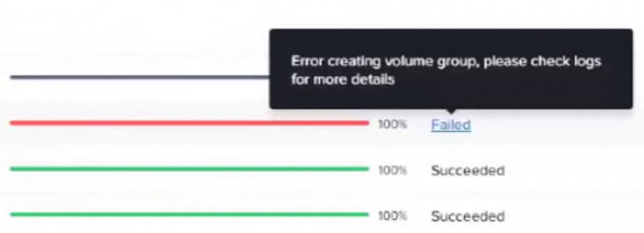
An administrator is deploying File Analytics. The following subnets are available:
- CVM subnet: 10.1.1.0/24
- AHV subnet: 10.1.2.0/24
- Nutanix Files client network: 10.1.3.0/24
- Nutanix Files storage network: 10.1.4.0/24
The administrator reserved IP address 10.1.4.100 as the Files Analytics IP. During deployment, the installation fails with the error message shown in the exhibit.
What action must the administrator take to deploy Files Analytics successfully?
Community Discussion