About the Exam

This exam validates the ability to deploy, configure, optimize, troubleshoot, and perform administrative tasks on Nutanix Unified Storage technologies: Files, Objects, and Volumes. It is aimed at IT professionals and IT architects with about 1-2 years of general IT experience and 6-12 months of data storage experience. Passing demonstrates you can work effectively with Nutanix Unified Storage in an administrator or architect role.

Exam Topics

  • Section 1 – Deploy and Upgrade Nutanix Unified Storage25%
  • Section 2 – Configure and Utilize Nutanix Unified Storage30%
  • Section 3 – Analyze and Monitor Unified Storage20%
  • Section 4 – Troubleshoot Nutanix Unified Storage25%

How to Use This Practice Exam

  1. Browse — Read each question, select your answer, and reveal the explanation.
  2. Exam Mode — Simulate real exam conditions with a timed session and score report.
  3. Learn Mode — Spaced repetition schedules questions you struggle with for long-term retention.

Download the Full Exam PDF

Get every question and answer in a clean, printable PDF built for offline study. Purchase once, keep permanent access, and re-download the latest version anytime.

Last updated April 19, 2026 at 6:07 PM

Topic filter
Retired questions
Question sort

QuestionQ1

Section 4 – Troubleshoot Nutanix Unified Storage

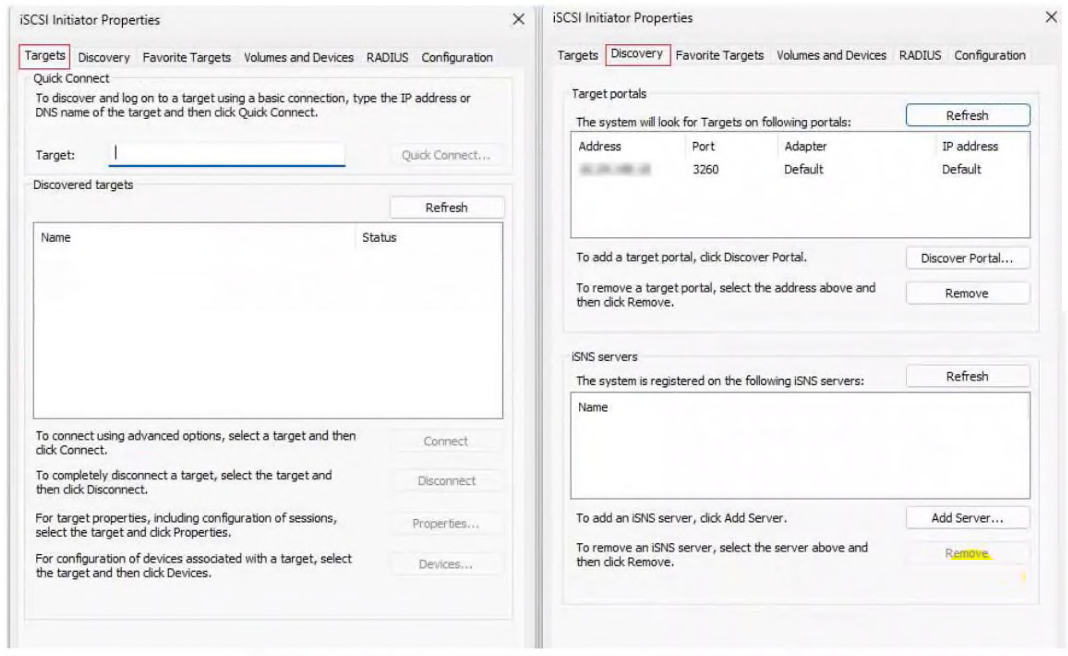
Refer to the exhibit.

Question Image

What is the most likely reason the user VM does not show the newly created Volume Group (LUN) as a discovered target?

  • A The iSCSI initiator service is not started on the Windows VM.
  • B The Volume Group is too large for Windows to recognize.
  • C The Windows VM IQN was not added to the client allowlist.
  • D The Windows VM needs to be rebooted to recognize the Volume Group.
Explanation

Nutanix Volume Groups use a client allowlist to control iSCSI access. The Windows VM’s iSCSI initiator IQN must be included in that allowlist for the target to be presented and discovered; merely configuring a reachable target portal does not grant the VM access to the Volume Group.

Learn more

Community Discussion

No comments yet. Be the first to start the discussion!

QuestionQ2

Section 2 – Configure and Utilize Nutanix Unified Storage

Which two protocols can be enabled during a Nutanix Files installation?

Choose two
  • A NFS
  • B iSCSI
  • C S3
  • D SMB
Explanation

Nutanix Files provides file services to clients through the Network File System (NFS) and Server Message Block (SMB) protocols. iSCSI is used for block storage, and S3-compatible access is for object storage.

Learn more

Community Discussion

No comments yet. Be the first to start the discussion!

QuestionQ3

Section 1 – Deploy and Upgrade Nutanix Unified Storage

An administrator finds that the option to upgrade Objects Manager is disabled.

What is the most likely cause?

  • A Provided access keys are wrong.
  • B Objects browser is not available.
  • C Prism Element upgrade previously failed.
  • D Objects Service upgrade previously failed.
Explanation

Nutanix Lifecycle Manager enforces component upgrade dependencies for Nutanix Objects. A failed Objects Service upgrade can leave the Objects upgrade state incomplete, disabling the related Objects Manager upgrade until the failed service upgrade is resolved.

Learn more

Community Discussion

No comments yet. Be the first to start the discussion!

QuestionQ4

Section 2 – Configure and Utilize Nutanix Unified Storage

An administrator is configuring a Windows client to access a Volume Group (VG) provided by a Nutanix cluster.

Which configuration details should the administrator obtain from the cluster?

Choose two
  • A The cluster's fully qualified domain name (FQDN)
  • B The cluster s data services IP (DSIP)
  • C The IPs of all cluster CVMs IP
  • D The VG name
Explanation

Nutanix Volumes uses the cluster iSCSI Data Services IP (DSIP) as the client target-discovery and initial connection portal. The Volume Group name identifies the specific iSCSI Volume Group target to access. Individual CVM IP addresses are not used for client iSCSI connections; the DSIP provides the cluster-wide, highly available access point.

Learn more

Community Discussion

No comments yet. Be the first to start the discussion!

QuestionQ5

Section 2 – Configure and Utilize Nutanix Unified Storage

An administrator has been instructed to access the Nutanix Files Server VM and verify that passwords comply with the organization’s security policy for server access.

Which password-complexity requirement is supported by Nutanix Files?

  • A At least 8 characters difference
  • B At least 2 lowercase letters
  • C At least 2 uppercase letters
  • D At least 8 characters long
Explanation

Nutanix Files requires an FSVM password to be at least 8 characters long. Its documented complexity policy also requires at least one lowercase letter, one uppercase letter, one number, one special character, and at least four characters different from the previous password.

Learn more

Community Discussion

No comments yet. Be the first to start the discussion!
Know a question that should be here? Contribute to this exam
Back home