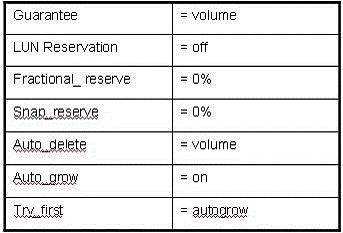
QuestionQ90Verified/SAN conceptsCopy linkReport a problemAsk AstroTutorSave questionSelect the Exhibit button. When should you configure the space-management policy shown in the table?Awhen you want to thin provision the LUNs and make the volume size less than the LUN sizeBwhen you want Data ONTAP to start deleting Snapshots to recover space from the volume before growing the volumeCwhen you want to set aside overwrite reserve space for the LUNs so that writes never fail with the presence of SnapshotsDwhen you want to guarantee space for Snapshots by letting the volume autogrowShow AnswerAnswerExplanationDisabling LUN space reservation enables thin provisioning: LUN capacity is not fully reserved in the containing volume, allowing the volume’s initial size to be smaller than the provisioned LUN capacity. A fractional reserve of 0% likewise avoids reserving additional volume space for LUN overwrite operations.Learn moreSAN volume configuration optionsShow comments0Show commentsCommunity DiscussionNo comments yet. Be the first to start the discussion!
Community Discussion