SC-300: Microsoft Identity and Access AdministratorDemo
By Microsoft · Browse Mode
//
SC-300: Microsoft Identity and Access Administrator Practice Exam
QuestionQ1
Plan and implement identity governance
Save question
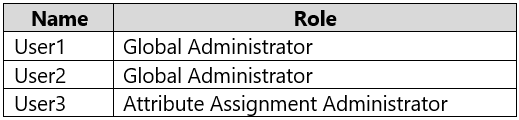
You have a Microsoft 365 E5 subscription containing two attribute sets, named Set1 and Set2. The subscription includes the users shown in the following table.
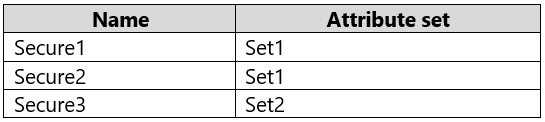
The custom security attributes are shown in the following table.
You assign User2 the Attribute Definition Administrator role for Set1.
For each of the following statements, select Yes if the statement is true. Otherwise, select No.
Yes or No
Yes
No
Statements
User1 can modify the configuration of Secure1.
User2 can view the value of Secure2 for all users.
User3 can view the value of Secure3 for all users.
0
Community Discussion
No comments yet. Be the first to start the discussion!
QuestionQ2
Implement authentication and access management
0
Community Discussion
No comments yet. Be the first to start the discussion!
QuestionQ3
Implement authentication and access management
0
Community Discussion
No comments yet. Be the first to start the discussion!
QuestionQ4
Plan and implement workload identities
0
Community Discussion
No comments yet. Be the first to start the discussion!
QuestionQ5
Implement authentication and access management
0
Community Discussion
No comments yet. Be the first to start the discussion!
It's free
100% of the questions are free for all users. No strings attached.
Implement and manage user identitiesImplement authentication and access managementPlan and implement workload identitiesPlan and implement identity governance
Your company has an Azure AD tenant that includes a user named User1.
The company has two departments: marketing and finance.
You need to grant User1 permission to manage only users in the marketing department. The solution must ensure that User1 does NOT have permission to manage users in the finance department.
What should you create first?
Aa management group
Ban administrative unit
Ca resource group
Da Microsoft 365 group
An Azure AD tenant has multi-factor authentication (MFA) enforced and self-service password reset (SSPR) enabled.
Combined registration is enabled in interrupt mode.
A new user named User1 is created.
Which two authentication methods can User1 use to finish the combined registration process? Each correct answer provides a complete solution.
> NOTE: Each correct selection is worth one point.
Choose two
Aa FIDO2 security key
Ba hardware token
Ca one-time passcode email
DWindows Hello for Business
Ethe Microsoft Authenticator app
You have an Azure subscription.
You are assessing enterprise software-as-a-service (SaaS) apps.
You must ensure that the apps support automatic provisioning of Azure AD users.
Which specification must the apps support?
AOAuth 2.0
BWS-Fed
CSCIM 2.0
DLDAP 3
You create a Conditional Access policy that blocks access when a user triggers a high-severity sign-in alert.
You need to test the policy under these conditions:
A user signs in from a different country.
A user triggers a sign-in risk.
What should you use to perform the test?
Athe Conditional Access What If tool
Bsign-ins logs in Azure Active Directory (Azure AD)
Cthe activity logs in Microsoft Defender for Cloud Apps
Daccess reviews in Azure Active Directory (Azure AD)
QuestionQ6
Plan and implement identity governance
0
Community Discussion
No comments yet. Be the first to start the discussion!
QuestionQ9
Implement authentication and access management
QuestionQ10
Plan and implement workload identities
QuestionQ11
Implement authentication and access management
QuestionQ12
Plan and implement identity governance
QuestionQ14
Plan and implement identity governance
QuestionQ16
Implement authentication and access management
QuestionQ17
Plan and implement identity governance
QuestionQ18
Plan and implement identity governance
QuestionQ19
Implement authentication and access management
QuestionQ20
Plan and implement workload identities
QuestionQ22
Implement authentication and access management
QuestionQ23
Plan and implement identity governance
QuestionQ24
Implement and manage user identities
QuestionQ25
Plan and implement identity governance
QuestionQ26
Plan and implement identity governance
QuestionQ27
Implement authentication and access management
QuestionQ28
Implement authentication and access management
QuestionQ29
Plan and implement workload identities
QuestionQ30
Implement authentication and access management
Save question
0
Community Discussion
No comments yet. Be the first to start the discussion!
Save question
0
Community Discussion
No comments yet. Be the first to start the discussion!
Save question
0
Community Discussion
No comments yet. Be the first to start the discussion!
Save question
0
Community Discussion
No comments yet. Be the first to start the discussion!
Save question
0
Community Discussion
No comments yet. Be the first to start the discussion!
Save question
0
Community Discussion
No comments yet. Be the first to start the discussion!
Save question
0
Community Discussion
No comments yet. Be the first to start the discussion!
Ad
Want a break from the ads?
Go ad-free and unlock Learn Mode, Exam Mode, AstroTutor AI and every premium tool — everything you need to walk in prepared, and confident.
No comments yet. Be the first to start the discussion!
Save question
0
Community Discussion
No comments yet. Be the first to start the discussion!
Save question
0
Community Discussion
No comments yet. Be the first to start the discussion!
Save question
0
Community Discussion
No comments yet. Be the first to start the discussion!
Save question
You have a Microsoft 365 tenant.
You have 100 IT administrators who are organized into 10 departments.
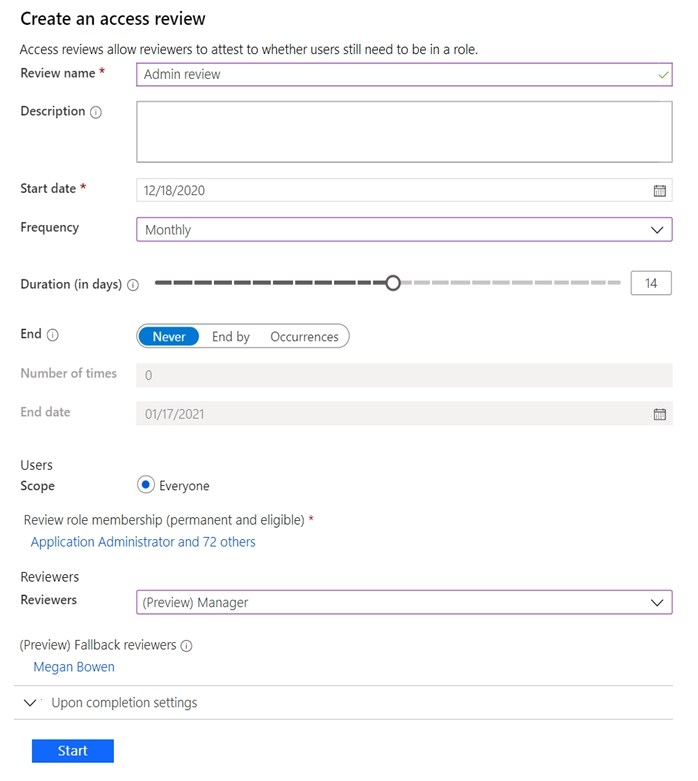
You create the access review shown in the exhibit. (Click the Exhibit tab.)
You discover that all access review requests are being received by Megan Bowen.
You need to make sure that the manager of each department receives the access reviews for their own department.
0
Community Discussion
No comments yet. Be the first to start the discussion!
Save question
You have a Microsoft 365 tenant.
You have 100 IT administrators who are organized into 10 departments.
You create the access review shown in the exhibit. (Click the Exhibit tab.)
You discover that all access review requests are being received by Megan Bowen.
You need to make sure that the manager of each department receives the access reviews for their own department.
0
Community Discussion
No comments yet. Be the first to start the discussion!
Save question
You have a Microsoft 365 tenant.
You have 100 IT administrators who are organized into 10 departments.
You create the access review shown in the exhibit. (Click the Exhibit tab.)
You discover that all access review requests are being received by Megan Bowen.
You need to make sure that the manager of each department receives the access reviews for their own department.
0
Community Discussion
No comments yet. Be the first to start the discussion!
Save question
You have a Microsoft 365 tenant.
You have 100 IT administrators who are organized into 10 departments.
You create the access review shown in the exhibit. (Click the Exhibit tab.)
You discover that all access review requests are being received by Megan Bowen.
You need to make sure that the manager of each department receives the access reviews for their own department.
0
Community Discussion
No comments yet. Be the first to start the discussion!
Save question
0
Community Discussion
No comments yet. Be the first to start the discussion!
Save question
-1
Community Discussion
No comments yet. Be the first to start the discussion!
Save question
0
Community Discussion
No comments yet. Be the first to start the discussion!
Save question
0
Community Discussion
No comments yet. Be the first to start the discussion!
You have a Microsoft 365 subscription that contains the following:
An Azure Active Directory (Azure AD) tenant with an Azure Active Directory Premium P2 license
A Microsoft SharePoint Online site named Site1
A Microsoft Teams team named Team1
You need to create an entitlement management workflow to manage Site1 and Team1.
What should you do first?
AConfigure an app registration.
BCreate an Administrative unit.
CCreate an access package.
DCreate a catalog.
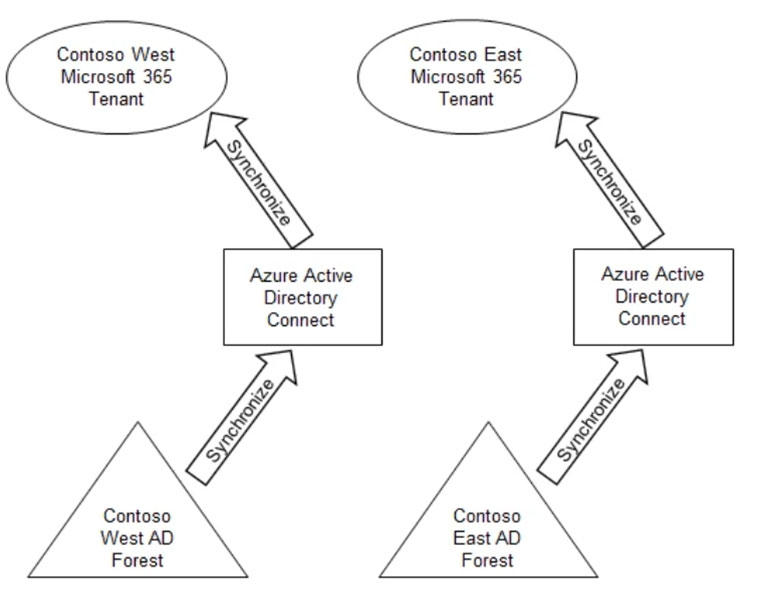
Your company has two divisions, named Contoso East and Contoso West. The Microsoft 365 identity architecture for the two divisions is shown in the following exhibit.
You need to grant users in the Contoso East division access to Microsoft SharePoint Online sites in the Contoso West tenant. The solution must not require any additional Microsoft 365 licenses.
What should you do?
AConfigure Azure AD Application Proxy in the Contoso West tenant.
BInvite the Contoso East users as guests in the Contoso West tenant.
CDeploy a second Azure AD Connect server to Contoso East and configure the server to sync the Contoso East Active Directory forest to the Contoso West tenant.
DConfigure the existing Azure AD Connect server in Contoso East to sync the Contoso East Active Directory forest to the Contoso West tenant.
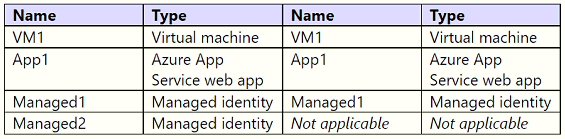
You have an Azure subscription containing the resources shown in the following table.
You create a Microsoft Entra user named User1.
Which identities can you add to VM1 and App1?
Select
VM1:
App1:
You have a Microsoft 365 E5 subscription that includes a Microsoft SharePoint Online site named Site1.
You need to enable Microsoft Defender for Cloud Apps session control for Site1.
Which type of policy should you create first?
Aaccess
Bapp governance
Csession
DConditional Access
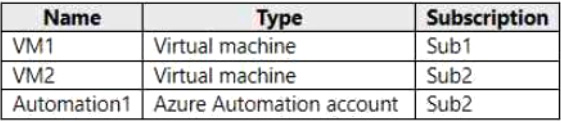
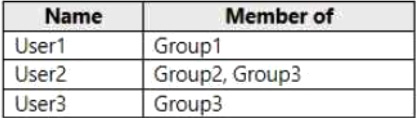
You have two Azure subscriptions named Sub1 and Sub2 that are linked to a Microsoft Entra tenant. The tenant includes three groups: Group1, Group2, and Group3.
The subscriptions contain the resources shown in the following table.
The tenant includes the users shown in the following table.
You manage the subscriptions by using Microsoft Entra Permissions Management. Permissions Management is configured as shown in the following table.
For each of the following statements, select Yes if the statement is true. Otherwise, select No.
Yes or No
Yes
No
Statements
User1 can request access to VM2 by using Permissions Management.
User2 can create an access request to Automation1 on behalf of User1.
User3 can approve access requests for VM2.
You need to fulfill the technical requirements concerning the likelihood that user identities have been compromised.
What must users do first, and what should you configure?
Select
The users must first:
You must configure:
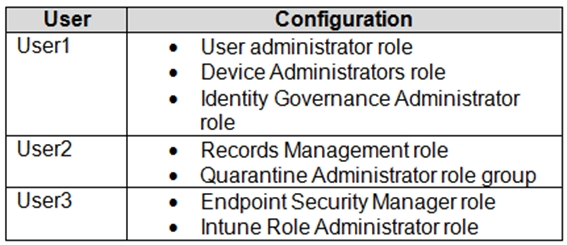
You have a Microsoft 365 E5 subscription containing three users: User1, User2, and User3. Configure the users as shown in the following table.
Which portal should be used to configure each user? Each portal can be used once, multiple times, or not at all.
Drag & Drop
Azure Active Directory admin center
Exchange admin center
Microsoft 365 compliance center
Microsoft Endpoint Manager admin center
SharePoint admin center
User1:
User2:
User3:
You have an Azure Active Directory (Azure AD) tenant containing three users named User1, User2, and User3.
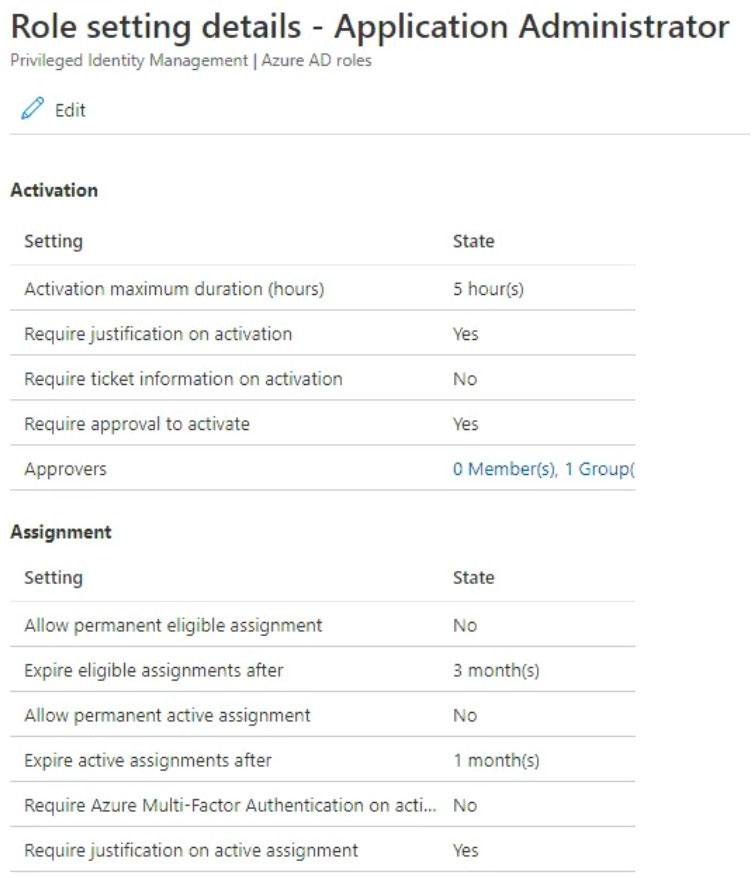
You create a group named Group1 and add User2 and User3 to Group1. You configure an Azure AD Privileged Identity Management (PIM) role as shown in the Application Administrator exhibit. (Click the Application Administrator tab.)
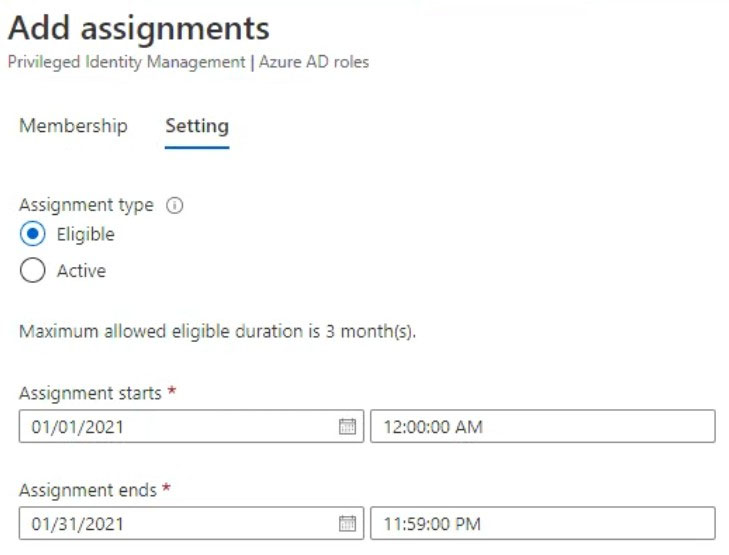
Group1 is configured as the approver for the Application administrator role. You configure User2 to be eligible for the Application administrator role. For User1, you add an assignment to the Application administrator role as shown in the Assignment exhibit. (Click the Assignment tab.)
For each of the following statements, select Yes if the statement is true. Otherwise, select No.
Yes or No
Yes
No
Statements
User1 is assigned the Application administrator role automatically.
When User2 requests to be assigned the Application administrator role, only User3 can approve the request.
If a request by User1 to be assigned the Application administrator role is approved on January 31, 2021, at 23:00, User1 can use the role until February 1, 2021, at 04:00.
HOTSPOT -
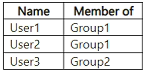
An Azure Active Directory (Azure AD) tenant contains the users shown in the following table.
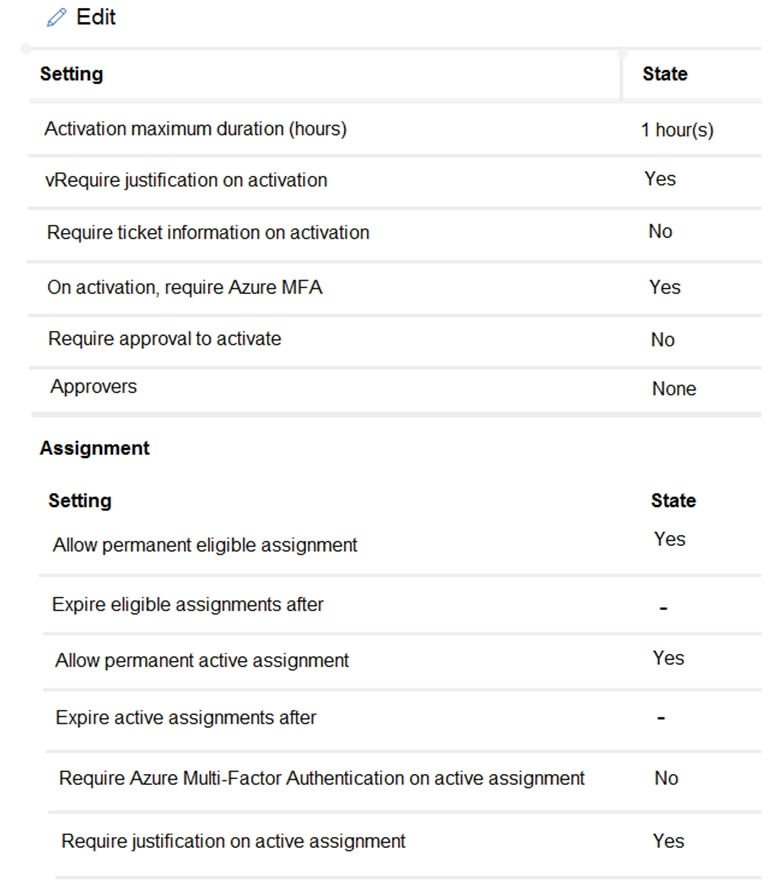
In Azure AD Privileged Identity Management (PIM), the Global administrator role is configured as shown in the following exhibit.
User1 is eligible for the Global administrator role.
For each of the following statements, select Yes if the statement is true. Otherwise, select No.
Yes or No
Yes
No
Statements
User1 requires Azure Multi-Factor Authentication (MFA) to activate the Global administrator role.
User2 must approve all activation requests for the Global administrator role.
User2 and User3 can edit the Global administrator role assignment.
You have a Microsoft 365 E5 subscription that contains a Microsoft SharePoint Online site named Site1.
You need to receive a notification when a user downloads more than 50 files from Site1 within one minute.
Which policy type should you create in the Microsoft Defender for Cloud Apps portal?
Asession policy
Bactivity policy
Cfile policy
Danomaly detection policy
Your on-premises network has an Active Directory Domain Services (AD DS) domain containing computers that run Windows 11.
You have a Microsoft 365 E5 subscription and plan to enable hybrid join and enroll the computers in Microsoft Intune.
You need to recommend the software to deploy to the domain and the actions to perform in Intune.
What should the recommendation include?
Select
Domain:
Intune:
How should access to the on-premises applications be configured?
Select
Configure the Azure AD Password Protection proxy service on:
Configure the password list:
Solution: Create a separate access review for every role.
Does this meet the goal?
AYes
BNo
Solution: Modify the properties of the IT administrator user accounts.
Does this achieve the goal?
AYes
BNo
Solution: Set Reviewers to Member (self).
Does this meet the goal?
AYes
BNo
Solution: Add every manager as a fallback reviewer.
Does this meet the goal?
AYes
BNo
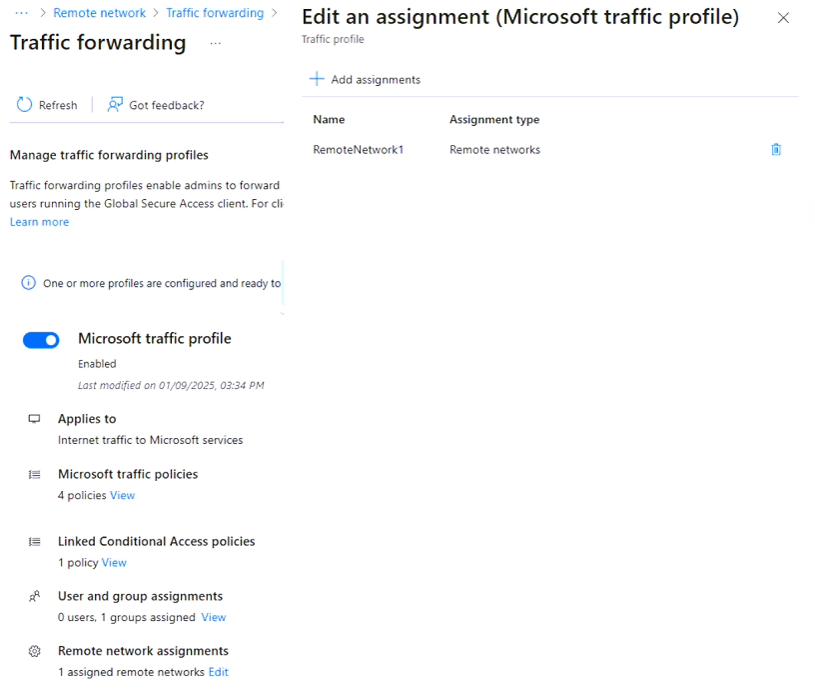
You have a Microsoft Entra tenant containing two remote networks, RemoteNetwork1 and RemoteNetwork2, and the users shown in the following table.
You have the devices shown in the following table.
You have a Conditional Access policy with these settings:
Name: CAPolicy1
Assignments
Users: Group1, Group2
Target resources: All internet resources with Global Secure Access
Access controls
Grant: Require multifactor authentication
Enable policy: On
Global Secure Access traffic forwarding is configured as shown in the following exhibit.
For each of the following statements, select Yes if the statement is true. Otherwise, select No.
Yes or No
Yes
No
Statements
When User1 signs in to Microsoft Exchange Online, the user will be prompted for multifactor authentication (MFA).
When User2 signs in to Microsoft SharePoint Online, the user will be prompted for multifactor authentication (MFA).
When User3 signs in to Microsoft Exchange Online, the user will be prompted for multifactor authentication (MFA).
You have a Microsoft Entra tenant containing 1,000 users. The users have Microsoft Entra Suite licenses.
You are deploying Global Secure Access.
You need to ensure that connections to www.microsoft.com bypass Global Secure Access.
Which profiles should you update?
AIntemet access profile only
BMicrosoft traffic profile only
CMicrosoft traffic profile and Internet access profile only
DMicrosoft traffic profile, Private access profile, and Internet access profile
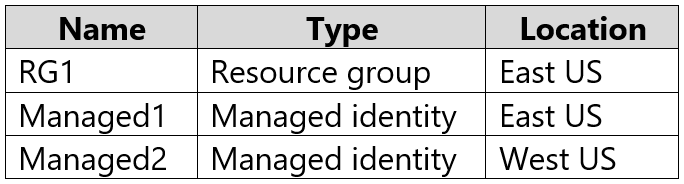
You have an Azure subscription containing the resources shown in the following table.
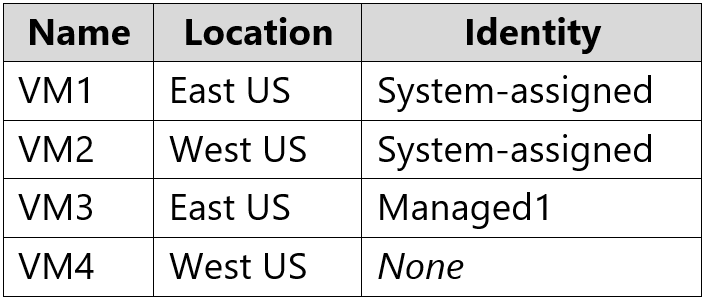
The subscription contains the virtual machines shown in the following table.
Which identities can receive the Owner role for RG1, and which virtual machines can be assigned Managed2?
Select
Identities with Owner role:
Virtual machines assigned to Managed2:
You have an Azure Active Directory (Azure AD) tenant containing the users shown in the following table.
You have the locations shown in the following table.
The tenant has a named location with these settings:
Name: Location1
Mark as trusted location: Enabled
IPv4 range: 10.10.0.0/16
MFA has a trusted IP address range of 193.17.17.0/24.
CAPolicy1 has the following configuration:
Assignments
Users or workload identities: Group1
Cloud apps or actions: All cloud apps
Conditions
Locations: All trusted locations
Access controls
Grant access: Require multi-factor authentication
Session: 0 controls selected
Enable policy: On
For each of the following statements, select Yes if the statement is true. Otherwise, select No.
Yes or No
Yes
No
Statements
If User1 connects to the tenant from IP address 10.10.0.150, the user will be prompted for MFA.
If User2 connects to the tenant from IP address 10.10.1.160, the user will be prompted for MFA.
If User2 connects to the tenant from IP address 192.168.1.20, the user will be prompted for MFA.






Community Discussion