MS-700: Managing Microsoft Teams Practice Exam — Free Online Test
QuestionQ1
Configure and manage a Teams environment
Save question
You work as a Systems Administrator for your company. The company has recently purchased a subscription to Microsoft 365. All users in your company have a
Microsoft 365 E3 license.
All users use Microsoft Teams for collaboration. Several teams and channels have been configured.
You need to configure Microsoft Teams to ensure that users within your company can collaborate with users in a partner company. You need to ensure that only external users with the email domain of the partner company can send emails to the team channels.
Which of the following actions should you perform?
AModify the list of Accepted Domains in the Exchange Online admin center.
BModify the Email integration options in the Org-wide Teams settings in the Microsoft Teams admin center.
CModify the Org-wide Guest access settings in the Microsoft Teams admin center.
DModify the Organization options in the Org-wide Teams settings in the Microsoft Teams admin center.
0
Community Discussion
No comments yet. Be the first to start the discussion!
QuestionQ2
Configure and manage a Teams environment
0
Community Discussion
No comments yet. Be the first to start the discussion!
QuestionQ3
Manage teams, channels, chats, and apps
0
Community Discussion
No comments yet. Be the first to start the discussion!
QuestionQ4
Manage meetings and calling
0
Community Discussion
No comments yet. Be the first to start the discussion!
QuestionQ5
Configure and manage a Teams environment
0
Community Discussion
No comments yet. Be the first to start the discussion!
It's free
100% of the questions are free for all users. No strings attached.
You need to configure the user accounts of the sales department users to meet the security requirements.
What should you do for each user?
AFrom the Microsoft Teams admin center, set the Microsoft Teams upgrade policy to Skype for Business with Teams collaboration and meetings coexistence mode.
BFrom PowerShell, run the Grant-CsTeamsUpgradePolicy -PolicyName SfBWithTeamsCollab cmdlet.
CFrom the Microsoft Teams admin center, set the Microsoft Teams upgrade policy to Skype for Business only coexistence mode.
DFrom the Microsoft Teams admin center, set the Microsoft Teams upgrade policy to Skype for Business with Teams collaboration coexistence mode.
Your company has a Microsoft 365 subscription that contains a team named Sales.
You need to recommend a solution to ensure that all guest users who are members of Sales receive an email message each year to verify that they want to remain in the team.
What should you include in the recommendation?
Aan identity provider
Ba Microsoft Outlook add-in
Ca communication compliance policy
Dan access review
Your organization has a Microsoft 365 subscription.
A user sends a Microsoft Teams meeting invitation to an external user through Microsoft Outlook. The external user is unable to join the meeting.
You need to make sure that all external users are able to join Microsoft Teams meetings.
What should you do from the Microsoft Teams admin center?
AFrom Guest access in the Org-wide settings, set Allow guest access in Microsoft Teams to On.
BEdit the Meeting settings and set Anonymous users can join a meeting to On.
CEdit the global meeting policy and set Allow scheduling private meetings to On.
DEdit the live events policy and set Who can join live events to Everyone.
You have a Microsoft 365 subscription that has Azure Active Directory Premium Plan 2 licenses. You need to implement Microsoft Teams lifecycle management to meet the following requirements:
All unused teams must be deleted after 180 days.
Inactive guest users must be removed from teams automatically every three months.
Microsoft Teams admin roles must only be assigned for specific time periods.
Which feature should you use for each requirement? Note that each feature may be used once, more than once, or not at all.
Drag & Drop
A Microsoft 365 group expiration policy
Access reviews in Azure Active Directory (Azure AD)
Azure Active Directory (Azure AD) Privileged Identity Management (PIM)
Entitlement management in Azure Active Directory (Azure AD)
All unused teams must be deleted after 180 days:
Inactive guest users must be removed from teams automatically every three months:
Microsoft Teams Admin roles must only be assigned for specific time periods:
QuestionQ6
Manage teams, channels, chats, and apps
0
Community Discussion
No comments yet. Be the first to start the discussion!
QuestionQ7
Configure and manage a Teams environment
QuestionQ8
Manage teams, channels, chats, and apps
QuestionQ10
Configure and manage a Teams environment
QuestionQ11
Configure and manage a Teams environment
QuestionQ12
Configure and manage a Teams environment
QuestionQ13
Manage meetings and calling
QuestionQ15
Manage meetings and calling
QuestionQ16
Monitor, report on, and troubleshoot Teams
QuestionQ17
Configure and manage a Teams environment
QuestionQ19
Manage meetings and calling
QuestionQ20
Monitor, report on, and troubleshoot Teams
QuestionQ21
Manage teams, channels, chats, and apps
QuestionQ22
Configure and manage a Teams environment
QuestionQ23
Monitor, report on, and troubleshoot Teams
QuestionQ24
Configure and manage a Teams environment
QuestionQ25
Configure and manage a Teams environment
QuestionQ27
Configure and manage a Teams environment
QuestionQ28
Configure and manage a Teams environment
QuestionQ29
Manage teams, channels, chats, and apps
Save question
0
Community Discussion
No comments yet. Be the first to start the discussion!
Save question
0
Community Discussion
No comments yet. Be the first to start the discussion!
Save question
0
Community Discussion
No comments yet. Be the first to start the discussion!
Save question
0
Community Discussion
No comments yet. Be the first to start the discussion!
Save question
0
Community Discussion
No comments yet. Be the first to start the discussion!
Save question
0
Community Discussion
No comments yet. Be the first to start the discussion!
Save question
0
Community Discussion
No comments yet. Be the first to start the discussion!
Ad
Want a break from the ads?
Go ad-free and unlock Learn Mode, Exam Mode, AstroTutor AI and every premium tool — everything you need to walk in prepared, and confident.
No comments yet. Be the first to start the discussion!
Save question
0
Community Discussion
No comments yet. Be the first to start the discussion!
Save question
0
Community Discussion
No comments yet. Be the first to start the discussion!
Save question
0
Community Discussion
No comments yet. Be the first to start the discussion!
Save question
0
Community Discussion
No comments yet. Be the first to start the discussion!
Save question
0
Community Discussion
No comments yet. Be the first to start the discussion!
Save question
0
Community Discussion
No comments yet. Be the first to start the discussion!
Save question
0
Community Discussion
No comments yet. Be the first to start the discussion!
Save question
0
Community Discussion
No comments yet. Be the first to start the discussion!
Save question
0
Community Discussion
No comments yet. Be the first to start the discussion!
Save question
0
Community Discussion
No comments yet. Be the first to start the discussion!
Save question
API Error: Header '14' has invalid value: 'Bearer sk-ant-oat01-rnCAnI789h62Qwl9_8oZbyF49sZHaGJ49SAsOcZPwEN3EldEENoRiUUg0if
xzj_ia97kb6BkPWl625hfvJgL0A-ym3NOwAA'
0
Community Discussion
No comments yet. Be the first to start the discussion!
Your company uses Microsoft Teams.
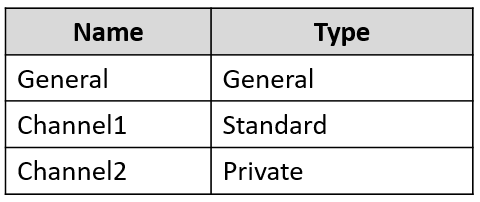
You have a team named Team1 that has the channels shown in the following table.
You plan to enable channel moderation for the channels.
Which channels support channel moderation?
AGeneral and Channel1 only
BChannel2 only
CChannel1 only
DChannel1 and Channel2 only
EGeneral, Channel1, and Channel2
FGeneral only
Your organization has a Microsoft 365 subscription containing 20 teams. You need to make sure that a team named Team1 is displayed as Highly Confidential within the Microsoft Teams client. What should you use?
Aa teams app setup policy in the Microsoft Teams admin center
Ba sensitivity label in the Microsoft 365 Compliance admin center
Ca supervision policy in the Microsoft 365 Compliance admin center
Da teams policy in the Microsoft Teams admin center
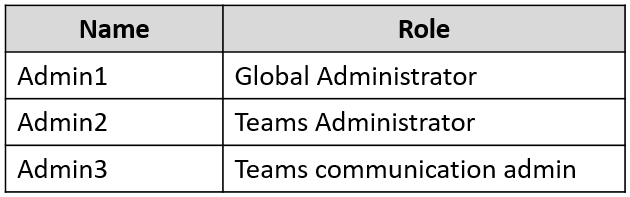
You have a Microsoft 365 subscription containing the users shown in the following table.
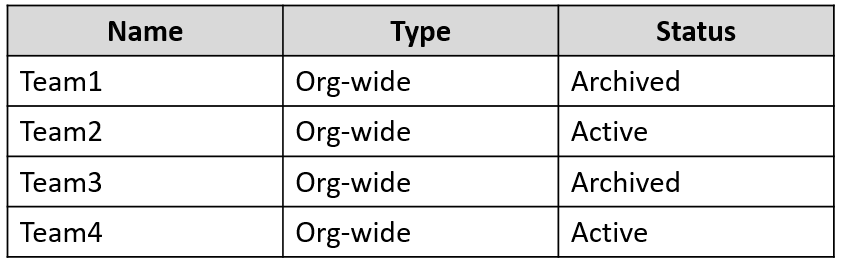
The subscription contains the Microsoft Teams teams shown in the following table.
Identify how many additional org-wide teams can be created in the subscription and which users can create them.
Select
Additional org-wide teams:
Users:
You need to configure data-retention policies for the teams. The solution must meet the data-retention requirements.
Which content locations should you include in the retention policies?
Each content location may be used once, more than once, or not at all.
Drag & Drop
Exchange email
OneDrive accounts
SharePoint sites
Teams channel messages
Teams chat
Requirement1:
Requirement2:
Requirement3:
Your company has a Microsoft 365 subscription.
You have a team that uses the following dynamic rule.
Your organization has a Microsoft 365 subscription that includes a Microsoft Teams auto attendant. Calls made to the auto attendant will be redirected to a shared voicemail.
You need to create a group to use for this shared voicemail.
Which type of group should you create?
Amail-enabled security
Bdistribution
Csecurity
DMicrosoft 365
Your company has a Microsoft 365 subscription. You need to create an auto attendant from the Microsoft Teams admin center. Which object must be associated to the auto attendant?
Aa conferencing bridge
Ba shared mailbox
Ca Calling Plan
Da resource account
You have a Microsoft 365 subscription that uses Microsoft Teams.
You need to analyze the following:
The call and meeting quality of individual users
The call and meeting quality trends of your company
What should you use for each requirement?
Select
The call and meeting quality of individual users:
The call and meeting quality trends of the company:
Your network contains an Active Directory domain. The domain contains 1,000 computers that run Windows 11.
Your company uses Microsoft Teams.
You need to ensure that the computers can prioritize audio and video during Teams meetings.
From the Microsoft Teams admin center, you set Insert Quality of Service (QoS) markers for real-time media traffic to On.
What should you do next?
AFrom Meeting settings in the Microsoft Teams admin center, configure the media port range to use any available ports.
BFrom Group Policy Management, create a Group Policy setting to specify the DSCP values.
CFrom the Teams PowerShell module, create a network roaming policy.
DFrom Meeting policies in the Microsoft Teams admin center, configure the Media bit rate (Kbs) setting.
You have a Microsoft 365 E5 subscription that uses Teams.
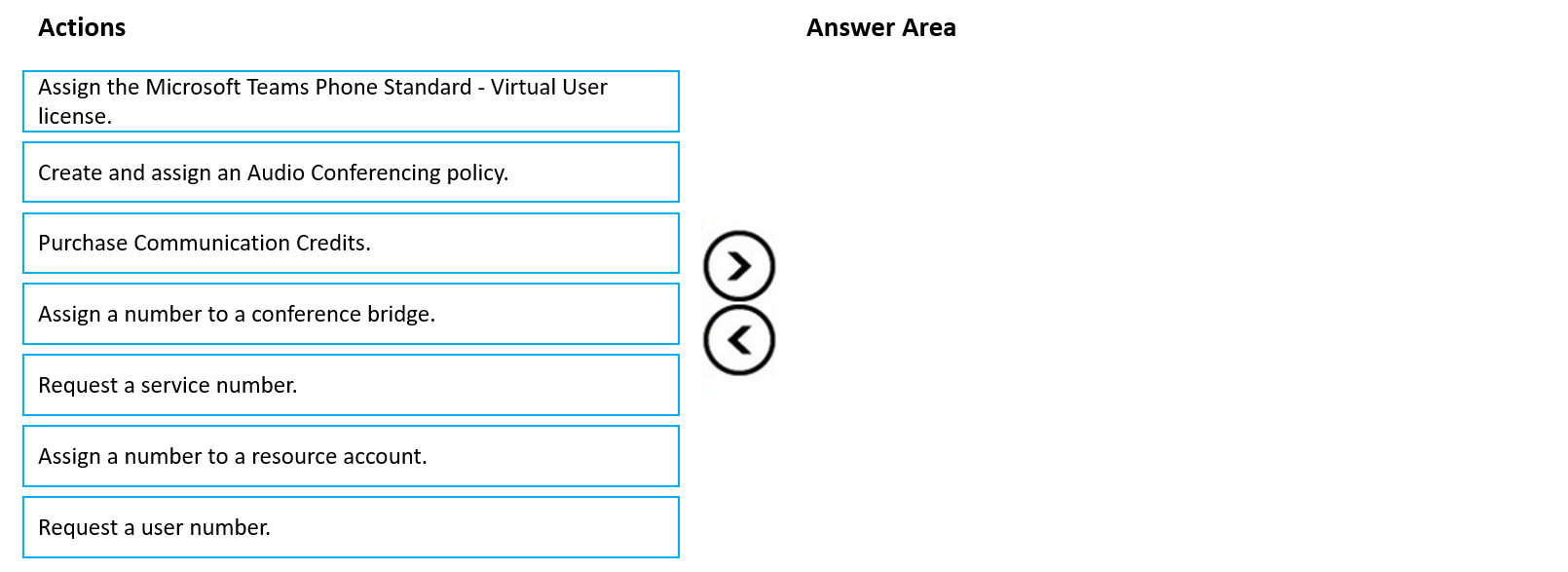
The sales department at your company requires that a toll-free number appear at the top of a list of numbers on Microsoft Outlook invites to Teams meetings.
Which four actions should you perform, and in which order?
Drag & Drop
Assign the Microsoft Teams Phone Standard - Virtual User license.
Create and assign an Audio Conferencing policy.
Purchase Communication Credits.
Assign a number to a conference bridge.
Request a service number.
Assign a number to a resource account.
Request a user number.
You need to recommend a solution to perform the network validation tasks for the planned upgrade.
Which tool and role should you recommend for each user?
Select
Admin5 - Tool
Admin5 - Role
Admin6 - Tool
Admin6 - Role
Your organization has a Microsoft 365 subscription. You need to prevent guest users from creating or updating channels. How should you complete the PowerShell script? Each option can be used once, more than once, or not at all.
Drag & Drop
Get-AzureADGroup
Get-AzureADUser
Get-Team
Set-AzureADGroup
Set-AzureADUser
Set-Team
| -AllowGuestCreateUpdateChannels $false
HOTSPOT -
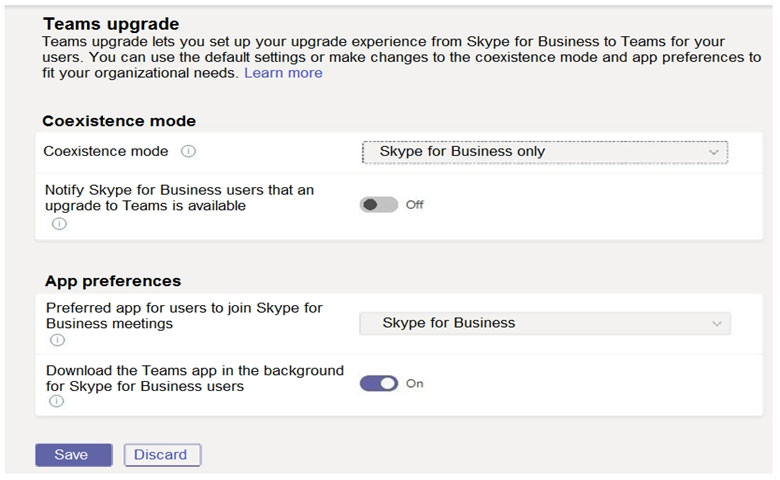
Your company uses Microsoft Skype for Business Online and Microsoft Teams. All Skype for Business Online users can place and receive PSTN calls, and Microsoft Teams is configured for PSTN calling.
You plan to upgrade the Skype for Business Online users to Microsoft Teams. The Teams upgrade settings are configured as shown in the Teams upgrade exhibit.
You apply TeamsUpgradePolicy to the user accounts in the company's R&D and human resources (HR) departments, using the coexistence modes shown in the following table.
For each of the following statements, select Yes if the statement is true. Otherwise, select No.
Yes or No
Yes
No
Statements
Users in the R&D department will not be able to join Skype for Business Online meetings.
Existing Skype for Business Online meetings scheduled by users in the HR department will migrate automatically to Microsoft Teams.
Users in the HR department will be able to make and receive PSTN calls by using Microsoft Teams.
You work as a Systems Administrator for your company. The company has a subscription to Microsoft 365.
All users in your company have a Microsoft 365 E5 license.
A user named User1 has the Microsoft Teams desktop client on his Windows 10 client computer.
User1 reports several problems when using Microsoft Teams.
You need to view the debug logs on User1's computer.
Which of the following actions should you perform to generate the debug logs?
APress the following key combination: Ctrl+Alt+Shift+1.
BRight click on the Teams icon and select Get Logs.
CUse Windows Event Viewer and browse to the Application Log.
DRun a Usage report in the Teams admin center.
You have a Microsoft 365 E5 subscription that uses Microsoft Teams.
You need to ensure that users in your organization can communicate with external users who use Teams for personal use.
How should you complete the PowerShell cmdlet? Drag the appropriate values to the correct targets. Each value may be used once, more than once, or not at all.
Drag & Drop
-AllowFederatedUsers
-AllowTeamsConsumer
-AllowedDomains
-AllowPublicUsers
Set-CsTenantFederationConfiguration $true $true
You have a Microsoft 365 subscription that uses Teams, in a tenant with the domain contoso.com.
A user named User1@contoso.com uses a Teams Rooms device account, room@contoso.com, and a Microsoft Surface Hub device account, hub@contoso.com.
You need to configure the Surface Hub (hub@contoso.com) so that:
room@contoso.com and hub@contoso.com can join meetings simultaneously.
User1 can configure the video settings of the Surface Hub.
Complete the XML file by choosing the correct value for each highlighted element.
You work as a Systems Administrator for your company. The company has recently purchased a subscription to Microsoft 365. All users in your company have a
Microsoft 365 E3 license.
You are in the process of configuring Microsoft Teams.
You need to restrict the companies that users can communicate with to five supplier companies. You have a list of email domains used by the supplier companies.
Which of the following actions should you configure?
AThe External access settings.
BThe Guest access settings.
CA Messaging policy.
DThe Org-wide Teams settings.
Your organization has a Microsoft 365 subscription, and the tenant uses a domain named contoso.com.
You need to make sure that Teams channels can only receive email from:
Users within the company
Email addresses that use the domain @fabrikam.com
What should you modify?
Athe External collaboration settings in the Azure Active Directory admin center
Bthe list of accepted domains in Microsoft Exchange Online
Cthe Teams settings
Dthe global teams policy
Solution: From a team, you add a tab that points to the Sales site.



Community Discussion