Deploy and manage a Microsoft 365 tenantImplement and manage Microsoft Entra identity and accessManage security and threats by using Microsoft Defender XDRManage compliance by using Microsoft Purview
Your network includes an on-premises Active Directory domain named contoso.com.
For every user account, the Logon Hours settings are configured to block sign-ins outside business hours.
You plan to synchronize contoso.com with an Azure AD tenant.
You need to recommend a solution that ensures the logon-hour restrictions are enforced when synchronized users sign in to Azure AD.
What should you include in the recommendation?
Apass-through authentication
Bconditional access policies
Cpassword synchronization
DAzure AD Identity Protection policies
You have a Microsoft 365 E5 subscription that uses Microsoft Defender for Office 365.
You need to automate Attack simulation training for users when a phishing campaign is detected in real time.
Which type of automation should you use, and which condition should you configure for Attack simulation training?
Select
Automation type:
Condition:
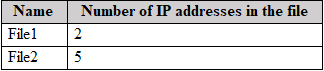
You have a Microsoft 365 E5 subscription that contains a SharePoint site named Site1. Site1 contains the files shown in the following table.
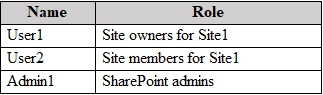
The users are shown in the following table.
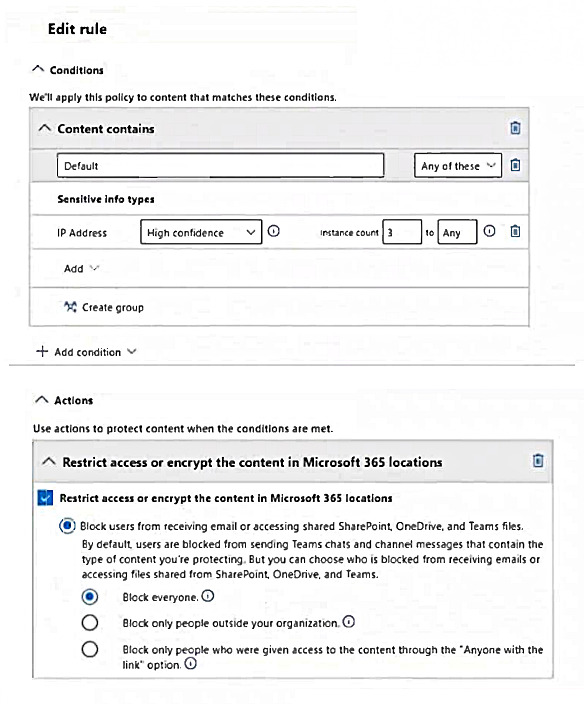
You create a data loss prevention (DLP) policy with an advanced DLP rule and apply it to Site1. The DLP rule is configured as shown in the following exhibit.
For each of the following statements, select Yes if the statement is true. Otherwise, select No.
Yes or No
Yes
No
Statements
User1 can open File2.
User2 can open File1.
Admin1 can open File2.
Your network has an on-premises Active Directory Domain Services (AD DS) domain named contoso.com. Contoso.com includes the users in the following table.
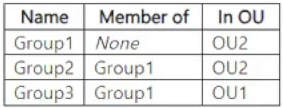
Contoso.com includes the groups in the following table.
Group3 has no members.
You have a Microsoft Entra tenant.
You deploy Microsoft Entra Cloud Sync and configure a scoping filter by using the following entry.
CN=Group1,OU=OU2,DC=contoso, DC=com
For each of the following statements, select Yes if the statement is true. Otherwise, select No.
Yes or No
Yes
No
Statements
User1 syncs with the Microsoft Entra tenant.
User2 syncs with the Microsoft Entra tenant.
Group3 syncs with the Microsoft Entra tenant.
QuestionQ7
Implement and manage Microsoft Entra identity and access
0
Community Discussion
No comments yet. Be the first to start the discussion!
QuestionQ8
Manage security and threats by using Microsoft Defender XDR
QuestionQ9
Implement and manage Microsoft Entra identity and access
QuestionQ10
Implement and manage Microsoft Entra identity and access
QuestionQ12
Manage security and threats by using Microsoft Defender XDR
QuestionQ13
Manage security and threats by using Microsoft Defender XDR
QuestionQ14
Deploy and manage a Microsoft 365 tenant
QuestionQ16
Manage compliance by using Microsoft Purview
QuestionQ17
Implement and manage Microsoft Entra identity and access
QuestionQ18
Implement and manage Microsoft Entra identity and access
QuestionQ19
Implement and manage Microsoft Entra identity and access
QuestionQ20
Implement and manage Microsoft Entra identity and access
QuestionQ21
Implement and manage Microsoft Entra identity and access
QuestionQ22
Manage security and threats by using Microsoft Defender XDR
QuestionQ23
Deploy and manage a Microsoft 365 tenant
QuestionQ24
Manage compliance by using Microsoft Purview
QuestionQ26
Implement and manage Microsoft Entra identity and access
QuestionQ28
Implement and manage Microsoft Entra identity and access
QuestionQ29
Implement and manage Microsoft Entra identity and access
QuestionQ30
Deploy and manage a Microsoft 365 tenant
Save question
0
Community Discussion
No comments yet. Be the first to start the discussion!
Save question
0
Community Discussion
No comments yet. Be the first to start the discussion!
Save question
0
Community Discussion
No comments yet. Be the first to start the discussion!
Save question
0
Community Discussion
No comments yet. Be the first to start the discussion!
Save question
0
Community Discussion
No comments yet. Be the first to start the discussion!
Save question
0
Community Discussion
No comments yet. Be the first to start the discussion!
Save question
0
Community Discussion
No comments yet. Be the first to start the discussion!
Ad
Want a break from the ads?
Go ad-free and unlock Learn Mode, Exam Mode, AstroTutor AI and every premium tool — everything you need to walk in prepared, and confident.
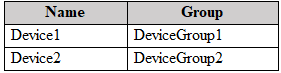
You have a Microsoft 365 E5 subscription that contains the devices in the following table.
At 08:00, you create an incident notification rule with these settings:
Name: Notification1
Notification settings
Notify on alert severity: Low
Device group scope: All (3)
Details: First notification per incident
Recipients: [email protected], [email protected]
At 08:02, you create an incident notification rule with these settings:
Name: Notification2
Notification settings
Notify on alert severity: Low, Medium
Device group scope: DeviceGroup1, DeviceGroup2
Recipients: [email protected]
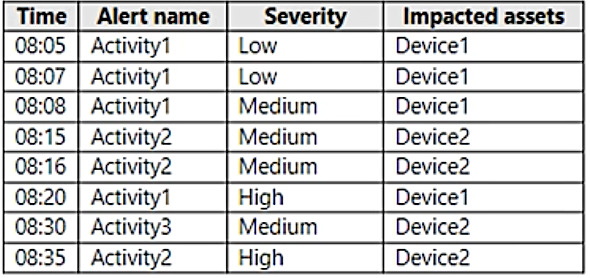
In Microsoft 365 Defender, the following alerts are logged.
For each of the following statements, select Yes if the statement is true. Otherwise, select No.
Yes or No
Yes
No
Statements
User1@contoso.com will receive two incident notification emails for the alert at 08:05.
User2@contoso.com will receive an incident notification email for the alert at 08:07.
User1@contoso.com will receive an incident notification email for the alert at 08:20.
HOTSPOT
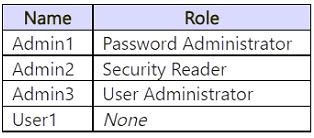
You have a Microsoft 365 E5 subscription that includes the users shown in the following table.
You use Microsoft Entra ID Protection.
For the Users at risk detected alerts setting, you configure the following:
Recipient: Admin1
Alert on user risk level at or above: Medium
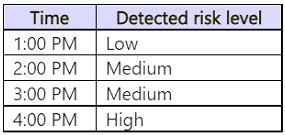
User1 signs in to Microsoft 365 services and is assigned the detected risk levels shown in the following table.
For each of the following statements, select Yes if the statement is true. Otherwise, select No.
Yes or No
Yes
No
Statements
By the end of the day, Admin1 has received two email alerts.
By the end of the day, Admin2 has received three email alerts.
By the end of the day, Admin3 has received three email alerts.
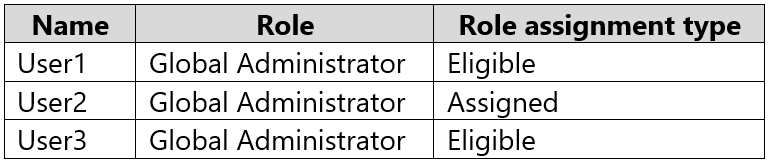
You have a Microsoft 365 subscription that contains the users shown in the following table.
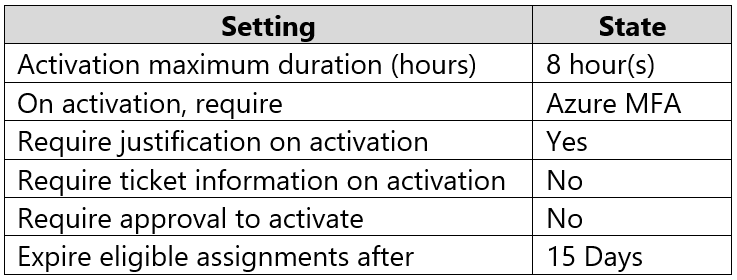
The Global Administrator role has the Privileged Identity Management (PIM) settings shown in the following table.
For each of the following statements, select Yes if the statement is true. Otherwise, select No.
Yes or No
Yes
No
Statements
User1 must provide justification to activate the Global Administrator role.
User2 must perform multifactor authentication (MFA) to activate the Global Administrator role.
After eight hours, User3 will no longer be able to activate the Global Administrator role.
You have a Microsoft 365 tenant.
You plan to manage incidents in the tenant by using Microsoft Defender XDR.
Which Microsoft service source will be shown on the Incidents page in the Microsoft Defender portal?
AMicrosoft Purview
BAzure Arc
CMicrosoft Defender for Cloud
DMicrosoft Defender for Identity
You have a Microsoft 365 E5 subscription that includes 1,000 Windows devices.
You need to review the devices’ exposure score.
Which portal should you use?
Athe Microsoft Intune admin center
Bthe Microsoft Purview portal
Cthe Microsoft Defender portal
Dthe Microsoft 365 admin center
You have a Microsoft 365 E5 subscription.
Configure the organization settings to meet these requirements:
Sign users out of Microsoft Office 365 web apps after one hour of inactivity.
Integrate an internal support tool with Office.
Which settings should you configure for each requirement?
Select
Sign users out after one hour of inactivity:
Integrate the internal support tool with Office:
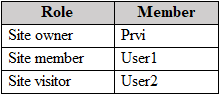
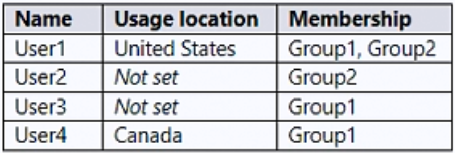
From the Microsoft Purview compliance portal, you configure a data loss prevention (DLP) policy for a Microsoft SharePoint site named Site1. Site1 includes the roles in the following table.
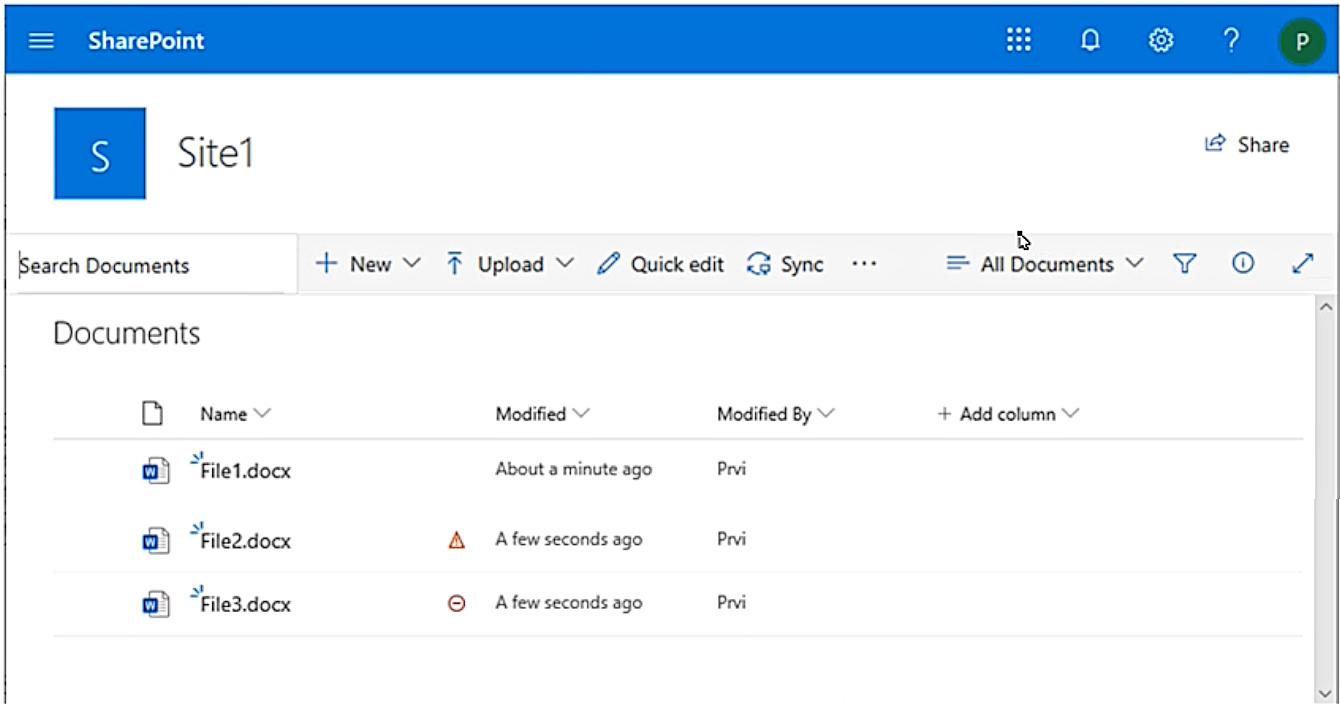
Prvi creates the files shown in the exhibit.
Determine which files User1 and User2 can open.
Select
User1:
User2:
You have a Microsoft 365 subscription containing an Azure AD tenant named contoso.com. The tenant has a user named User1.
You enable Azure AD Identity Protection.
You must ensure that User1 can review the Azure AD Identity Protection list of users flagged as risky. The solution must follow the principle of least privilege.
To which role should you add User1?
AGlobal Administrator
BService Administrator
CSecurity Administrator
DReports Reader
Your company has a Microsoft Azure Active Directory (Azure AD) tenant named contoso.com that contains the users shown in the following table.
Group2 is a member of Group1.
You assign a Microsoft Office 365 Enterprise E3 license to Group1.
How many Office 365 E3 licenses are assigned?
A1
B2
C3
D4
Your network has an on-premises Active Directory domain and a Microsoft 365 E5 subscription. You plan to implement directory synchronization.
You need to find potential synchronization problems in the domain while following the principle of least privilege. What should you use?
Select
Tool:
Required group membership:
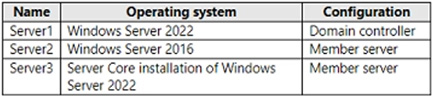
Your network has an on-premises Active Directory domain. The domain includes the servers shown in the following table.
You purchase a Microsoft 365 E5 subscription.
You need to implement Azure AD Connect cloud sync. What should you install first, and on which server?
Select
Install:
Server:
You have a Microsoft 365 subscription that includes a user named User1.
User1 needs administrative access to complete the following tasks:
Manage Microsoft Exchange Online settings.
Create Microsoft 365 groups.
You need to ensure that User1 has administrative access for only eight hours and must receive approval before the role assignment occurs.
What should you use?
AAzure AD Identity Protection
BMicrosoft Entra Verified ID
CConditional Access
DAzure AD Privileged Identity Management (PIM)
You have a Microsoft 365 subscription that uses Microsoft Defender for Office 365.
You need to identify settings configured less securely than the Standard protection profile settings in the preset security policies.
What should you use?
Select
Portal:
Feature:
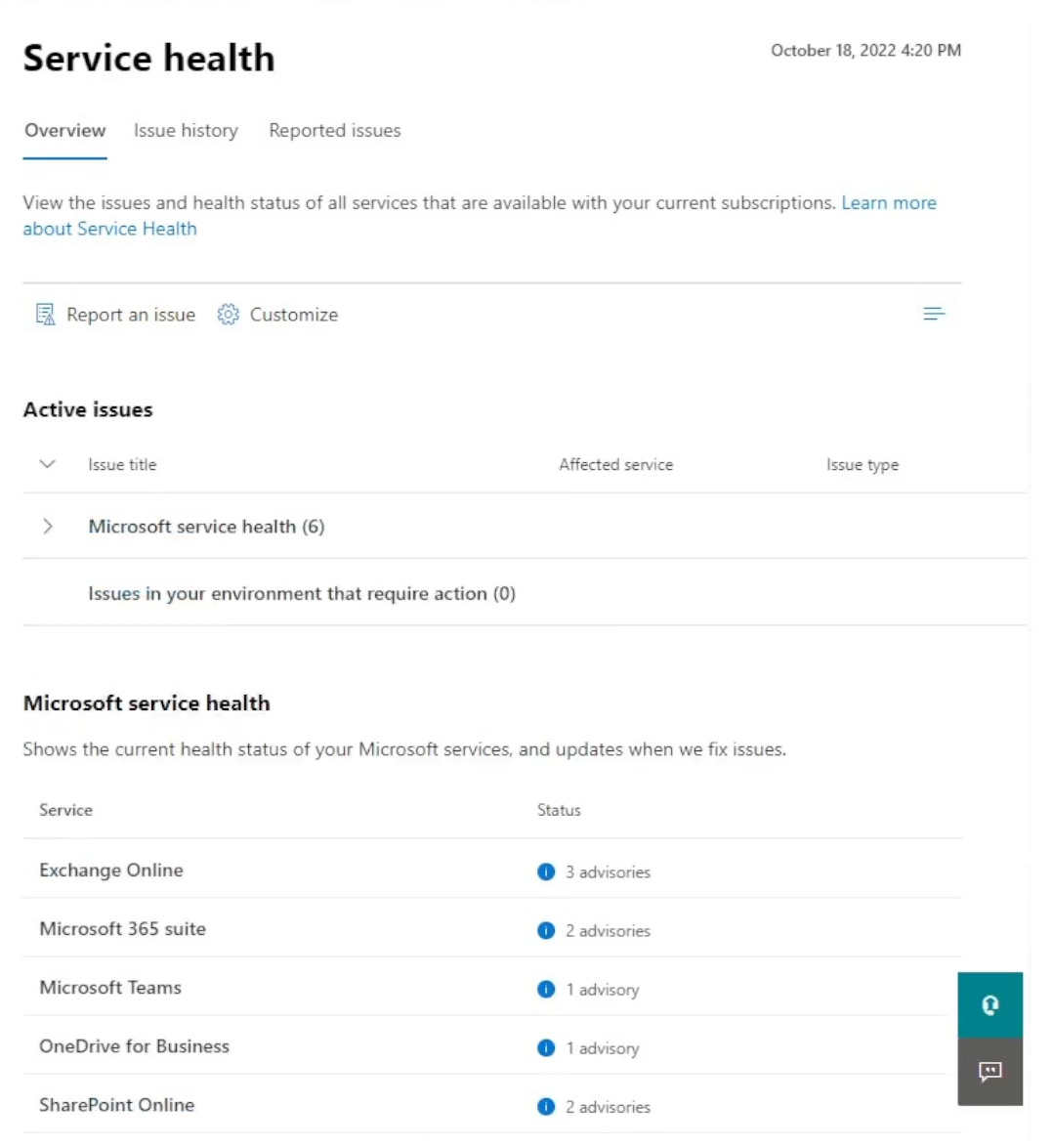
You have a Microsoft 365 subscription. You view the Service health Overview shown in the following exhibit.
You need to ensure that a user named User1 can view the advisories in order to investigate service health issues. Which role should you assign to User1?
AMessage Center Reader
BReports Reader
CService Support Administrator
DCompliance Administrator
You have a Microsoft 365 E5 subscription.
You plan to implement Microsoft Purview policies to satisfy these requirements:
Identify documents stored in Microsoft Teams and SharePoint that contain Personally Identifiable Information (PII).
Report on shared documents that contain PII.
What should you create?
Aa data loss prevention (DLP) policy
Ba retention policy
Can alert policy
Da Microsoft Defender for Cloud Apps policy
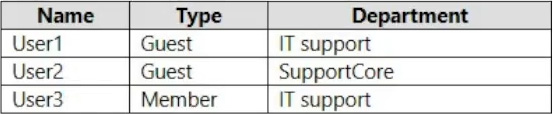
You have a Microsoft 365 subscription containing the users shown in the following table.
You need to configure a dynamic user group that includes guest users in any department containing the word Support. How should you complete the membership rule?
Select
(user.userType ) and (user.department )
Your network has an Active Directory domain named adatum.com that is synchronized with a Microsoft Entra tenant.
The domain has 100 user accounts.
The city attribute for every user is set to the city in which that user lives.
You need to change the city attribute value to each city’s three-letter airport code.
What should you do?
AFrom Azure Cloud Shell, run the Get-ADUser and Set-ADUser cmdlets.
BFrom Azure Cloud Shell, run the Get-MsolUser and Set-Msoluser cmdlets.
CFrom Windows PowerShell on a domain controller, run the Get-MgUser and Update-MgUser cmdlets.
DFrom Active Directory Administrative Center, select the Active Directory users, and then modify the Properties settings.
Your network has an Active Directory domain and an Azure AD tenant.
You implement directory synchronization for all 10,000 users in the organization.
You automate the creation of 100 new user accounts.
You need to ensure that the new user accounts synchronize to Azure AD as quickly as possible.
Which command should you run?
Select
-PolicyType
HOTSPOT -
You have a Microsoft 365 subscription. A user named [email protected] was recently provisioned.
Use PowerShell to assign a Microsoft Office 365 E3 license to User1, while ensuring that Microsoft Bookings is not enabled. Complete the command by selecting the appropriate options in the answer area.


Community Discussion