You have a Microsoft 365 subscription that uses Microsoft Intune and includes 100 Windows 10 devices.
You need to create Intune configuration profiles to perform these actions on the devices:
Deploy a custom Start layout.
Rename the local Administrator account.
Which profile type template should you use for each action?
Select
Deploy a custom Start layout:
Rename the local Administrator account:
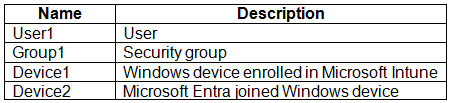
You have a Microsoft 365 E5 subscription linked to a Microsoft Entra tenant named contoso.com. The subscription includes User1 and a new Windows 11 device named Device1.
User1 must automatically enroll Device1 in Microsoft Intune. Ensure that no other users can use automatic enrollment.
Which three actions should you perform, in order?
Drag & Drop
Enable Group1 to join devices to Microsoft Entra.
Create a group named Group1 and add User1 to Group1.
Configure the mobile device management (MDM) user scope.
Assign the Cloud Device Administrator role to User1.
Instruct User1 to register Device1 in contoso.com.
Add User1 as a device enrollment manager.
Instruct User1 to join Device1 to contoso.com.
You have a Microsoft 365 subscription that includes Microsoft Intune and Microsoft Defender for Endpoint.
Users have devices that run Windows 11.
You deploy a connection from Defender for Endpoint to Intune.
You need to ensure that when a device is enrolled in Intune, the device is automatically onboarded to Defender for Endpoint.
What should you configure, and which portal should you use?
Select
Configure:
In portal:
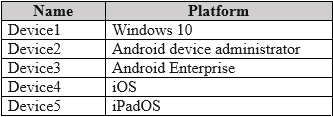
You have a Microsoft 365 tenant that uses Microsoft Intune to manage the devices shown in the following table.
You must deploy a compliance solution that meets these requirements:
Marks devices as Not Compliant when they fail to meet compliance policies.
Remotely locks noncompliant devices.
What is the minimum number of compliance policies required, and which devices support the remote lock action?
Select
Minimum number of compliance policies required:
Devices that support the remote lock action:
QuestionQ6
Prepare infrastructure for devices
0
Community Discussion
No comments yet. Be the first to start the discussion!
QuestionQ7
Prepare infrastructure for devices
QuestionQ8
Manage and maintain devices
QuestionQ9
Manage and maintain devices
QuestionQ10
Manage applications
QuestionQ11
Manage applications
QuestionQ12
Manage applications
QuestionQ13
Manage applications
QuestionQ14
Protect devices
QuestionQ15
Prepare infrastructure for devices
QuestionQ16
Prepare infrastructure for devices
QuestionQ17
Prepare infrastructure for devices
QuestionQ18
Protect devices
QuestionQ19
Manage applications
QuestionQ20
Protect devices
QuestionQ21
Protect devices
QuestionQ22
Manage applications
QuestionQ23
Prepare infrastructure for devices
QuestionQ24
Protect devices
QuestionQ25
Manage applications
Save question
0
Community Discussion
No comments yet. Be the first to start the discussion!
Save question
0
Community Discussion
No comments yet. Be the first to start the discussion!
Save question
0
Community Discussion
No comments yet. Be the first to start the discussion!
Save question
0
Community Discussion
No comments yet. Be the first to start the discussion!
Save question
0
Community Discussion
No comments yet. Be the first to start the discussion!
Save question
0
Community Discussion
No comments yet. Be the first to start the discussion!
Save question
0
Community Discussion
No comments yet. Be the first to start the discussion!
Ad
Want a break from the ads?
Go ad-free and unlock Learn Mode, Exam Mode, AstroTutor AI and every premium tool — everything you need to walk in prepared, and confident.
No comments yet. Be the first to start the discussion!
Save question
0
Community Discussion
No comments yet. Be the first to start the discussion!
Save question
0
Community Discussion
No comments yet. Be the first to start the discussion!
Save question
0
Community Discussion
No comments yet. Be the first to start the discussion!
Save question
0
Community Discussion
No comments yet. Be the first to start the discussion!
Save question
0
Community Discussion
No comments yet. Be the first to start the discussion!
Save question
0
Community Discussion
No comments yet. Be the first to start the discussion!
Save question
0
Community Discussion
No comments yet. Be the first to start the discussion!
Save question
0
Community Discussion
No comments yet. Be the first to start the discussion!
Save question
0
Community Discussion
No comments yet. Be the first to start the discussion!
Save question
0
Community Discussion
No comments yet. Be the first to start the discussion!
Save question
0
Community Discussion
No comments yet. Be the first to start the discussion!
You have a Microsoft 365 E5 subscription and use Microsoft Intune.
You purchase 50 Windows devices.
You configure automatic enrollment to Intune for Microsoft Entra joined devices.
You need to use a provisioning package to join the devices to Microsoft Entra.
What should you use to create the provisioning package, and what is the maximum period for which you can use the package for bulk enrollment?
Select
Use:
Maximum amount of time:
You have a Microsoft 365 subscription that uses Microsoft Intune.
You plan to use Windows Autopilot to provision 25 Windows 11 devices.
During device provisioning, you must meet these requirements:
Display the progress of app and profile deployments.
Join the devices to Azure AD.
What should you configure for each requirement? Each setting may be used once, more than once, or not at all.
Drag & Drop
CNAME Validation
Co-management Settings
Deployment Profiles
Enrollment notifications
Enrollment Status Page
Display the progress of app and profile deployments:
Join the devices to Azure AD:
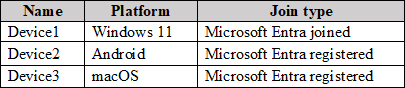
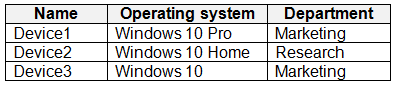
You have a Microsoft 365 subscription containing devices enrolled in Microsoft Intune, as shown in the following table.
On which devices can Device query be used?
ADevice1 only
BDevice1 and Device2 only
CDevice1 and Device3 only
DDevice1, Device2, and Device3
You have a Microsoft 365 subscription that uses Microsoft Intune Suite.
You use Microsoft Intune for device management.
The devices are shown in the following table.
Which devices can be changed to Windows 11 Enterprise by using subscription activation?
ADevice3 only
BDevice2 and Device3 only
CDevice1 and Device2 only
DDevice1, Device2, and Device3
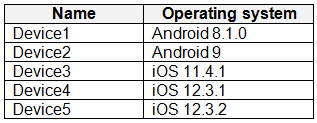
You have devices enrolled in Microsoft Intune, as shown in the following table.
Which devices can have app configuration policies applied for managed devices?
ADevice1 only
BDevice1 and Device2 only
CDevice1 and Device3 only
DDevice2 and Device3 only
EDevice1, Device2, and Device3
You have a Microsoft 365 subscription that uses Microsoft Intune.
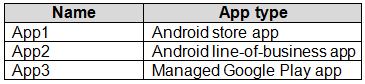
You add apps to Intune as shown in the following table.
You need to create an app configuration policy named Policy1 for the Android Enterprise platform.
Which apps can you manage by using Policy1?
AApp2 only
BApp3 only
CApp1 and App3 only
DApp2 and App3 only
EApp1, App2, and App3
HOTSPOT
You have the devices shown in the following table.
You need to migrate app data from Device1 to Device2. The data must be encrypted and stored on Server1 during the migration.
Which command should be run on each device?
Select
Device1:
Device2:
You have a Microsoft Intune subscription.
Devices are enrolled in Intune as shown in the following table.
An app named App1 is installed on every device. What is the minimum number of app configuration policies needed to manage App1?
A1
B2
C3
D4
E5
You have an Azure AD tenant named contoso.com.
You need to make sure users are not automatically added to the local Administrators group when they join their Windows 11 device to contoso.com.
What should you configure?
AWindows Autopilot
Bprovisioning packages for Windows
CSecurity defaults in Azure AD
DDevice settings in Azure AD
You have a Hyper-V host that hosts the virtual machines shown in the following table.
On which virtual machines can Windows 11 be installed?
AVM1 only
BVM3 only
CVM1 and VM2 only
DVM2 and VM3 only
EVM1, VM2, and VM3
You have an Azure subscription and an on-premises Windows 11 device named Device1. You plan to monitor Device1 by using Azure Monitor, and you create a data collection rule (DCR) named DCR1 in the subscription.
What should DCR1 be associated with?
AAzure Network Watcher
BDevice1
Ca Log Analytics workspace
Da Monitored Object
You have a Microsoft 365 subscription that uses Microsoft Intune and contains the users shown in the following table.
Group2 is assigned to the Enrollment Status Page.
You have the devices shown in the following table.
You capture and upload the hardware IDs for devices in the marketing department.
You configure Windows Autopilot.
For each of the following statements, select Yes if the statement is true. Otherwise, select No.
Yes or No
Yes
No
Statements
User1 can complete the Autopilot process on Device1.
User2 can complete the Autopilot process on Device1.
User3 can view device setup information during the enrollment phase of Device1.
You have a Microsoft 365 E5 subscription.
You use Microsoft Intune to manage every Windows 11 device.
You create an attack surface reduction (ASR) policy named Profile1 by using the Attack Surface Reduction Rules profile, and assign Profile1 to all devices.
A user reports that an Adobe Reader plug-in is now blocked.
You need to make sure that the plug-in is unblocked.
What should you do?
ACreate an Endpoint Privilege Management policy and assign the policy to all the devices.
BAdd a scope tag to Profile1.
CConfigure ASR Only Per Rule Exclusions in Profile1.
DCreate a device compliance policy and assign the policy to all the devices.
You have a Microsoft 365 E5 subscription that includes Microsoft Intune and has a user named Admin1.
Admin1 must use the Microsoft Intune admin center to complete the following tasks:
Create and assign apps and policies to users and devices by using Intune.
Create, assign, and delete Windows 365 Cloud PC provisioning policies.
You need to assign the necessary roles to Admin1. The solution must meet these requirements:
Follow the principle of least privilege.
Minimize administrative effort.
What should you do?
AAssign Admin1 the Help Desk Operator role.
BAssign Admin1 the Cloud PC Reader role.
CAssign Admin1 the Cloud PC Administrator role.
DCreate a custom Microsoft Entra role and assign the role to Admin1.
ECreate a custom Intune role and assign the role to Admin1.
You have a Microsoft 365 E5 subscription containing three Windows devices named Device1, Device2, and Device3. Microsoft Intune manages the devices. Each device has a file named Script1.ps1.
Users do not have local administrator permissions on the devices.
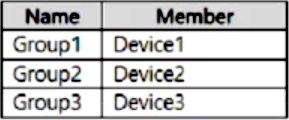
The subscription contains the groups shown in the following table.
You create two Endpoint Privilege Management (EPM) elevation settings policies with these settings:
Name: Policy1
Endpoint Privilege Management: Enabled
Default elevation response: Deny all requests
Allow Elevation Detection: No
Send elevation data for reporting: No
Assignments:
Included groups: Group1
Name: Policy2
Endpoint Privilege Management: Require support approval
Allow Elevation Detection: No
Send elevation data for reporting: No
Assignments:
Included groups: Group3
You create an EPM elevation rules policy named RulesPolicy1 with the following configuration:
Rule name: Rule1
Elevation type: Automatic
Child process behavior: Deny all
File name: Script1.ps1
File hash:
Assignments: Group 1, Group2
For each statement, select Yes if it is true. Otherwise, select No.
Yes or No
Yes
No
Statements
A user on Device1 must get approval before the user can run Script1.ps1 with elevated privileges.
A user on Device2 must get approval before the user can run Script1.ps1 with elevated privileges.
A user on Device3 must get approval before the user can run Script1.ps1 with elevated privileges.
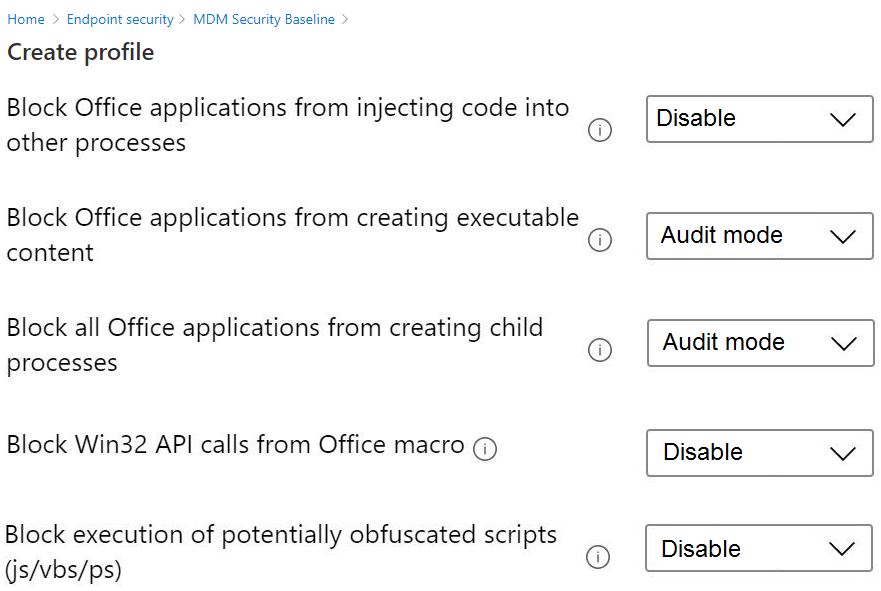
You have the MDM Security Baseline profile shown in the MDM exhibit. (Select the MDM tab.)
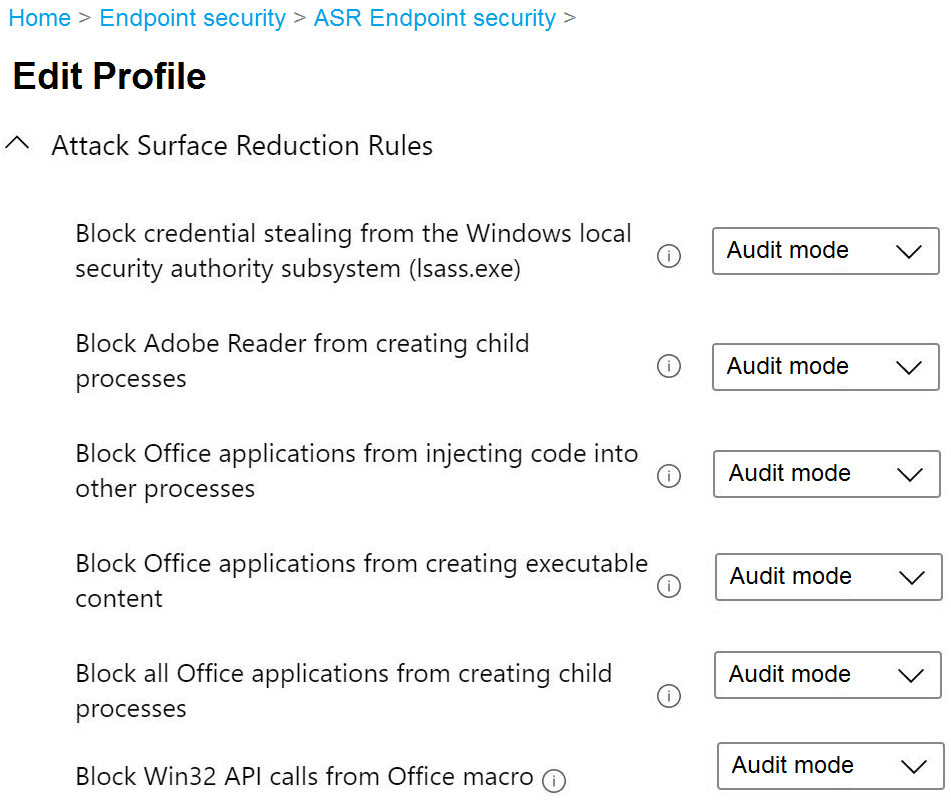
You have the ASR Endpoint Security profile shown in the ASR exhibit. (Select the ASR tab.)
You plan to deploy both profiles to devices enrolled in Microsoft Intune.
Identify how these settings will be configured on the devices:
Block Office applications from creating executable content
Block Win32 API calls from Office macro
The settings are currently disabled locally on every device.
What are the effective device settings?
Select
Block Office applications from creating executable content:
Block Win32 API calls from Office macro:
You have a Microsoft 365 E5 subscription containing 500 Windows devices and the resources shown in the following table.
Both devices have Microsoft 365 Apps installed.
You need to create and assign a Policies for Office Apps policy that blocks macros from running in Office files from the internet.
Which portal should you use, and what should the policy scope be?
Select
Portal:
Scope:
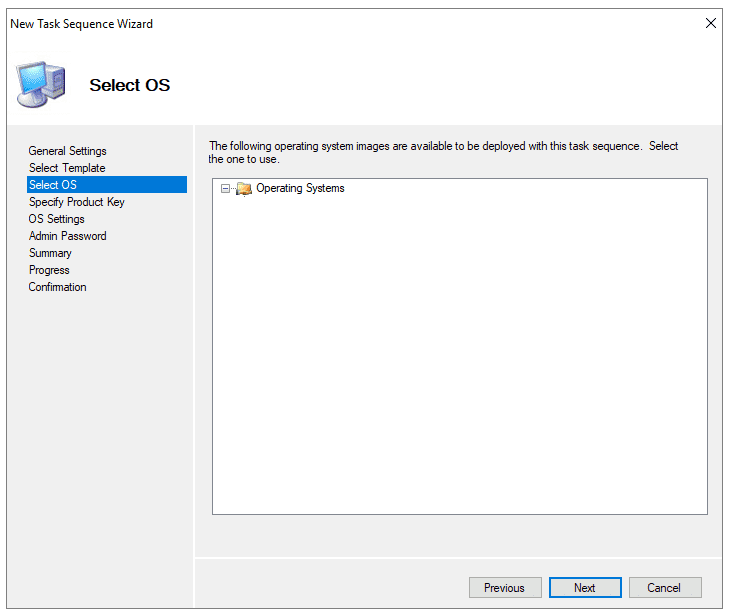
You use the Microsoft Deployment Toolkit (MDT) to deploy Windows 11.
You create a new task sequence by using the Standard Client Task Sequence template to deploy Windows 11 Enterprise to new computers. The computers each have a single hard disk.
You need to modify the task sequence so that it creates a system volume and a data volume.
Which task-sequence phase should you modify?
AInitialization
BState Restore
CPreinstall
DPostinstall
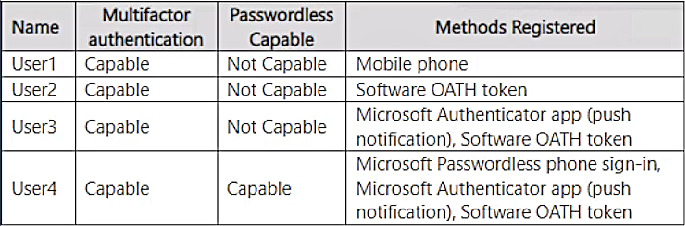
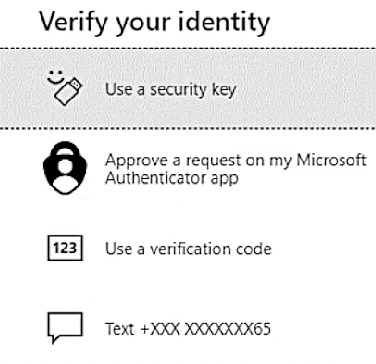
You have a Microsoft Entra tenant containing the users shown in the following table.
When you sign in to the tenant, the available verification methods appear as shown here.
Which users are prompted for the verification-code method, and which are prompted for the text method?
Select
Verification code:
Text:
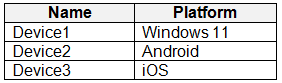
You have a Microsoft 365 E5 subscription that includes the devices in the following table.
You need to implement Microsoft Tunnel for Mobile Application Management (MAM) to give the devices access to an on-premises web app named App1.






Community Discussion