QuestionQ28
Secure, optimize, and deploy database solutionsYou have an Azure SQL database with Query Store enabled. Query Performance Insight identifies one stored procedure as having the longest runtime. The procedure executes the following parameterized query.
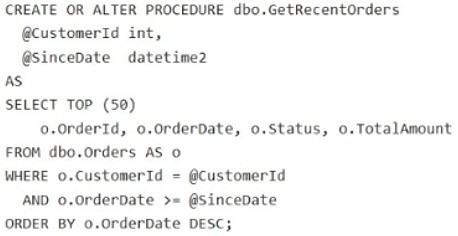
The dbo.Orders table contains approximately 120 million rows. CustomerId is highly selective, while OrderDate is used for range filtering and sorting.
You have these indexes:
- Clustered index:
PK_Orderson (OrderId) - Nonclustered index:
IX_Orders_OrderDateon (OrderDate) with no included columns
An actual execution plan from Query Store for slow executions shows the following:
- An index seek on
IX_Orders_OrderDate, followed by a Key Lookup (Clustered) onPK_OrdersforCustomerId,Status, andTotalAmount - A Sort operator before
Top (50)because the results are ordered byOrderDate DESC
For each of the following statements, select Yes if the statement is true. Otherwise, select No.
Yes or No
| Statements | Yes | No |
|---|---|---|
| To avoid the explicit sort for the query, create a nonclustered index on (CustomerId, OrderDate DESC) that includes (Status, TotalAmount). | ||
| To eliminate the sort and make the query use an ordered seek, add CustomerId as an included column to IX_Orders_OrderDate. | ||
| The plan indicates a bottleneck from a suboptimal query plan, rather locking or blocking. |
Community Discussion