QuestionQ112
VerifiedImplement a secure environmentYou have the on-premises networks shown in the following table.
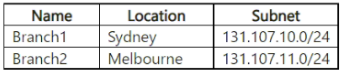
You have an Azure subscription that contains an Azure SQL Database server named SQL1. SQL1 contains two databases named DB1 and DB2.
You need to configure access to DB1 and DB2. The solution must meet the following requirements:
- Ensure that DB1 can be accessed only by users in Branch1.
- Ensure that DB2 can be accessed only by users in Branch2.
Solution: Connect to DB1 and run the following command.
EXECUTE sp_set_firewall_rule ‘Deny db1 users’, ‘131.107.11.0’, ‘131.107.11.255’
Connect to DB2 and run the following command.
EXECUTE sp_set_database_firewall_rule ‘Deny db2 users’, ‘131.107.10.0’, ‘131.107.10.255’
Does this solution meet the goal?
Community Discussion