QuestionQ58
VerifiedAdministración de servicios de archivos y almacenamientoYou have a server named Server1 running Windows Server with three volumes named C, D, and E.
Files are stored on Server1 as shown in the following table.
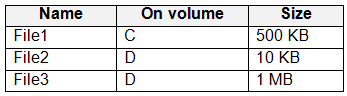
Data Deduplication is enabled on volume D and configured for a General purpose file server.
You perform these actions:
- Move File1 to volume D.
- Copy File2 to volume D and name the copied file File4.
- Move File3 to volume E.
For each statement, select Yes if it is true. Otherwise, select No.
Yes or No
| Statements | Yes | No |
|---|---|---|
| File1 is deduplicated after the deduplication job runs. | ||
| File3 is deduplicated after the deduplication job runs. | ||
| File4 is deduplicated after the deduplication job runs. |
Community Discussion