QuestionQ1
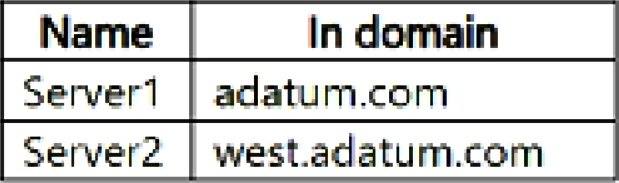
Implementación y administración de Active Directory Domain Services (AD DS) en entornos locales y en la nubeYour network has an on-premises Active Directory Domain Services (AD DS) domain. The domain includes a user named User1 and the servers shown in the following table.
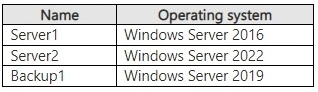
User1 belongs to the Protected Users security group.
User1 performs these actions:
- From Server1, establishes a remote PowerShell session to Server2.
- From the PowerShell session on Server2, tries to access a resource on Backup1.
The attempt to access the resource on Backup1 is denied.
You need to ensure that User1 can access the resources on Backup1 by using the PowerShell session on Server2. The solution must adhere to the principle of least privilege and minimize administrative effort.
What should you configure?
QuestionQ2
Implementación y administración de Active Directory Domain Services (AD DS) en entornos locales y en la nubeAn Active Directory Domain Services (AD DS) domain contains a member server named Server1 that runs Windows Server.
You need to ensure that you can manage the domain password policies from Server1.
Which command should you run first on Server1?
Community Discussion
QuestionQ3
Implementación y administración de Active Directory Domain Services (AD DS) en entornos locales y en la nubeYour on-premises network has a single-domain Active Directory Domain Services (AD DS) forest and an Azure AD tenant named contoso.com. The AD DS forest synchronizes with the Azure AD tenant by using Azure AD Connect.
You must ensure that forest users with a custom attribute of NoSync are excluded from synchronization.
How should you configure the Azure AD Connect cloudFiltered attribute, and which tool should you use?
Community Discussion
QuestionQ4
Administración de cargas de trabajo y servidores de Windows en un entorno híbridoYou have an Azure subscription named Sub1 linked to a Microsoft Entra tenant named contoso.com. Contoso.com includes the users in the following table.
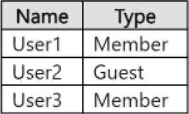
You deploy a virtual machine with these configurations:
- Name: VM1
- Resource group: RG1
- Operating system: Windows Server
- Login with Microsoft Entra ID: Enabled
The Azure role assignments are shown in the following table.

For each of the following statements, select Yes if the statement is true. Otherwise, select No.
| Statements | Yes | No |
|---|---|---|
| User1 can sign in to VM1 by using their Microsoft Entra credentials. | ||
| User2 can sign in to VM1 by using their Microsoft Entra credentials. | ||
| User3 can sign in to VM1 by using their Microsoft Entra credentials. |
Community Discussion
QuestionQ5
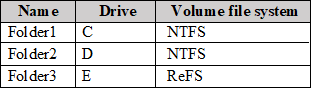
Administración de máquinas virtuales y contenedoresYou have a Windows Server 2022 container host named Host1 with the Subsystem for Linux installed and the container images shown in the following table.
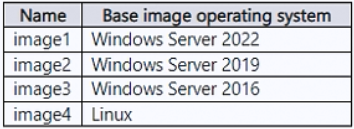
You need to deploy the images to Host1 while maximizing container isolation.
Which images can run using process isolation, and which can run using Hyper-V isolation?


Community Discussion