QuestionQ176

VerifiedImplementación y administración de Active Directory Domain Services (AD DS) en entornos locales y en la nube

Your network has an on-premises Active Directory Domain Services (AD DS) domain named contoso.com. The domain includes the objects shown in the following table.
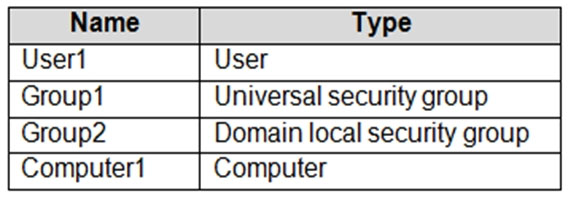
Question Image

You plan to synchronize contoso.com with an Azure Active Directory (Azure AD) tenant by using Azure AD Connect.

You need to ensure that every object can be used in Conditional Access policies.

What should you do?

Explanation

Conditional Access can target users, groups, and devices. User1 and both security groups synchronize to Entra ID through Azure AD Connect regardless of group scope — Azure AD Connect syncs universal and domain-local security groups alike — so no scope change is required. The only object that cannot be used in Conditional Access without action is Computer1: an on-premises domain-joined computer becomes a usable device object in Entra ID only when Microsoft Entra hybrid join is configured in Azure AD Connect. Selecting the Configure Hybrid Azure AD join option (A) is therefore what ensures every object, including the computer/device, can be used in CA policies. Changing Group2 to Universal (D) is unnecessary because domain-local groups already sync and work in CA.

Learn more

Community Discussion

No comments yet. Be the first to start the discussion!