QuestionQ109
VerifiedAdministración de servicios de archivos y almacenamientoYou have an Active Directory domain containing a file server named Server1. Server1 runs Windows Server and hosts the file shares shown in the following table.
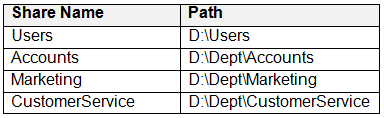
When users log in to the network, they receive these network drive mappings:
- H: maps to
\\server1\users\%UserName% - G: maps to
\\server1\%Department%
You need to limit the storage space consumed by users on Server1. The solution must meet these requirements:
- Prevent users from using more than 5 GB on their H: drive.
- Prevent Accounts department users from using more than 10 GB on their G: drive.
- Prevent Marketing department users from using more than 15 GB on their G: drive.
- Prevent Customer Service department users from using more than 2 GB on their G: drive.
- Minimize administrative effort.
What should you use?
Community Discussion