QuestionQ54
Secure Azure using Microsoft Defender for Cloud and Microsoft SentinelHOTSPOT -
You have an Azure subscription containing the resources shown in the following table.
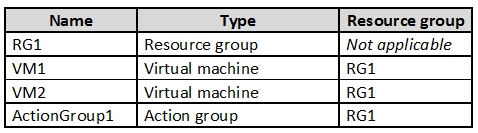
VM1 and VM2 are stopped.
You create an alert rule with these settings:
- Resource: RG1
- Condition: All Administrative operations
- Actions: Action groups configured for this alert rule: ActionGroup1
- Alert rule name: Alert1
You create an action rule with these settings:
- Scope: VM1
- Filter criteria: Resource Type = "Virtual Machines"
- Define on this scope: Suppression
- Suppression config: From now (always)
- Name: ActionRule1
For each of the following statements, select Yes if the statement is true. Otherwise, select No.
Yes or No
| Statements | Yes | No |
|---|---|---|
| If you start VM1, an alert is triggered. | ||
| If you start VM2, an alert is triggered. | ||
| If you add a tag to RG1, an alert is triggered. |
Community Discussion