QuestionQ41
Secure identity and accessYou have an Azure Active Directory (Azure AD) tenant named contoso.com that contains the users in the following table.

Azure AD Privileged Identity Management (PIM) is used in contoso.com. In PIM, the Password Administrator role has these settings:
- Maximum activation duration (hours): 2
- Send email notifying admins of activation: Disable
- Require incident/request ticket number during activation: Disable
- Require Azure Multi-Factor Authentication for activation: Enable
- Require approval to activate this role: Enable
- Selected approver: Group1
You assign the Password Administrator role to users as shown in the following table.
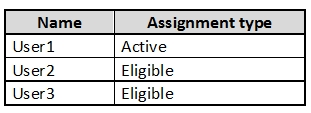
For each of the following statements, select Yes if the statement is true. Otherwise, select No.
Yes or No
| Statements | Yes | No |
|---|---|---|
| When User1 signs in, the user is assigned the Password Administrator role automatically. | ||
| User2 can request to activate the Password Administrator role. | ||
| If User3 wants to activate the Password Administrator role, the user can approve their own request. |
Community Discussion