QuestionQ187
Plan and implement user environments and appsYou have an Azure subscription containing two users named User1 and User2, and the Microsoft Entra groups shown in the following table.

You have an Azure Virtual Desktop host pool named Pool1 that contains two session hosts named Host1 and Host2. The session hosts use FSLogix user profiles.
Host1 has the local groups shown in the following table.
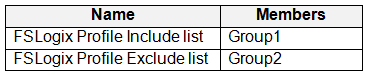
Host2 has the local groups shown in the following table.

User1 connects to Pool and changes their desktop.
User1 reports that, when reconnecting to Pool, the desktop changes do not appear.
You need to ensure that User1 sees the modified desktop when connecting to Pool. The solution must minimize the impact on other user profiles.
What should you do?
- A Add User1 to both FSLogix Profile Include list groups.
- B Remove Group2 from both FSLogix Profile Exclude list groups.
- C Remove User1 from Group3.
- D Remove Group3 from Group2.
Community Discussion