QuestionQ266

VerifiedMonitor and maintain Azure resources

You have an Azure subscription that includes a resource group named RG26.

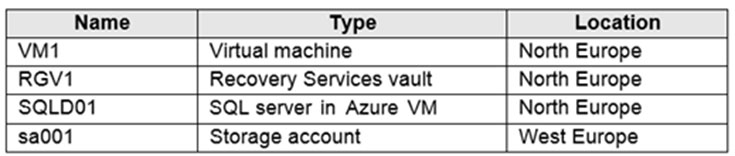
RG26 is configured in the West Europe region and is used to create temporary resources for a project. RG26 contains the resources shown in the following table.
Question Image

SQLD01 is backed up to RGV1.

When the project is finished, you try to delete RG26 from the Azure portal, but the deletion fails.

You need to delete RG26.

What should you do first?

Explanation

RG26 can't be deleted because it contains RGV1, a Recovery Services vault, and a vault can't be deleted while it contains protected data sources (such as SQL Server in an Azure VM), backup data, or backup data in the soft-deleted state. Because SQLD01 is backed up to RGV1, the first step is to stop the backup of SQLD01 by using Stop Backup with Delete Backup Data. If soft delete is enabled on the vault, deleted backup data moves to the soft-deleted state, which also blocks deletion, so disable soft delete and permanently delete any soft-deleted items. The vault, and therefore RG26, can then be deleted.

Learn more

Community Discussion

No comments yet. Be the first to start the discussion!