QuestionQ251

VerifiedImplement and manage virtual networking

You have an Azure subscription named Subscription1. Subscription1 contains a virtual machine named VM1.

You have a computer named Computer1 that runs Windows 10. Computer1 is connected to the Internet.

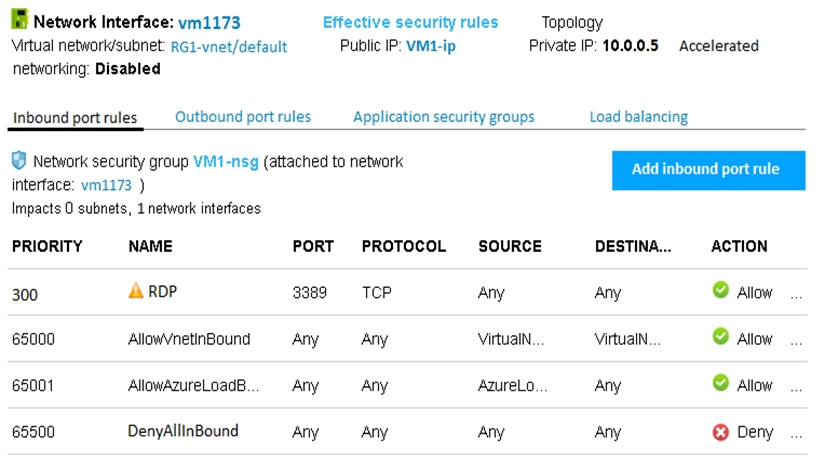
You add a network interface named vm1173 to VM1 as shown in the exhibit. (Click the Exhibit tab.)
Question Image

From Computer1, you try to connect to VM1 by using Remote Desktop, but the connection fails.

You need to establish a Remote Desktop connection to VM1.

What should you do first?

Explanation

Start VM1. To attach a network interface to an existing VM, the VM must first be stopped (deallocated), and Microsoft's procedure ends with Overview > Start to start the VM again. VM1 is therefore still stopped, which is why the exhibit shows the public IP resource name (VM1-ip) instead of an address: a dynamic public IP address is released when the resource it's assigned to is stopped. (Dynamic allocation existed only on the Basic SKU, which was retired on September 30, 2025; Standard public IPs are always static.) The other options don't fix the problem. The RDP rule (priority 300) already takes precedence, because lower numbers are processed first. The network interface vm1173 is already attached. DenyAllInBound is a default rule that can't be removed, and it's processed last (65500) anyway.

Learn more

Community Discussion

No comments yet. Be the first to start the discussion!