QuestionQ232

VerifiedDeploy and manage Azure compute resources

You purchase a new Azure subscription.

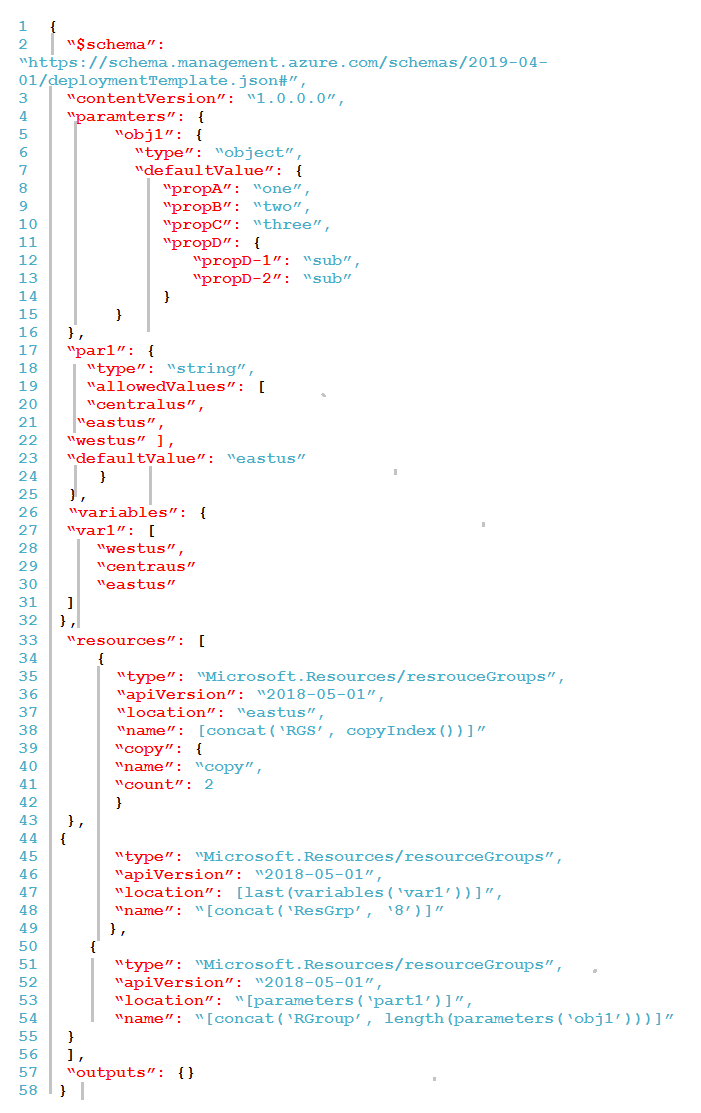
You create an Azure Resource Manager (ARM) template named deploy.json as shown in the following exhibit.
Question Image

You connect to the subscription and run the following command.

New-AzDeployment -Location westus -TemplateFile "deploy.json"

For each of the following statements, select Yes if the statement is true. Otherwise, select No.

Yes or No
StatementsYesNo
Three resource groups are created when you run the script.
A resource group named RGroup5 is created.
All the resource groups are created in the East US Azure region.
Explanation

The exhibit contains typos; read them as the intended names and expressions (parameters, resourceGroups, centralus, par1, and quoted [...] expressions). The template creates four resource groups total. The first resource uses a copy loop with count 2, so it creates two groups named RGS0 and RGS1 in eastus. The second creates one group named ResGrp8; last(variables('var1')) evaluates to eastus. The third creates one group named RGroup4 because the object parameter obj1 has four top-level properties, so length(parameters('obj1')) is 4. Its location is parameters('par1'), and because no parameter value is supplied at deployment time, the default eastus is used. The -Location westus value on New-AzDeployment is for the deployment metadata location, not the location of the resource groups defined in the template.

Learn more

Community Discussion

No comments yet. Be the first to start the discussion!