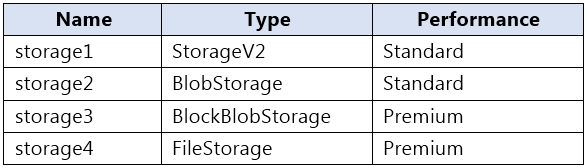
Lifecycle management policies apply to block blobs and append blobs in general-purpose v2 and premium block blob accounts, so storage1 (StorageV2) and storage3 (BlockBlobStorage) qualify. Tiering isn't supported in a premium block blob account, so rules there can only delete blobs. storage2 uses the legacy Blob Storage kind (BlobStorage). The lifecycle management overview still lists Blob Storage accounts as supported, and that kind is now retired: new legacy Blob Storage accounts can't be created since September 2026, and existing ones are being converted to general-purpose v2, which supports lifecycle management. storage4 is a premium file shares (FileStorage) account, which supports only Azure Files and holds no blobs, so lifecycle management rules can't be applied to it. The answer is storage1, storage2, and storage3.
Community Discussion