QuestionQ206
VerifiedImplement and manage virtual networkingYou have an Azure virtual machine that runs Windows Server 2019 and has the following configurations:
- Name: VM1
- Location: West US
- Connected to: VNET1
- Private IP address: 10.1.0.4
- Public IP addresses: 52.186.85.63
- DNS suffix in Windows Server: Adatum.com
You create the Azure DNS zones shown in the following table.
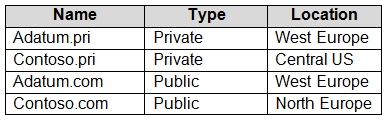
You need to identify which DNS zones you can link to VNET1 and the DNS zones to which VM1 can automatically register.
Select
DNS zones that you can link to VNET1:
DNS zones to which VM1 can automatically register:
Community Discussion