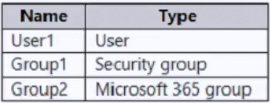
Self-service password reset can be enabled for None, Selected, or All users. With Selected, you choose a Microsoft Entra group; there's no option to select an individual user account, so User1 can't be targeted directly (it's covered only through group membership or the All option). The SSPR tutorial describes this setting as selecting a Microsoft Entra group and doesn't restrict it to security groups, so either Group1 (security group) or Group2 (Microsoft 365 group) can be selected. Only one group can be enabled for SSPR at a time in the Microsoft Entra admin center, and the deployment guide recommends using a security group.
Community Discussion